Introduction
The following guide is for a screen repair on a Nikon Coolpix S51c LCD. If your screen is damaged, cracked, or dirty, this repair guide can help! The guide will walk you through the steps to remove the LCD screen from your camera.
To avoid injury or damage to your camera, power off your camera, unplug from the charger, and remove the battery before you begin. Also, for your safety, you may need to use a capacitor discharge tool as cameras have capacitors and you can get a shock if there is still power running through it. STOP the repair if there are any unusual occurrences like if the product starts to produce smoke.
What you need
-
-
First, use a Phillips #00 screwdriver to remove all five screws that are located at the bottom of the camera.
-
-
-
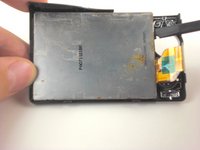
On back of LCD screen, locate the three screws underneath the ribbon.
-
Remove each screw using your screwdriver.
-


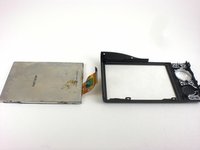
To reassemble your device, follow these instructions in reverse order. Take your e-waste to an R2 or e-Stewards certified recycler.
Cancel: I did not complete this guide.
One other person completed this guide.


Team

Cal Poly, Team 18-24, Garner Spring 2011 Member of Cal Poly, Team 18-24, Garner Spring 2011
CPSU-GARNER-S11S18G24
4 Members
6 Guides authored
