Introduction
If your kickstand has worn out or broken and is no longer supporting your device, use this guide to replace it. You may need to replace the kickstand due to normal wear-and-tear or an accidental drop. The process is very simple and doesn’t require taking the Surface Pro 3 apart. You’re just removing and replacing the kickstand itself.
What you need
-
-
-
-
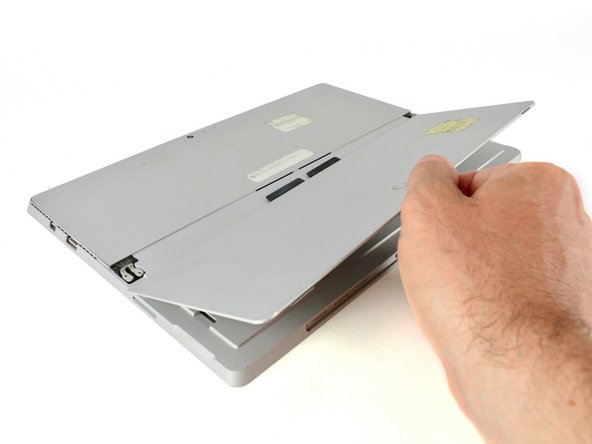
Wiggle the kickstand gently back and forth to disengage the two lightly-adhered tabs connecting the center of the kickstand to the main body.
-
Remove the kickstand from the back cover of the Surface Pro 3.
-

 Ask FixBot


To reassemble your device, follow these instructions in reverse order.
Cancel: I did not complete this guide.
2 other people completed this guide.


2 Guide Comments
The title for this repair guide is incorrect. This is for the kickstand, not the battery.
Hi Michael, thanks for catching this! It looks like someone changed it and it was ok’d on accident. We’ve changed it back.
