Introduction
If you're having connectivity issues with your Stealth Pro, or simply want to upgrade your connectivity, this guide will walk you through the replacement process.
What you need
-
-
Unscrew the 15 screws on the bottom panel of the computer using a Phillips #00 screwdriver. One screw will be hidden under a warranty sticker
-
Gently pry around the back cover off the with a plastic spudger
-
Unplug the battery cable from the motherboard.
-
-
-
-
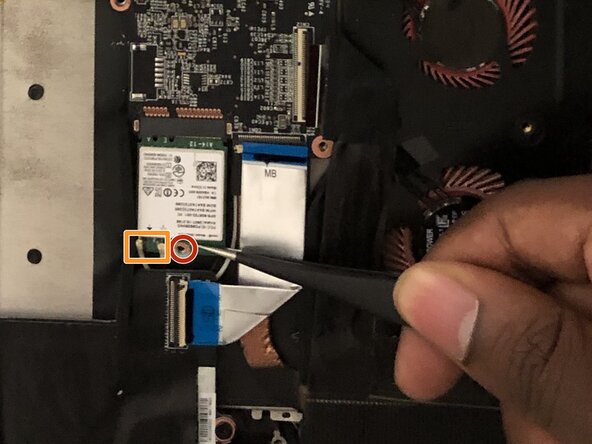
Unscrew the single screw from the Wi-Fi card using a Phillips #00 screwdriver.
-
Slide a thin, ESD-safe pry tool or angled tweezers under the metal neck of the connector (as close to the head as possible) and lift straight up from the board.
-
Using tweezers, carefully grab and remove the Wi-Fi card.
-




To reassemble your device, follow these instructions in reverse order. Take your e-waste to an R2 or e-Stewards certified recycler.
Cancel: I did not complete this guide.
One other person completed this guide.



Team

University of North Texas, Team S5-G5, Thomas Fall 2017 Member of University of North Texas, Team S5-G5, Thomas Fall 2017
UNT-THOMAS-F17S5G5
4 Members
4 Guides authored
3 Guide Comments
Is this a msata card or a m.2 card?
Hi, do you know where I can find some new wifi cables? I broke mine (with my WiFi card) and looking to repair it
Best regards
