Free Shipping on Domestic Orders $75+

Logitech MX Master 3S Mouse Feet Replacement

What you need

    1. Logitech MX Master 3S Mouse Feet Replacement, Prepare the mouse for disassembly: step 1, image 1 of 2 Logitech MX Master 3S Mouse Feet Replacement, Prepare the mouse for disassembly: step 1, image 2 of 2
      • Flip the mouse's power switch into the OFF position, unplug any cables, and flip it over so the feet are facing up.

      • The unique shape of some mice can prevent them from laying flat. If you need to, lay your mouse on a soft towel to prevent wobble.

      Ask FixBot

      Add Comment

    2. Logitech MX Master 3S Mouse Feet Replacement, Soften the foot adhesive: step 2, image 1 of 2 Logitech MX Master 3S Mouse Feet Replacement, Soften the foot adhesive: step 2, image 2 of 2
      • If you're planning to reuse your existing feet, note that the adhesive needs to be thoroughly heated for them to be cleanly removed.

      • Heat an iOpener and apply it to a foot for about one minute.

      • Alternatively, you can use a hair dryer to soften the feet adhesive.

      • When using a hair dryer, don't heat the feet for more than a couple seconds at a time—anything hotter than just warm to the touch risks melting or warping the plastic lower case.

      • The information sticker adhesive may soften during this step, but you don't need to remove it.

      Ask FixBot

      Add Comment

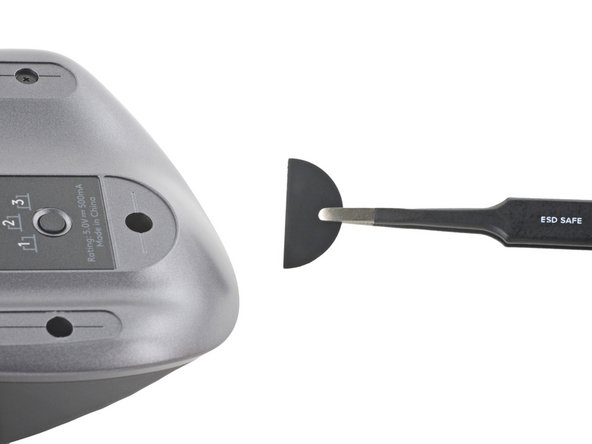
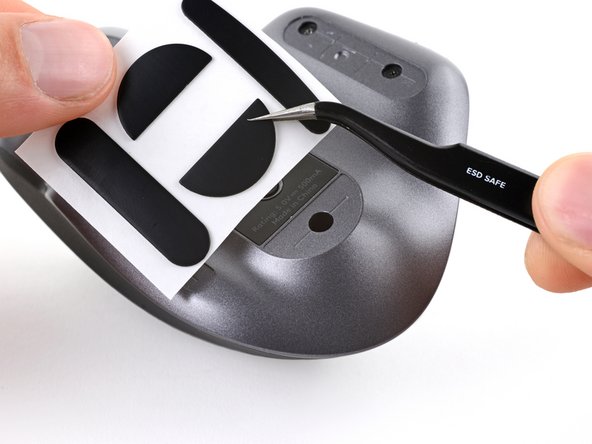
    3. Logitech MX Master 3S Mouse Feet Replacement, Separate the foot adhesive: step 3, image 1 of 3 Logitech MX Master 3S Mouse Feet Replacement, Separate the foot adhesive: step 3, image 2 of 3 Logitech MX Master 3S Mouse Feet Replacement, Separate the foot adhesive: step 3, image 3 of 3
      • The front foot doesn't cover any screws. If you're only removing the mouse feet to open up the mouse, you don't need to remove the front foot.

      • Slide an opening pick under an edge of a foot.

      • Go slowly, and make sure the pick slides underneath both the foot and its adhesive pad. These layers separate easily.

      • If you plan on reusing your mouse feet, be careful not to crease them or separate them from their adhesive pads.

      • If the foot feels stuck, apply more heat before continuing.

      • Slide your pick under the foot to separate its adhesive until you can grab it with your fingers.

      • Peel up and remove the left foot.

      Ask FixBot

      Add Comment

    4. Logitech MX Master 3S Mouse Feet Replacement, Remove the remaining feet: step 4, image 1 of 3 Logitech MX Master 3S Mouse Feet Replacement, Remove the remaining feet: step 4, image 2 of 3 Logitech MX Master 3S Mouse Feet Replacement, Remove the remaining feet: step 4, image 3 of 3
      • Repeat the previous two steps for the remaining feet.

      Ask FixBot

      Add Comment

    5. Logitech MX Master 3S Mouse Feet Replacement, Reassembly information: step 5, image 1 of 3 Logitech MX Master 3S Mouse Feet Replacement, Reassembly information: step 5, image 2 of 3 Logitech MX Master 3S Mouse Feet Replacement, Reassembly information: step 5, image 3 of 3
      • If the adhesive separated from the foot:

      • Slide the flat end of a spudger under an edge of the adhesive. If the adhesive seems stuck, you may need to heat the adhesive further.

      • Use a pair of tweezers or a spudger to remove any large chunks of leftover adhesive.

      • For installing new mouse feet or reusing your old ones:

      • Thoroughly clean the bottom of the mouse with isopropyl alcohol and a lint-free or microfiber cloth. Allow the surface to dry completely.

      • Peel your new mouse feet away from their adhesive liners and press them firmly into place.

      Ask FixBot

      Add Comment

Conclusion

Compare your new replacement part to the original part—you may need to transfer remaining components or remove adhesive backings from the new part before installing.

To reassemble your device, follow the above steps in reverse order.

Cancel: I did not complete this guide.

7 other people completed this guide.

Alex Diaz-Kokaisl

Member since: 01/16/22

249,714 Reputation

1,203 Guides authored

Team

Guide Team Member of Guide Team

Staff

10 Members

61,541 Guides authored

0 Guide Comments

Add Comment

View Statistics:

Past 24 Hours: 26

Past 7 Days: 132

Past 30 Days: 548

All Time: 21,757