Introduction
If your Logitech G400s mouse (model 910-002836) feels sluggish, drags, or makes a scratchy sound when you move it across a mousepad, use this guide to replace the mouse skates (also called mouse feet or glide pads). The skates are the small PTFE pads stuck to the bottom of the mouse that let it slide smoothly across a surface. When they wear down or start peeling, you'll get friction, uneven movement, and poor tracking.
Before you start, flip the mouse over and check for debris stuck to the skates. If present, try removing it and see if that fixes the problem. If not, unplug the mouse from your computer before starting the repair.
What you need
-
-
-
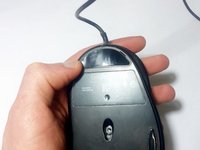
Use a Jimmy to remove the mouse feet. Be careful to remove any film left by the mouse feet as well.
 Ask FixBot
-
-
-
-
The smaller skate will go on the top portion of the mouse as shown.
-
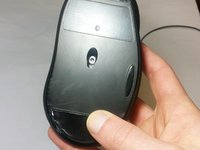
The larger skate will go on the bottom portion of the mouse.
-
Take care to press both mouse skates firmly into place.
-
-


To reassemble your device, follow these instructions in reverse order.
Cancel: I did not complete this guide.
One other person completed this guide.

Team

USF Tampa, Team 16-7, Eyestone Fall 2016 Member of USF Tampa, Team 16-7, Eyestone Fall 2016
USFT-EYESTONE-F16S16G7
1 Member
36 Guides authored
