Introduction
If your Lenovo ThinkPad L460 is running slowly, crashing, or cannot open large files, replacing the RAM (random-access memory) may improve performance.
RAM stores the data and instructions your processor needs for quick access, helping the laptop run programs and files more efficiently.
Before you begin, back up your data, power off the laptop, and work on a clean, static-free surface. Handle the RAM by its edges and do not force it into the slot.
What you need
-
-
-
Shut down your Lenovo ThinkPad L460 completely.
-
Disconnect the AC power adapter.
-
Disconnect all connected cables and devices.
 Ask FixBot
-
-
-
Use your two thumbs to push the two locking latches to the left and the right of the battery to the unlocked position.
-
While holding the latches open, slide the battery out of the connector to remove it.
-
-
-
-
-
-
Use a Phillips #1 screwdriver to loosen the 8 captive screws on the back cover of the laptop.
-
Remove the SIM tray from the side of the laptop.
-
-
-
Use an opening tool to gently pry along the edges of the cover, releasing all the plastic clips of the laptop.
-
Carefully pull up and remove the back cover from the laptop.
-
-
-


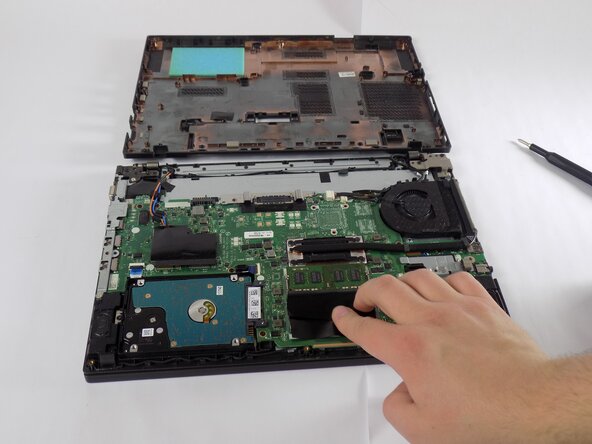


To reassemble your device, follow these instructions in reverse order. Take your e-waste to an R2 or e-Stewards certified recycler.

Team

UMass Dartmouth, Team 2-4, Bowman Fall 2025 Member of UMass Dartmouth, Team 2-4, Bowman Fall 2025
UMASSD-BOWMAN-F25S2G4
4 Members
72 Guides authored
