Introduction
If you are experiencing any issues with your ThinkPad A285 and are planning on replacing any parts, or you just want to clean your ThinkPad of any lint or dust, you must first remove the back panel of the device. Before following this guide, make sure that the device is fully powered off and is unplugged from any external power sources.
What you need
-
-
-
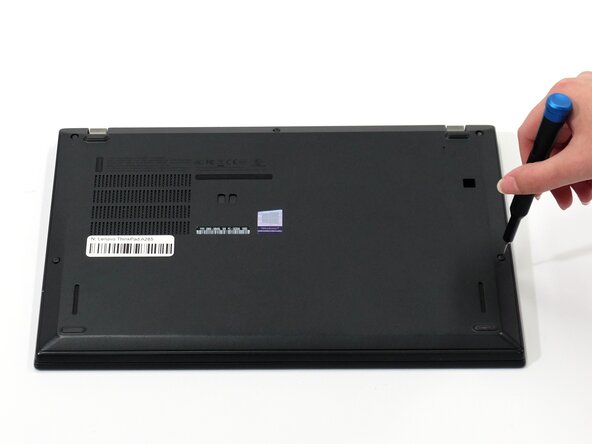
Flip your laptop over so the bottom panel is facing up.
-
Use a Phillips #0 to loosen the five screws holding the back panel to the laptop.
-
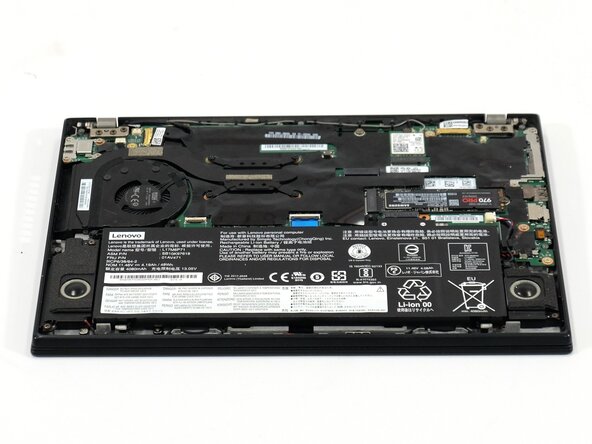
Lift the bottom of the panel to separate the back panel away from the device.
-
Remove the back panel.
 Ask FixBot
-
-
-



To reassemble your device, follow these instructions in reverse order. Take your e-waste to an R2 or e-Stewards certified recycler.

Team

Linn Benton Community College, Team 1-4, Karnes Spring 2025 Member of Linn Benton Community College, Team 1-4, Karnes Spring 2025
LBCC-KARNES-S25S1G4
4 Members
54 Guides authored
