Introduction
Buttons on a JBL speaker can wear out over time due to lifespan and usage. This guide will show you how to remove the button panel on the bottom of the speaker when replacing.
Be CAREFUL when applying pressure to the button system, as to not damage or snap the system.
What you need
-
-
-
Find the seam on the speaker and position it upward.
-
Begin by turning the device so that the bottom side with the grooves faces towards you. Using the (5) spudger, carefully pry open the side of the outer shell where the red indicators are to unlatch the outer shell. After they are unlatched, you should be able to open the shell by hand.
 Ask FixBot
-
-
-
To continue to remove the outer shell, unscrew the two screws (size 1cm) shown in the picture with a size 0 (zero) Phillips screwdriver.
-
-
-
-
To continue to remove the shell, use a (5) spudger to slowly pop the shell off.
-
There is one nudge in the center below the power and Bluetooth button that should pop off.
-
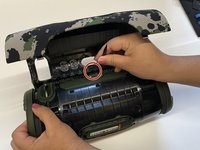
Once you have unlatched this piece correctly, the shell will remove itself from the speaker. As it is shown in the following figure.
-
-
-
-
-
-
Once the sides of the outer button cover are released, wiggle the spudger around the outer cover and lift the button cover off.
-
After, all you should see is the inner button panel.
-
-
-
With the inner button panel exposed, place the spudger directly under the inner panel and gently push the panel up.
-
Repeat the last steps all the way around the inner panel.
-
-


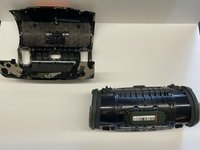


To reassemble your device, follow these instructions in reverse order.
Cancel: I did not complete this guide.
One other person completed this guide.

Team

IUPUI, Team 2-5, Harley Fall 2023 Member of IUPUI, Team 2-5, Harley Fall 2023
IUPUI-HARLEY-F23S2G5
3 Members
24 Guides authored
