Shop the Holiday Gift Guide
Free Shipping on Domestic Orders $75+

Huawei P9 Battery Replacement

Views: 132K

View statistics:

Past 24 Hours:
5
Past 7 Days:
62
Past 30 Days:
228
All Time:
131,942
Comments: 79

50 comments on steps, 29 guide comments.

Go to guide comments
Completed: 93

93 people have marked this guide "completed." Will you be next?

Favorites: 13

13 people have favorited (and subscribed to) this guide. Will you be next?

Time Required: 25 minutes
Difficulty: Moderate
Featured Guide

This guide has been found to be exceptionally cool by the iFixit staff.

Huawei P9 Battery Replacement

Introduction

Go to step 1 ↓

Use this guide to replace the battery in your Huawei P9 smartphone.

Before disassembling your phone, discharge the battery below 25%. The battery can catch fire and/or explode if accidentally punctured, but the chances of that happening are much lower if discharged.

What you need

Parts

Tools

    1. Huawei P9 Battery Replacement, Back Cover: step 1, image 1 of 3 Huawei P9 Battery Replacement, Back Cover: step 1, image 2 of 3 Huawei P9 Battery Replacement, Back Cover: step 1, image 3 of 3
      • First switch off your phone and remove the SIM card tray.

      • Unscrew the two Pentalobe P2 screws located at the bottom next to the device's USB C port.

      • If the screen is cracked you might want to use some tape to protect your eyes from glass shreds and get a better grip to open the phone.

      Ask FixBot

      Add Comment

    2. Huawei P9 Battery Replacement: step 2, image 1 of 2 Huawei P9 Battery Replacement: step 2, image 2 of 2
      • Avoid to lift only the display instead of the whole phone assembly as doing so may cause damage to the screen.

      • Use an iSclack or a suction handle to separate the phone assembly from the rear panel.

      • In case you can‘t manage to lift the phone assembly out of the rear panel you can insert the pointed end of a spudger in the headphone jack opening and press the phone assembly upwards until you create a gap between assembly and rear panel. Then use the spudger to lever the phone assembly out of the panel.

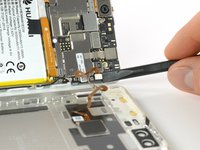
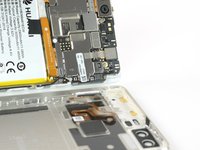
      • Don't remove the rear panel completely yet. There is a cable connected to it! It is running from the finger print sensor to the display unit.

      Ask FixBot

      Add Comment

    3. Huawei P9 Battery Replacement, Fingerprint sensor: step 3, image 1 of 2 Huawei P9 Battery Replacement, Fingerprint sensor: step 3, image 2 of 2
      • Disconnect the fingerprint sensor using a spudger.

      Ask FixBot

      Add Comment

    1. Huawei P9 Battery Replacement, Battery: step 4, image 1 of 3 Huawei P9 Battery Replacement, Battery: step 4, image 2 of 3 Huawei P9 Battery Replacement, Battery: step 4, image 3 of 3
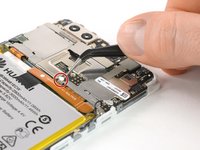
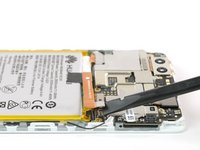
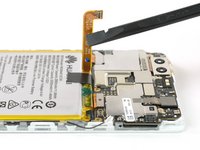
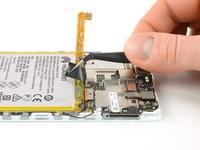
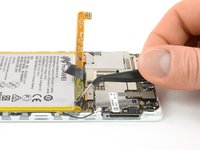
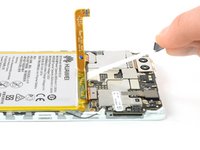
      • Unplug the antenna cable.

      • Remove the sticker that sits on top of the screw.

      Ask FixBot

      Add Comment

    2. Huawei P9 Battery Replacement: step 5, image 1 of 3 Huawei P9 Battery Replacement: step 5, image 2 of 3 Huawei P9 Battery Replacement: step 5, image 3 of 3
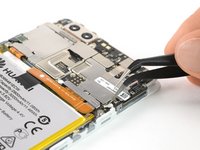
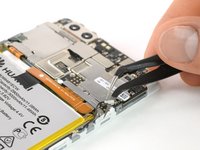
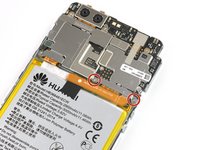
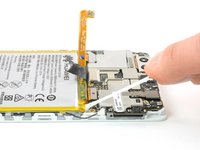
      • Unscrew the two Phillips #00 screws that hold the metal plate in place.

      • The plate, which is covering the battery connector, has two little hooks on each side. Use a tweezer to free them and unhinge the plate by carefully moving it upwards.

      Ask FixBot

      Add Comment

    3. Huawei P9 Battery Replacement: step 6, image 1 of 2 Huawei P9 Battery Replacement: step 6, image 2 of 2
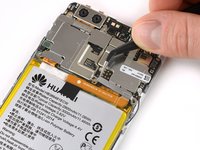
      • Now you can unplug the battery connector and bend it aside.

      • The EVA-L09 model has an NFC antenna adhered onto the battery.

      • If you are just removing the battery to get to the display, you can leave the NFC on the battery.

      • Mark its place on the battery with a felt pen for reassembly. Carefully peel it off and make sure not to rip or crease the antenna.

      • For reassembly, place the NFC antenna on the battery where it was before so its contacts align with their counterparts.

      Ask FixBot

      Add Comment

    4. Huawei P9 Battery Replacement: step 7, image 1 of 2 Huawei P9 Battery Replacement: step 7, image 2 of 2
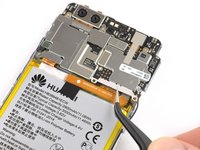
      • Free the ends of the adhesive pull tabs to get a good grip on them.

      Ask FixBot

      Add Comment

    5. Huawei P9 Battery Replacement: step 8, image 1 of 3 Huawei P9 Battery Replacement: step 8, image 2 of 3 Huawei P9 Battery Replacement: step 8, image 3 of 3
      Tool used on this step:
      Tesa 61395 Tape
      $8.95
      Buy
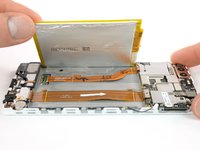
      • The battery is secured with three pieces of adhesive, a removable pull-tab in the center, and on the SIM tray side. A third piece of adhesive on the button side has no pull-tab.

      • Pull the adhesive tabs in a slow constant movement to free the battery.

      • Should those adhesive tabs snap, you might want to use an iOpener to heat and soften them a little bit so you can pry out the battery with a spudger.

      • There are two cables running directly underneath the battery. Take care not to damage them when prying with a spudger! You can see their position in the last picture.

      • Slowly lift the battery toward the button side and free it from the remaining hidden piece of adhesive.

      • When reassembling your phone, replace old adhesive with stretch release adhesive strips, double-sided tape, or pre-cut adhesive strips.

      Ask FixBot

      Add Comment

Conclusion

To reassemble your device, follow these instructions in reverse order.

Cancel: I did not complete this guide.

93 other people completed this guide.

Author

with

Tobias Isakeit

Member since: 03/31/14

136,445 Reputation

189 Guides authored

Team

29 Guide Comments

Just FYI, My replacement battery from Huawei doesn’t fit. The cable doesn’t reach the connector. Soldering Required!

https://imgur.com/gallery/vTsX8

dallebull - Reply Share

Bonjour j es effectué cette opération.J es changé le connecteur de chargeur complet suite à un dysfonctionnement. Et la batterie aussi.Et mon soucis reste le même. Le téléphone s allumé mais pas de voyant de charge.merci de me renseigner.

Berhault - Reply Share
Bonjour,

J’ai le même problème , avez-vous trouvé une solution ?

Amenis - Reply Share

J'ai le même problème quand je charge sa passe mais le pourcentage n'augmente pas

300elmoise - Reply Share

Bonjour suite à une panne avec mon huawei p9 j es changé le connecteur de chargeur et la batterie et mon problèmereste toujours le même. Il charge toujours pas.merci de me

Berhault - Reply Share

Add Comment

View Statistics:

Past 24 Hours: 5

Past 7 Days: 62

Past 30 Days: 228

All Time: 131,942