15% Off Selected iFixit Tools — Limited Time
Free Shipping on Domestic Orders $75+

HTC One Mini 2 Back Plate Replacement

What you need

  1. HTC One Mini 2 Back Plate Replacement, Sim and MicroSD Card: step 1, image 1 of 3 HTC One Mini 2 Back Plate Replacement, Sim and MicroSD Card: step 1, image 2 of 3 HTC One Mini 2 Back Plate Replacement, Sim and MicroSD Card: step 1, image 3 of 3
    • Insert the end of a paper clip into the holes on each side of the phone to eject the SIM card and Micro SD card.

    • Set the cardholders aside.

    Ask FixBot

    Add Comment

  2. HTC One Mini 2 Back Plate Replacement: step 2, image 1 of 1
    • Heat up the top grey speaker plate with the iFixit iOpener for two minutes.

    Ask FixBot

    Add Comment

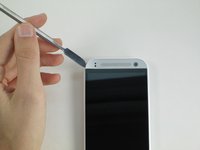
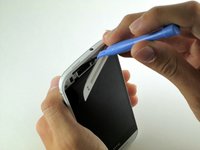
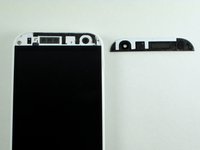
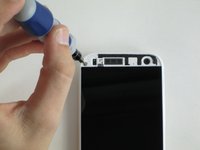
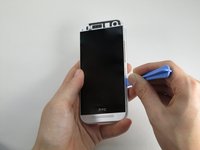
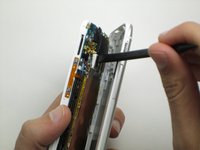
  3. HTC One Mini 2 Back Plate Replacement, Front Plate: step 3, image 1 of 3 HTC One Mini 2 Back Plate Replacement, Front Plate: step 3, image 2 of 3 HTC One Mini 2 Back Plate Replacement, Front Plate: step 3, image 3 of 3
    • Use a metal spudger to pry up the left edge of the upper grey front plate.

    • Place the spudger between the inside white plastic edge and the grey plate. Do not pry between the two white plastic frames.

    • Don’t pry against the glass. Pry against only the left side as there is a delicate antenna under the plate.

    • Use the narrow plastic pry tool to carefully separate the black ribbon antenna from the grey plate.

    Ask FixBot

    Add Comment

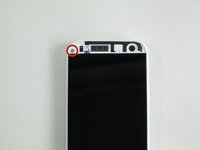
  4. HTC One Mini 2 Back Plate Replacement: step 4, image 1 of 2 HTC One Mini 2 Back Plate Replacement: step 4, image 2 of 2
    • Remove the 2mm screw with a T5 torx screwdriver head from the iFixit tool kit.

    Ask FixBot

    Add Comment

  5. HTC One Mini 2 Back Plate Replacement: step 5, image 1 of 2 HTC One Mini 2 Back Plate Replacement: step 5, image 2 of 2
    • Use the plastic pry tool to pry around the edge of the phone.

    • Pry carefully around the card slots.

    • Slowly pull up from the right side of the screen like opening a book.

    • The plastic piece for the power button may fall out. Set it aside for reassembly.

    • Use the plastic spudger to peel the foam adhesive around the camera away from the back plate.

    Ask FixBot

    Add Comment

Conclusion

To reassemble your device, follow these instructions in reverse order.

Cancel: I did not complete this guide.

5 other people completed this guide.

Caleb Kelsay

Member since: 10/14/14

590 Reputation

1 Guide authored

Team

Cal Poly, Team 4-48, Amido Fall 2014 Member of Cal Poly, Team 4-48, Amido Fall 2014

CPSU-AMIDO-F14S4G48

5 Members

17 Guides authored

1 Guide Comment

what is the black ribbon antenna on the front

deancvijic90 - Reply Share

Add Comment

View Statistics:

Past 24 Hours: 1

Past 7 Days: 7

Past 30 Days: 36

All Time: 10,783