Free Shipping on Domestic Orders $75+

Google Pixel 3 Antenna Cable Disconnect

Prerequisite Only
This is a prerequisite-only guide! This guide is part of another procedure and isn’t meant to be used alone.

What you need

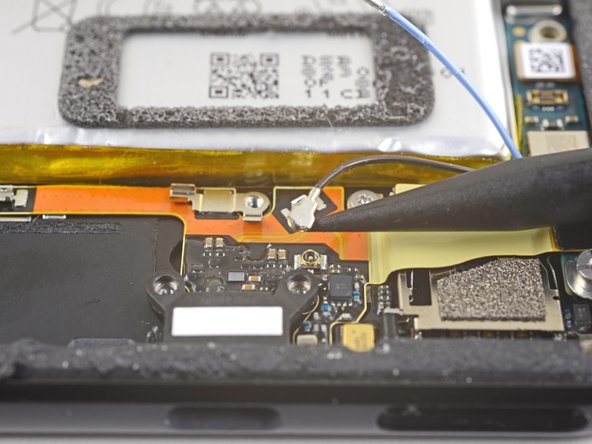
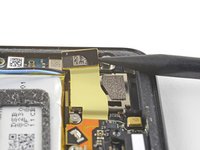
    1. Google Pixel 3 Antenna Cable Disconnect, Disconnect the blue antenna cable: step 1, image 1 of 2 Google Pixel 3 Antenna Cable Disconnect, Disconnect the blue antenna cable: step 1, image 2 of 2
      • Use the point of a spudger to pry up and disconnect the blue antenna cable from its socket on the charging assembly.

      Ask FixBot

      Add Comment

    2. Google Pixel 3 Antenna Cable Disconnect: step 2, image 1 of 2 Google Pixel 3 Antenna Cable Disconnect: step 2, image 2 of 2
      • Use the point of a spudger to carefully pry up and release the blue antenna cable from its grounding clips.

      • The cable is fragile and prone to breaking. If it feels like the wire is firmly clamped in place, use the point of a spudger to push the clip open slightly, then try again.

      Ask FixBot

      Add Comment

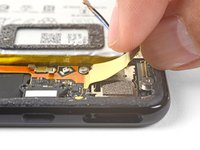
    3. Google Pixel 3 Antenna Cable Disconnect, Disconnect the black antenna cable: step 3, image 1 of 2 Google Pixel 3 Antenna Cable Disconnect, Disconnect the black antenna cable: step 3, image 2 of 2
      • Use the point of a spudger to pry up and disconnect the black antenna cable from its socket near the USB-C port.

      Ask FixBot

      Add Comment

    4. Google Pixel 3 Antenna Cable Disconnect, De-route the antenna cables: step 4, image 1 of 1
      • Carefully de-route both antenna cables and move them away from the charging assembly.

      Ask FixBot

      Add Comment

    5. Google Pixel 3 Antenna Cable Disconnect: step 5, image 1 of 3 Google Pixel 3 Antenna Cable Disconnect: step 5, image 2 of 3 Google Pixel 3 Antenna Cable Disconnect: step 5, image 3 of 3
      • Use the point of a spudger to pry up and disconnect the charging assembly's connector from its motherboard socket, near the right edge of the phone.

      • Carefully peel the flex cable from the top of the SIM card reader.

      Ask FixBot

      Add Comment

Conclusion

To reassemble your device, follow these instructions in reverse order.

Cancel: I did not complete this guide.

Arthur Shi

Member since: 01/03/18

350,889 Reputation

938 Guides authored

Team

iFixit Member of iFixit

Staff

122 Members

72,401 Guides authored

0 Guide Comments

Add Comment

View Statistics:

Past 24 Hours: 1

Past 7 Days: 1

Past 30 Days: 16

All Time: 324