Free Shipping on Domestic Orders $75+

Google Pixel 10a Wide Camera Installation

Prerequisite Only
This is a prerequisite-only guide! This guide is part of another procedure and isn’t meant to be used alone.
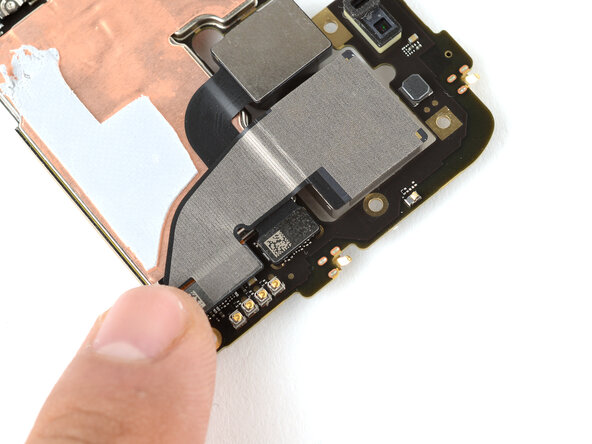
    1. Google Pixel 10a Wide Camera Installation, Install the wide camera: step 1, image 1 of 3 Google Pixel 10a Wide Camera Installation, Install the wide camera: step 1, image 2 of 3 Google Pixel 10a Wide Camera Installation, Install the wide camera: step 1, image 3 of 3
      • Leave any lens caps on the camera for now—they'll protect the lens during reassembly. You'll remove them before installing the rear cover.

      • Put the wide camera into place on the logic board, being careful not to smudge the lens.

      • Align the press connector over its socket and press down with your fingertip—first on one of the short sides, then the other—until it clicks into place.

      Ask FixBot

      Add Comment

Conclusion

To reassemble your device, follow these instructions in reverse order.

Cancel: I did not complete this guide.

Arthur Shi

Member since: 01/03/18

350,747 Reputation

938 Guides authored

0 Guide Comments

Add Comment

View Statistics:

Past 24 Hours: 0

Past 7 Days: 1

Past 30 Days: 10

All Time: 55