Introduction
The trigger is a button on the top of the GameSir X2 Pro. It allows a user to produce various outputs depending on the game.
You may need to replace the trigger if it is unresponsive to input or the response is lagging.
If you need to replace the left trigger on your controller, follow this guide.
What you need
-
-
-
Insert the tip of the Jimmy between the rubber pad and the back of the controller, then slide it along the edge to loosen the adhesive and lift the pad away.
-
Gently remove the rubber pad.
 Ask FixBot
-
-
-
Use a Phillips #000 screwdriver to remove the four 4.5 mm screws under the rubber pad.
-
-
-
Flip the controller over so the back is facing up.
-
Remove the eight 6.0 mm T6 Torx screws from the back of the device.
-
-
-
-
Remove the six 4.5 mm screws from under the back panel with a Phillips #000 screwdriver.
-
-
-
Use a Phillips #000 screwdriver to remove the three 4.5 mm screws securing the joystick board in the corner.
-
-
-
Remove the four 4.5 mm Phillips #000 screws securing the circuit board behind the joystick board that was just removed.
-
Remove the board from the frame.
-
-


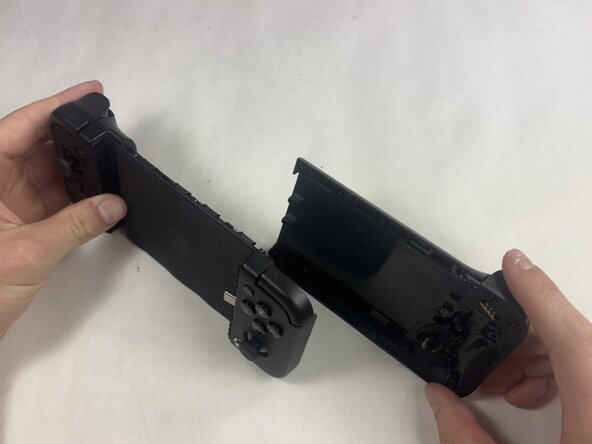


To reassemble your device, follow these instructions in reverse order. Take your e-waste to an R2 or e-Stewards certified recycler.

Team

UMass Dartmouth, Team 5-2, Rioux Spring 2026 Member of UMass Dartmouth, Team 5-2, Rioux Spring 2026
UMASSD-RIOUX-S26S5G2
3 Members
60 Guides authored
