Free Shipping on Domestic Orders $75+

Framework Laptop 16" Keyboard Removal

Prerequisite Only
This is a prerequisite-only guide! This guide is part of another procedure and isn’t meant to be used alone.
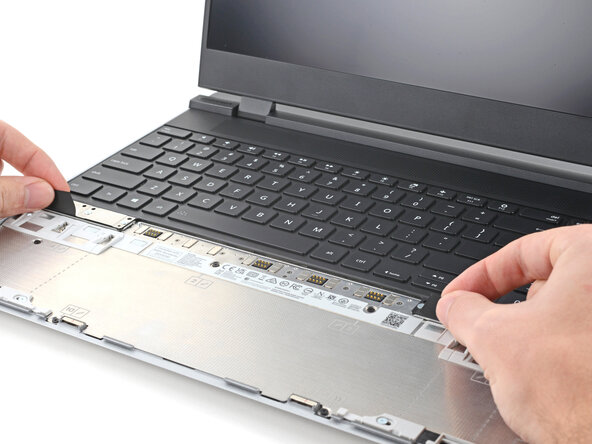
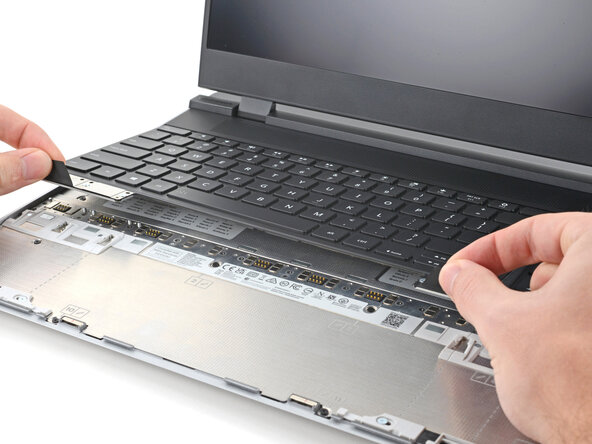
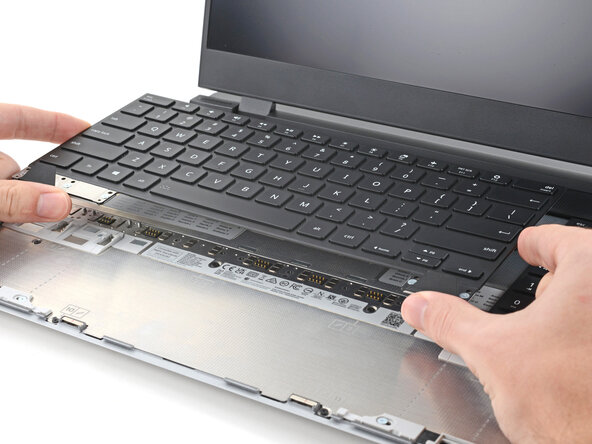
    1. Framework Laptop 16" Keyboard Removal, Remove the keyboard: step 1, image 1 of 3 Framework Laptop 16" Keyboard Removal, Remove the keyboard: step 1, image 2 of 3 Framework Laptop 16" Keyboard Removal, Remove the keyboard: step 1, image 3 of 3
      • The keyboard is held in place with strong magnets. Apply gradually increasing force to avoid having the keyboard violently eject.

      • Grip the two pull tabs along the bottom of the keyboard and lift until its magnets release.

      • Remove the keyboard.

      Ask FixBot

      Add Comment

Conclusion

To reassemble your device, follow these instructions in reverse order.

Take your e-waste to an R2 or e-Stewards certified recycler.

Repair didn’t go as planned? Try some basic troubleshooting, or ask our Answers Community for help.

Cancel: I did not complete this guide.

Alex Diaz-Kokaisl

Member since: 01/16/22

250,018 Reputation

1,203 Guides authored

0 Guide Comments

Add Comment

View Statistics:

Past 24 Hours: 1

Past 7 Days: 3

Past 30 Days: 6

All Time: 110