Free Shipping on Domestic Orders $75+

Framework Laptop 12 Touchpad Installation (With Alignment Tool Instructions)

Prerequisite Only
This is a prerequisite-only guide! This guide is part of another procedure and isn’t meant to be used alone.

What you need

    1. Framework Laptop 12 Touchpad Installation (With Alignment Tool Instructions), Align the replacement touchpad: step 1, image 1 of 2 Framework Laptop 12 Touchpad Installation (With Alignment Tool Instructions), Align the replacement touchpad: step 1, image 2 of 2
      • The next two steps show how to attach the alignment tool to the touchpad. If your touchpad comes with the alignment tool pre-attached, or if you're not using the alignment tool, skip down two steps.

      • Fold all the edge tabs on the alignment tool down.

      Ask FixBot

      Add Comment

    2. Framework Laptop 12 Touchpad Installation (With Alignment Tool Instructions): step 2, image 1 of 3 Framework Laptop 12 Touchpad Installation (With Alignment Tool Instructions): step 2, image 2 of 3 Framework Laptop 12 Touchpad Installation (With Alignment Tool Instructions): step 2, image 3 of 3
      • Lay the alignment tool over the top of the touchpad.

      • The folded-down tabs should dangle freely over the touchpad edges. If they don't, try rotating the alignment tool 180° over the touchpad.

      • Use your fingers to press the alignment tool onto the touchpad.

      Ask FixBot

      Add Comment

    3. Framework Laptop 12 Touchpad Installation (With Alignment Tool Instructions): step 3, image 1 of 2 Framework Laptop 12 Touchpad Installation (With Alignment Tool Instructions): step 3, image 2 of 2
      • Lay the touchpad into its Input Cover recess.

      • The tabs on the alignment tool will center the touchpad on the Input Cover.

      Ask FixBot

      Add Comment

    4. Framework Laptop 12 Touchpad Installation (With Alignment Tool Instructions), Install the touchpad screws: step 4, image 1 of 2 Framework Laptop 12 Touchpad Installation (With Alignment Tool Instructions), Install the touchpad screws: step 4, image 2 of 2
      • Use your Framework Screwdriver to install the seven 2 mm‑long T5 Torx screws to secure the touchpad.

      • If you didn't use an alignment tool, manually center the touchpad to the Input Cover before tightening the screws.

      • Tighten the screws until they're snug. Don't over-tighten them, or you may strip the screws.

      Ask FixBot

      Add Comment

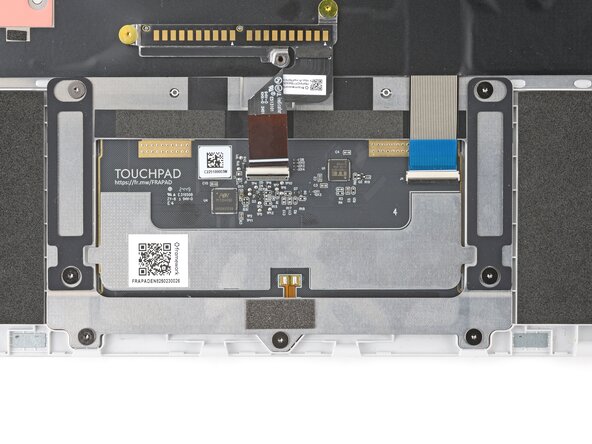
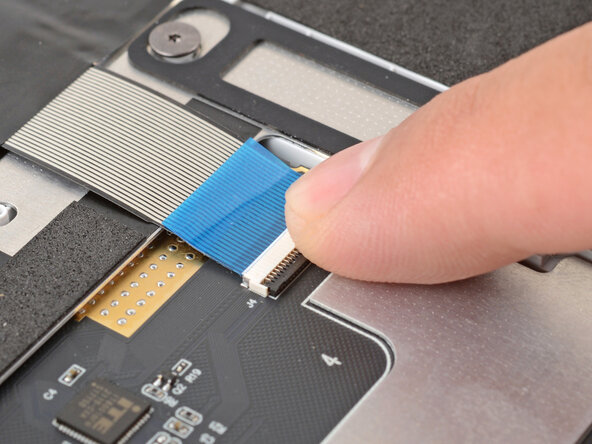
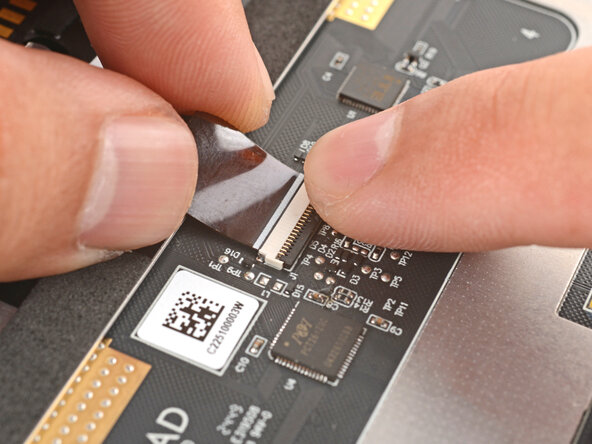
    5. Framework Laptop 12 Touchpad Installation (With Alignment Tool Instructions), Connect the touchpad cables: step 5, image 1 of 3 Framework Laptop 12 Touchpad Installation (With Alignment Tool Instructions), Connect the touchpad cables: step 5, image 2 of 3 Framework Laptop 12 Touchpad Installation (With Alignment Tool Instructions), Connect the touchpad cables: step 5, image 3 of 3
      • Slide the keyboard ZIF cable into its connector, up to the printed line on the cable.

      • Use your finger to flip down and gently press the locking tab in place.

      Ask FixBot

      Add Comment

    6. Framework Laptop 12 Touchpad Installation (With Alignment Tool Instructions): step 6, image 1 of 3 Framework Laptop 12 Touchpad Installation (With Alignment Tool Instructions): step 6, image 2 of 3 Framework Laptop 12 Touchpad Installation (With Alignment Tool Instructions): step 6, image 3 of 3
      • Slide the touchpad ZIF cable into its connector, up to the printed line on the cable.

      • Use your finger to flip down and gently press the locking tab in place.

      Ask FixBot

      Add Comment

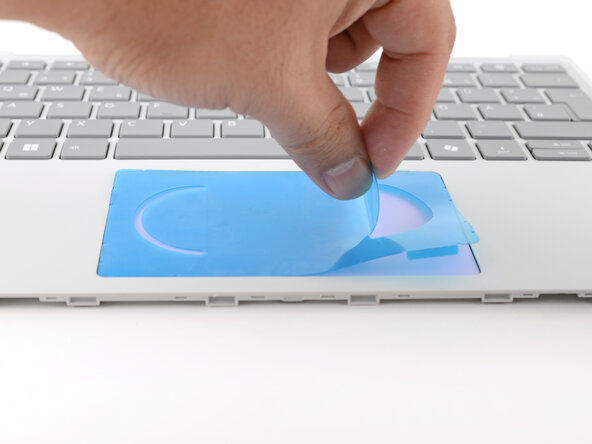
    7. Framework Laptop 12 Touchpad Installation (With Alignment Tool Instructions), Remove the alignment tool: step 7, image 1 of 2 Framework Laptop 12 Touchpad Installation (With Alignment Tool Instructions), Remove the alignment tool: step 7, image 2 of 2
      • Skip this step if you didn't use an alignment tool.

      • Use your fingers to peel and remove the alignment tool from the touchpad.

      Ask FixBot

      Add Comment

Finish Line

Cancel: I did not complete this guide.

Arthur Shi

Member since: 01/03/18

350,781 Reputation

938 Guides authored

0 Guide Comments

Add Comment

View Statistics:

Past 24 Hours: 0

Past 7 Days: 1

Past 30 Days: 8

All Time: 62