Framework Laptop 12 Memory Module Installation

Prerequisite Only
This is a prerequisite-only guide! This guide is part of another procedure and isn’t meant to be used alone.

What you need

  1. Framework Laptop 12 Memory Module Installation, Install the memory module: step 1, image 1 of 3 Framework Laptop 12 Memory Module Installation, Install the memory module: step 1, image 2 of 3 Framework Laptop 12 Memory Module Installation, Install the memory module: step 1, image 3 of 3
    • Hold the memory module by its edges. Don't touch the gold contacts with your fingers. If you do, wipe the contacts with a clean, lint-free cloth to remove any finger oils.

    • Orient the module with the label facing down and align the gold contacts with the socket.

    • Insert the contact edge into the socket at a shallow angle. The gold contacts should mostly be covered by the socket.

    • Press the edges of the memory module down until the side clips lock it in place.

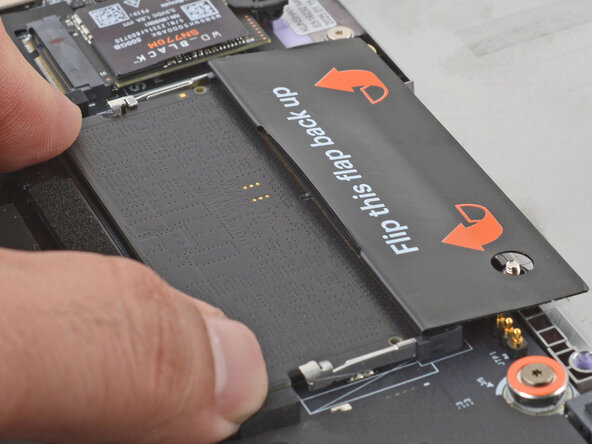
  2. Framework Laptop 12 Memory Module Installation: step 2, image 1 of 2 Framework Laptop 12 Memory Module Installation: step 2, image 2 of 2
    • Flip the memory flap back over the memory module.

Finish Line

Arthur Shi

Member since: 01/03/18

310,401 Reputation

701 Guides authored

0 Guide Comments

Add Comment

View Statistics:

Past 24 Hours: 0

Past 7 Days: 0

Past 30 Days: 0

All Time: 30