
Framework Laptop 12 Display Cover Replacement

Arthur Shi and one other contributor
Last updated on Jun 17, 2025
Views: 498
View statistics:
- Past 24 Hours:
- 2
- Past 7 Days:
- 15
- Past 30 Days:
- 54
- All Time:
- 498
Comments: 0
No one has left comments on this guide. Will you be first?
Go to guide commentsCompleted: 0 1
No one has marked this guide "completed." Will you be the first?
1 person has marked this guide "completed." It's you — great job!
Favorites: 0 1
No one has favorited (and subscribed to) this guide. Will you be the first?
1 person has favorited (and subscribed to) this guide — and that's you!
OEM Guide
iFixit collaborated with the manufacturer to make this guide.
Introduction
Go to step 1 ↓Follow this guide to remove and replace the Display Cover in your Framework Laptop 12.
The Display Cover is the plastic bezel strip below the screen. You can easily replace a broken one or swap out a different colored one.
What you need


-
-
-
Open the laptop lid so that both the screen and the base lie flat on your work surface.
 Ask FixBot
-
-
-
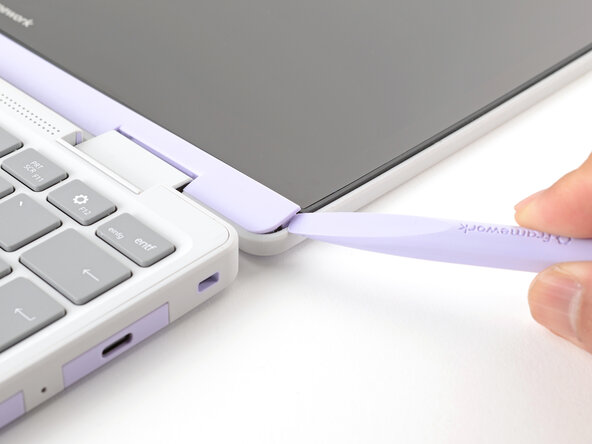
Use the flat end of your Framework Screwdriver to pry up the right edge of the Display Cover.
-
-
-
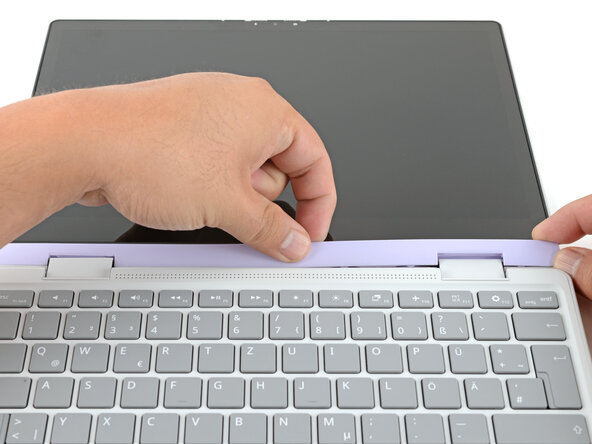
Slide your fingers under the top edge of the Display Cover to release it from the laptop.
-
-
-
-
-
-
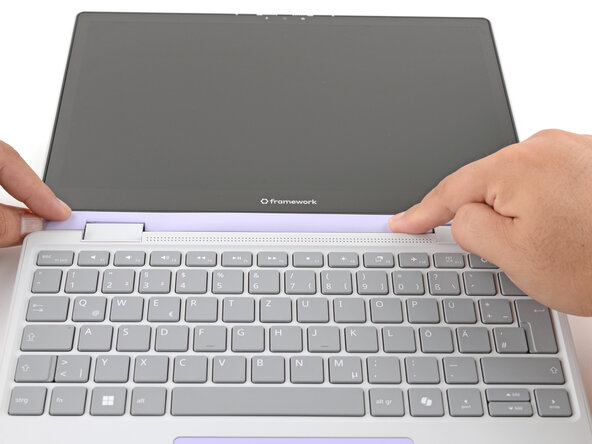
Align the Display Cover to the bottom of the display.
-
-
-
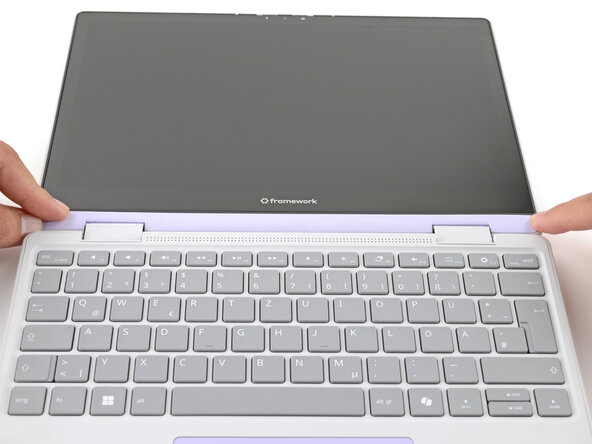
Use your finger to press along the length of the Display Cover to snap it onto the laptop.
-
-








You finished fixing your Framework Laptop!
If you need help, contact Framework support.


