Introduction
A common problem on the Canon EOS A2 is for the pop up flash mechanism to get stuck and not "pop-up". This is caused by the camera fooling itself into thinking an external flash is installed, which interferes with the main flash.
What you need
-
-
-
Locate the battery door/camera grip on the left side of the camera and lift the rotating removal tab.
 Ask FixBot
-
-
-
Twist the tab clockwise to unlock the door, then pull outward from the camera to remove it.
-
-
-
-
-
-
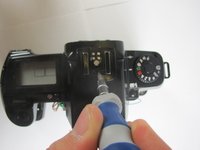
The inside of the flash shoe has a removable cover which is just snapped in place.
-
Using the flathead screwdriver, pry up on the front end of the cover.
-
Warning: The cover is on tight and is tough to pry off.
-
-
-
Push a paperclip in and out of the plunger hole, ensuring the plunger moves up and down freely.
-
-


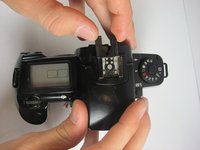


To reassemble your device, follow these instructions in reverse order.
Cancel: I did not complete this guide.
One other person completed this guide.

Team

Cal Poly, Team 8-9, Regan Spring 2011 Member of Cal Poly, Team 8-9, Regan Spring 2011
CPSU-REGAN-S11S8G9
4 Members
72 Guides authored
2 Guide Comments
What about the other way, where the external flash IS installed (and the camera is successfully communicating TTL focal length data to it) yet the camera still doesn’t believe there is an external flash installed? Sometimes twisting the external flash a little causes the camera to change its mind and then it works, but then it usually forgets by the next exposure.
Think this mechanism could be causing that behavior too?
