Introduction
If you need to access the battery, volume and noise cancelling control buttons, or right speaker subassembly of your Sony WH-CH710N headphones, opening the right ear cup is an essential first step. This guide will walk you through the disassembly process, showing you how to safely remove the ear pad and access the internal components without causing damage. With careful handling and the right tools, you’ll be able to open the ear cup and prepare for further repairs or replacements.
Before you begin, power off the headphones and disconnect them from the charger and any connected audio cable.
What you need
-
-
-
Pinch the right ear pad cushion and gently pull it away from the ear cup to remove it.
 Ask FixBot
-
-
-
Use a Phillips #1 screwdriver to remove the four 4.0 mm screws from the outer ear plate.
-
-
-
-
Using even pressure around all edges, gently pull the black outer ear plate away from the cup of the earphone.
-
-
-
Use a Phillips #1 screwdriver to remove the four 3.0 mm screws from the inner ear plate.
-
-
-
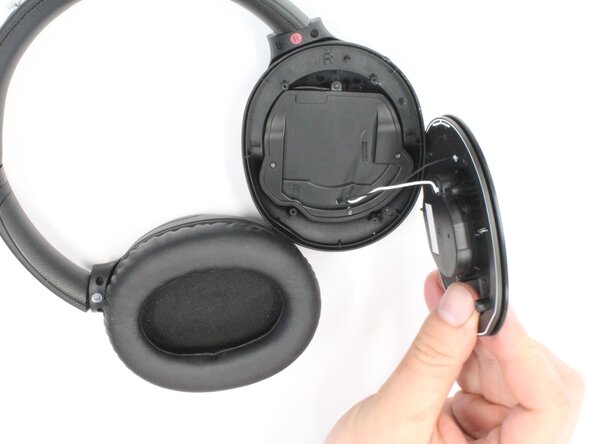
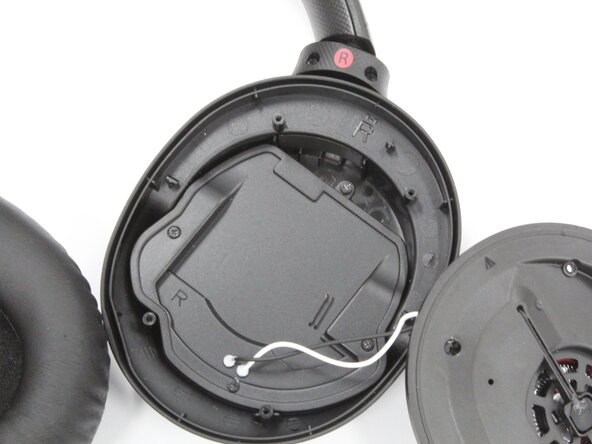
Gently grasp the black inner ear plate and pull it away from the cup of the earphone, exposing the internal components.
-
-




To reassemble your device, follow these instructions in reverse order. Take your e-waste to an R2 or e-Stewards certified recycler.

Team

Purdue University Northwest, Team 7-10, Dieterle Spring 2026 Member of Purdue University Northwest, Team 7-10, Dieterle Spring 2026
PNW-DIETERLE-S26S7G10
4 Members
82 Guides authored
