
Digiland DL8006 Battery Replacement

Landon Choi and 5 other contributors
Last updated on Jul 11, 2024
Views: 701
View statistics:
- Past 24 Hours:
- 1
- Past 7 Days:
- 15
- Past 30 Days:
- 60
- All Time:
- 701
Comments: 0
No one has left comments on this guide. Will you be first?
Go to guide commentsCompleted: 0 1
No one has marked this guide "completed." Will you be the first?
1 person has marked this guide "completed." It's you — great job!
Favorites: 0 1
No one has favorited (and subscribed to) this guide. Will you be the first?
1 person has favorited (and subscribed to) this guide — and that's you!
Needs Better Images
Better photos will improve this guide. Help out by taking, editing, or uploading new ones!
Missing Prerequisites
This guide is missing information on how to start the process. Make a prerequisite guide!
Better Introduction
Improve this guide by completing or revising its introduction.
Introduction
Go to step 1 ↓This guide provides detailed steps for replacing the internal battery of the DigiLand DL8006. Required items are listed in the "What You Need" section, followed by step-by-step instructions for replacing the battery as you scroll down.
What you need
Parts
Tools


-
-
-
Place the device down on its front with the back facing upward.
-
Split the two faces of the device with a plastic opening tool to pry the back cover off.
-
Remove the silver/metallic tape covering the bottom end of the tablet.
 Ask FixBot
-
-
-
Remove the red & black wire that connects the motherboard to the bottom end of the tablet.
-
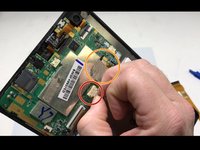
Remove the ribbon cable over the battery by flipping up the plastic tab on the ZIF connector on either side of the cable and pulling it out.
-
-
-
-
Remove the red & blue cord connecting the battery to the motherboard.
-
Remove the tape connecting the motherboard to the back of the LED screen.
-
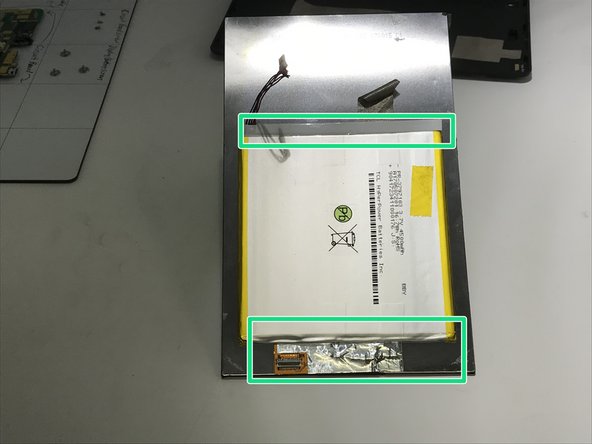
Pry open with a plastic opening tool along the top and bottom edges until the battery is free from the device.
-
Remove all the remaining tape from the battery.
-
-


To reassemble your device, follow these instructions in reverse order.
Attached Documents

Team

University of Memphis, Team S2-G5, Kim Fall 2019 Member of University of Memphis, Team S2-G5, Kim Fall 2019
UM-KIM-F19S2G5
3 Members
60 Guides authored
