This translation was generated by a machine and has not been reviewed by a person yet. Speak this language? Review it.
Introduction
In test mode, you can quickly test components and the touchscreen. This guide shows how to access and use it.
-
-
-
Turn on the device using the main power switch. Wait until it is in standby mode. The display is dark.
-
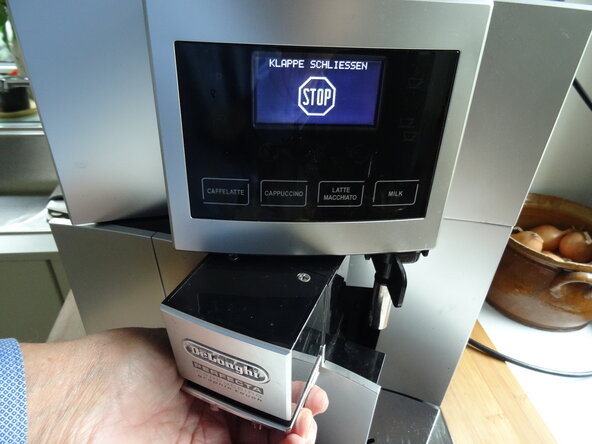
Open the service door. A corresponding message appears on the display.
 Ask FixBot
-
-
-
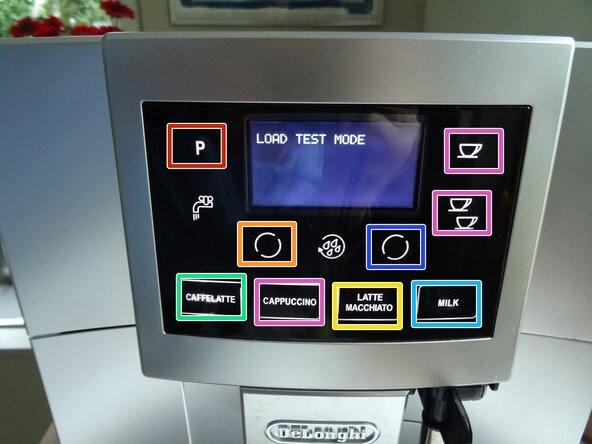
Press and hold the Programming (P), one cup, and rinse buttons simultaneously for about 5 seconds until "SELECT TEST" appears.
-
Close the service door.
-
You now have a few seconds to determine the type of test:
-
For the component test: Press the Cappuccino button. "LOAD TEST MODE" appears on the display.
-
For the touchscreen test: Press the Caffeelatte button. "DISPLAY TEST MODE" appears on the display.
-
-
-
-
During the component test, "LOAD TEST MODE" appears on the display. Each button (except for water and rinse) triggers a test of a component. The component is displayed on the screen each time:
-
The heater turns on.
-
The pump runs.
-
The grinder runs.
-
The brew unit moves up, end position is displayed.
-
The brew unit moves down, end position is displayed.
-
The steam heater turns on.
-
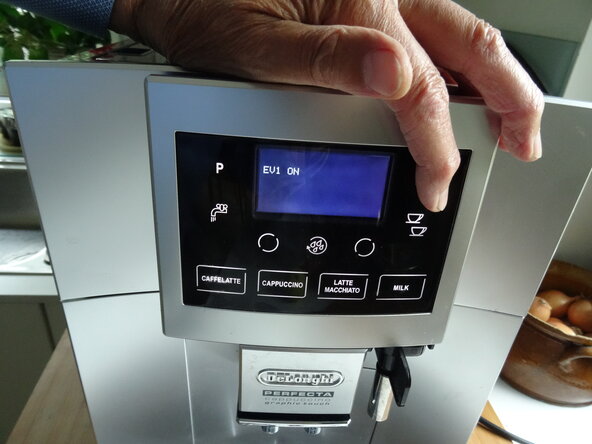
The buttons for one cup, two cups, and cappuccino control both solenoid valves individually and together. You should hear them click.
-
-
-
During the touchscreen test, "DISPLAY TEST MODE" appears on the display. Each button triggers a different display: "BUTTON 0" through "BUTTON 10".
-
-





Switch off the device using the power switch to exit test mode.

3 Guide Comments
Thank you very much!!!! Perfect information!!
