
DJI Phantom 2 Vision+ Propellers Removal

David Hoyt and 2 other contributors
Last updated on Feb 19, 2015
Views: 7.9K
View statistics:
- Past 24 Hours:
- 4
- Past 7 Days:
- 18
- Past 30 Days:
- 89
- All Time:
- 7,858
Comments: 0
No one has left comments on this guide. Will you be first?
Go to guide commentsCompleted: 5 6
5 people have marked this guide "completed." Will you be next?
6 people have marked this guide "completed." Including you — great job!
Favorites: 2 3
2 people have favorited (and subscribed to) this guide. Will you be next?
3 people have favorited (and subscribed to) this guide — including you!
Introduction
Go to step 1 ↓Use this guide to replace a broken propellor on your DJI Phantom 2 Vision+. When replacing, be sure to match the original propellor spin direction.
Note: the drone used in this guide probably looks different from yours! It's just a custom paint job, otherwise it's completely stock.
What you need
Parts
-
-
-
Pinch the top and bottom tabs of the battery case, pull the battery straight out to remove it.
 Ask FixBot
-
-
-
-
-
Determine if the propellor is clockwise or counter-clockwise rotating.
-
If this icon is missing or you can't read it, you can determine the direction of rotation by examining the propellor.
-
-
-
-
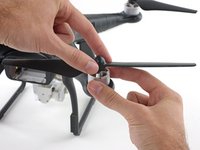
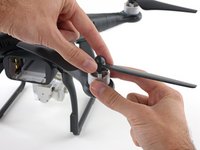
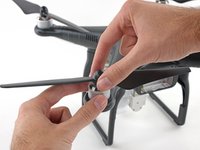
Loosen a clockwise rotating propeller by holding the motor with one hand and spinning the propellor clockwise.
-
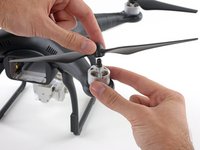
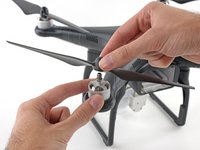
Remove the propellor.
-
-
-
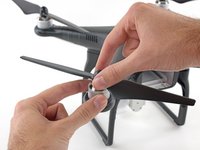
Loosen a counter-clockwise rotating propeller by holding the motor with one hand and spinning the propellor counter-clockwise.
-
Remove the propellor.
-
-




To reassemble your device, follow these instructions in reverse order.
Cancel: I did not complete this guide.
5 other people completed this guide.

Team

Cal Poly, Team 25-89, Amido Spring 2010 Member of Cal Poly, Team 25-89, Amido Spring 2010
CPSU-AMIDO-S10S25G89
4 Members
564 Guides authored
