
Compaq Evo N1000v LED Cover Replacement

Last updated on Jul 3, 2025
Views: 3.3K
View statistics:
- Past 24 Hours:
- 2
- Past 7 Days:
- 26
- Past 30 Days:
- 89
- All Time:
- 3,328
Comments: 2
2 comments on steps.
Completed: 1 2
1 person has marked this guide "completed." Will you be next?
2 people have marked this guide "completed." Including you — great job!
Favorites: 0 1
No one has favorited (and subscribed to) this guide. Will you be the first?
1 person has favorited (and subscribed to) this guide — and that's you!
Missing Prerequisites
This guide is missing information on how to start the process. Make a prerequisite guide!
Introduction
Go to step 1 ↓Over time, the LED cover on the Compaq Evo N1000v may become cracked, loose, or discolored due to regular wear and tear. This repair is typically needed when the cover is visibly damaged or no longer holds in place, which can affect the appearance of the laptop and possibly interfere with the power or status indicators. This guide requires only basic tools and no advanced technical skills. While the repair is relatively straightforward, care must be taken when removing nearby components to avoid damage.
Before you begin this repair, power off and unplug your laptop.
What you need
Tools
-
Spudger4.9


-
-
-
Using a TR8 Torx screwdriver, remove the two T8 Torx screws that secure the LED cover to the base enclosure.
-
-
-
While holding the F1 and F2 keys, insert a spudger between the keys into the notch in the LED cover. Lift up.
-
-
-
-
While holding the Scroll and Pause keys, insert a spudger between the keys into the notch in the LED cover. Lift up.
-
-
-
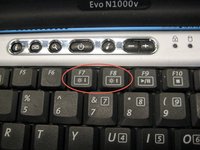
Insert a spudger between the F7 and F8 keys. Lift up to remove the LED cover.
-

 Ask FixBot



To reassemble your device, follow these instructions in reverse order. Take your e-waste to an R2 or e-Stewards certified recycler.
Cancel: I did not complete this guide.
One other person completed this guide.

Team

Cal Poly, Team 29-74, Johann Spring 2010 Member of Cal Poly, Team 29-74, Johann Spring 2010
CPSU-JOHANN-S10S29G74
3 Members
84 Guides authored
