Introduction
If your Brother CS6000i sewing light is flickering, dim, or not working at all, use this guide to replace the old LED light.
Before you begin, inspect the light for any debris or build up on the bulb. If the bulb is dirty, this could cause it to illuminate less. Make sure this is not the case before disassembling the sewing machine.
Step 5 requires you to remove the light wiring from the PSU. A faulty connection beforehand could be the reason for the light not working. Make sure that the faulty connection is not the issue before buying a new part to replace the light system.
Before beginning, make sure the sewing machine is not connected to any power.
What you need
-
-
-
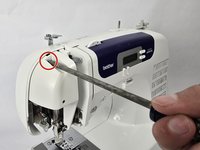
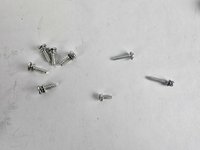
Remove the five 20 mm Phillips #2 screws on the back of the device.
-
Remove the single 28 mm Phillips #2 screw on the back of the device.
-
Remove the single 23 mm Phillips #2 screw on the back of the device.
 Ask FixBot
-
-
-
-
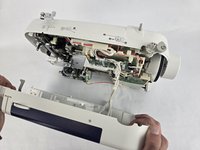
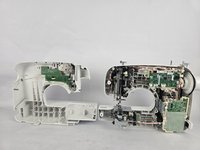
Slightly pull apart the two halves of the machine, taking care not to strain the attached cables.
-
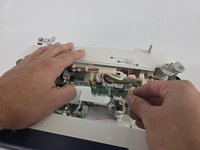
Unhook the white wires that are connected to the motherboard.
-
Fully separate the two halves.
-
-
-
-
-
Use a Phillips #2 screwdriver to remove the single 16 mm Phillips #2 screw.
-
Remove the metal plate.
-
-
-
Use a Phillips #2 screwdriver to remove the two 16 mm Phillips #2 screws.
-
Remove the metal plate underneath screws once screws are removed.
-
-
-
Use a standoff tip to remove the 10 mm Phillips #2 screw directly next to the lightbulb.
-
-






To reassemble your device, follow the above steps in reverse order.
Take your e-waste to an R2 or e-Stewards certified recycler.
Repair didn’t go as planned? Try some basic troubleshooting or ask our Answers community for help.

Team

Cuesta, Team 20-1, Krynen Fall 2024 Member of Cuesta, Team 20-1, Krynen Fall 2024
CUESTA-KRYNEN-F24S20G1
5 Members
96 Guides authored
