Free Shipping on Domestic Orders $75+

Kobo Clara Colour Battery Disconnection

Prerequisite Only
This is a prerequisite-only guide! This guide is part of another procedure and isn’t meant to be used alone.

What you need

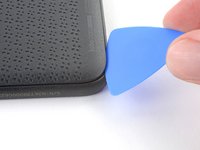
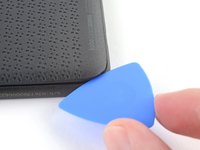
  1. Kobo Clara Colour Battery Disconnection, Insert an opening pick: step 1, image 1 of 2 Kobo Clara Colour Battery Disconnection, Insert an opening pick: step 1, image 2 of 2
    • Lay your eReader down so the back cover is facing up.

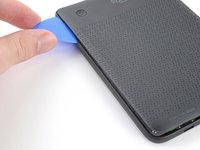
    • Insert the flat edge of an opening pick between the frame and the bottom left corner of the back cover.

    • Push the pick downwards at a slight angle until it slides under the back cover.

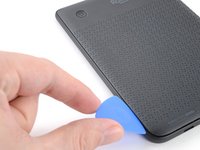
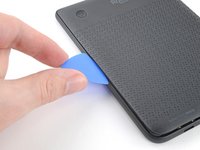
  2. Kobo Clara Colour Battery Disconnection, Release the bottom clips: step 2, image 1 of 3 Kobo Clara Colour Battery Disconnection, Release the bottom clips: step 2, image 2 of 3 Kobo Clara Colour Battery Disconnection, Release the bottom clips: step 2, image 3 of 3
    • Slide the pick toward the bottom right corner to release the clips along the bottom edge.

  3. Kobo Clara Colour Battery Disconnection: step 3, image 1 of 2 Kobo Clara Colour Battery Disconnection: step 3, image 2 of 2
    • Remove the pick and reinsert it under the bottom left corner.

    • Angle the pick flat under the back cover and rotate it around the bottom left corner to release its clips.

    • If you're having trouble, try twisting the pick to lift the corner clips out of their slots.

  4. Kobo Clara Colour Battery Disconnection, Release the left clips: step 4, image 1 of 3 Kobo Clara Colour Battery Disconnection, Release the left clips: step 4, image 2 of 3 Kobo Clara Colour Battery Disconnection, Release the left clips: step 4, image 3 of 3
    • Slide the pick toward the top left corner to release the clips along the left edge.

  5. Kobo Clara Colour Battery Disconnection, Remove the back cover: step 5, image 1 of 3 Kobo Clara Colour Battery Disconnection, Remove the back cover: step 5, image 2 of 3 Kobo Clara Colour Battery Disconnection, Remove the back cover: step 5, image 3 of 3
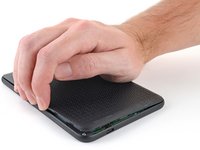
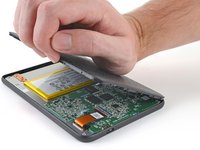
    • At this point, you should be able to grip the back cover and release its remaining clips. If not, slide a pick under the perimeter of the back cover until you can grip an edge.

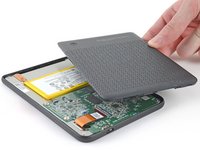
    • Grip the left edge of the back cover and lift it away from the eReader to release the remaining clips.

    • Remove the back cover.

    • During reassembly, align the back cover over the eReader and press along the perimeter until all its clips snap back into place.

  6. Kobo Clara Colour Battery Disconnection, Coating information: step 6, image 1 of 3 Kobo Clara Colour Battery Disconnection, Coating information: step 6, image 2 of 3 Kobo Clara Colour Battery Disconnection, Coating information: step 6, image 3 of 3
    • The entire surface of the eReader's internals is covered in a thin, plastic-like waterproof coating. Keep the following in mind as you continue disassembly:

    • While this won't hurt your device, removing the coating compromises the device to potential water damage.

    • The coating is brittle and can flake into many small pieces. Heating the coating helps, but working with it is still a time-consuming process.

    • The ZIF connector locking tabs are coated in a gel that can jam the hinge and keep the locking tab from completely unlocking. Make sure the tabs are completely upright before disconnecting any cables.

    • Depending on your repair, you might have to remove the coating from ZIF connectors and their cables.

  7. Kobo Clara Colour Battery Disconnection, Soften the battery connector coating: step 7, image 1 of 2 Kobo Clara Colour Battery Disconnection, Soften the battery connector coating: step 7, image 2 of 2
  8. Kobo Clara Colour Battery Disconnection, Remove the battery connector coating: step 8, image 1 of 3 Kobo Clara Colour Battery Disconnection, Remove the battery connector coating: step 8, image 2 of 3 Kobo Clara Colour Battery Disconnection, Remove the battery connector coating: step 8, image 3 of 3
    Tool used on this step:
    Tweezers
    $4.99
    Buy
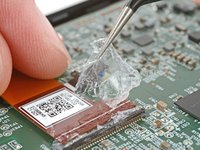
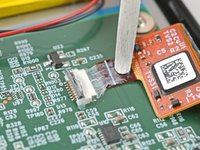
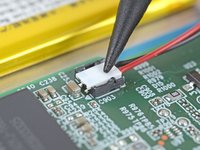
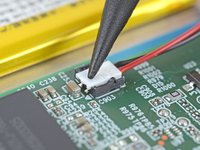
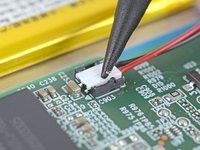
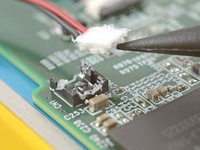
    • Use the tip of a spudger to scrape up the coating along the white battery connector head—enough so you can grab clumps of it with pointed tweezers.

  9. Kobo Clara Colour Battery Disconnection: step 9, image 1 of 3 Kobo Clara Colour Battery Disconnection: step 9, image 2 of 3 Kobo Clara Colour Battery Disconnection: step 9, image 3 of 3
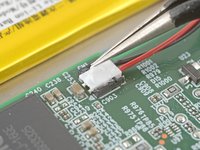
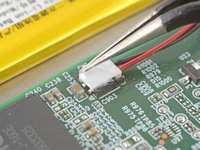
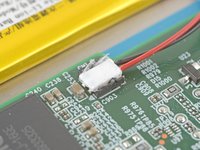
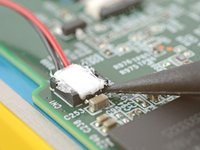
    • Use pointed tweezers to peel off all of the coating around the battery connector head and its socket.

    • If the coating becomes too brittle and hard to peel off, reheat the connector and try again.

    • This is a meticulous process! Failure to remove enough of the coating could damage the plastic head during disconnection, so take your time!

  10. Kobo Clara Colour Battery Disconnection, Disconnect the battery: step 10, image 1 of 2 Kobo Clara Colour Battery Disconnection, Disconnect the battery: step 10, image 2 of 2
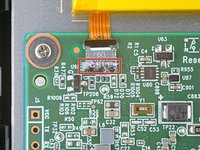
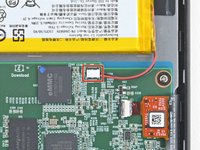
    • Insert the point of a spudger under the edge of the battery connector head opposite of the cable.

    • There's a surface-mounted component close to the connector. Be careful not to touch it with your spudger!

    • Lift up the connector with the spudger to separate the rest of the coating and disconnect the battery.

    • During reassembly:

    • Inspect the connector head and its socket for any remaining coating that could prevent a good connection.

    • Peel off the coating, heating the area when the coating becomes too brittle.

    • It doesn't have to look pretty! You just need to remove enough coating so the connector head sits properly in its socket.

Conclusion

To reassemble your device, follow these instructions in reverse order.

Alex Diaz-Kokaisl

Member since: 01/16/22

216,539 Reputation

1,046 Guides authored

Team

iFixit Member of iFixit

Staff

123 Members

23,905 Guides authored

0 Guide Comments

Add Comment

View Statistics:

Past 24 Hours: 0

Past 7 Days: 4

Past 30 Days: 11

All Time: 143