Introduction
Use this guide to replace a broken or faulty display for your Asus X200CA laptop.
The LCD display of a computer is the screen that a laptop uses in order to display the video sent from the graphics card. A broken display can cause the screen to become solid black, or can cause a screen to have discolored LCDs. Discolored LCDs mean that images will show in the wrong color, or may not appear at all. If you are unsure of whether the screen is broken, refer to the blog post “How do I know if my screen is broken?” This blog post will give a run down of different types of breaks and what to look for to identify each.
Before using this guide, consider checking the battery and its condition. If the battery is failing, then the display will not show. To replace the battery, follow the Asus X200CA Battery Replacement guide.
The Asus X200CA display is made of glass. If your screen is shattered, follow the Taping Over The Display guide. This guide will ensure you do not hurt yourself on the glass or spill glass onto your work surface. The Taping Over The Display guide refers to an iPhone, but the concepts can be applied to the laptop screen.
Before beginning, make sure your laptop is completely off and that it is disconnected from external power sources.
What you need
-
-
-
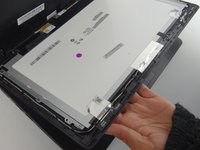
Wedge a metal spudger between the bezel and display cover.
-
Slide the metal spudger back and forth along the top, left, and right sides to pry apart the screen from the outer shell.
 Ask FixBot
-
-
-
Remove the six silver 2.7 mm screws securing the screen bracket to the screen bezel.
-
-
-
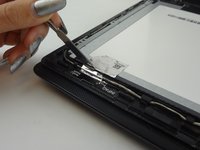
Slice the silver foil tape with a spudger by applying pressure between the frame and the back of the screen case.
-
-
-
-
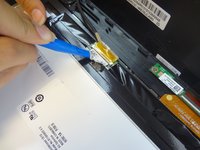
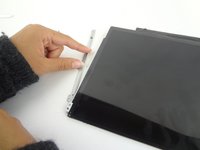
Use an opening tool to peel off the sticker label securing the LCD cable to the LCD display.
-
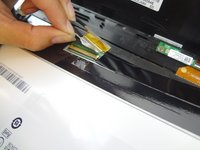
Gently pull the sticker to disconnect the LCD cable.
-
-
-
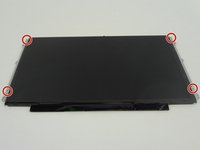
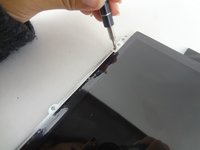
Remove the four silver 2.7 mm screws to separate the LCD screen from the two screen brackets.
-
-






To reassemble your device, follow these instructions in reverse order.
Cancel: I did not complete this guide.
4 other people completed this guide.

Team

USF Tampa, Team S1-G2, Leahy Fall 2017 Member of USF Tampa, Team S1-G2, Leahy Fall 2017
USFT-LEAHY-F17S1G2
4 Members
60 Guides authored
