Battery
|
1 Answer 0 Score |
I've dropped it in water |
|
3 Answers 0 Score |
Can't perform a factory reset |
|
1 Answer 0 Score |
Replaced battery and phone wont turn on but it heats up. |
|
1 Answer 1 Score |
Frp lock after update 7.0.1 - "sign in with an owner account" |
For any issues you may be having with the Huawei Honor 8, try referring to the Huawei Honor 8 Troubleshooting Guide.
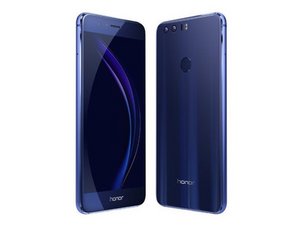
The Huawei Honor 8 was the first flagship device that Huawei debuted in America, in July of 2016, with the Honor 5X releasing earlier in 2016. Notable features include a 5.2-inch 1080p display, a dual 12MP camera sensor, a fingerprint sensor, an all-glass back, a dual SIM card tray, and a USB Type-C port. The Honor 8 runs Andriod 6.0, Marshmallow, that can be upgraded to 7.0, Nougat. Its successors in the Honor series are the Huawei Honor 8 Pro and the Huawei Honor 9. The Huawei Honor 8 is easily recognized by its fingerprint scanner being located on the rear glass panel and its smooth rear camera bezel.
Past 24 Hours: 3
Past 7 Days: 45
Past 30 Days: 139
All Time: 52,479