
Released in May 2020, the 13" MacBook Pro features quad-core Intel 10th generation Core i5 and i7 processors, and Intel Iris Plus integrated graphics. (Model A2251/EMC3348 with four Thunderbolt 3 ports)

Half of the keyboard lighting not working after disassembly

I replaced thermal paste on my 2020 Macbook Pro A2251. Everything seems to work fine except half of the keyboard lighting. I suspect I didn't connect the cable properly but unable to find which exactly cable. I can't find a disassembly guide for this particular model anywhere and guides for older models didn't help.

Update: Added a picture
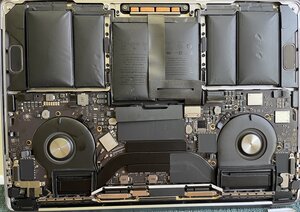
Block Image
Answered! View the answer I have this problem too

Is this a good question?

Score 0
4 Comments

Check near both the fans, I think there are 2 connections for the BL

by

Thank you very much! I'll try to reconnect this cable. Do I have to disconnect the battery just for this?

by

@ray68836 It is always recommended to disconnect the battery before any internal adjustments are made ;)

by

@livfe Thanks!

by

Add a comment

1 Answer

Chosen Solution

I am not 100% but check the connections by the fans I have marked, 2 of them should be for the BL

Block Image

@danj to assist further if I got it wrong.

Was this answer helpful?

Score 0

8 Comments:

Thanks, but mine looks totally different. I attached a picture to my original post.

by

@ray68836 Oh I took my image from the device listed guide! Edited the answer.

by

There must be a mistake. Mine is 100% A2251.

by

@ray68836 I edited the answer and marked the connections to check.

by

@livfe Thanks a lot for all your help! The longer cables (top of the image) are most likely from the fans as the fan replacement pictures for this model have them which means I need to check only the other two cables.

by

Show 3 more comments

Add a comment

Add your answer

Ray will be eternally grateful.
View Statistics:

Past 24 Hours: 0

Past 7 Days: 0

Past 30 Days: 50

All Time: 50