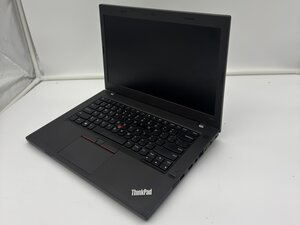

Battery not charging forward
My battery doesn't charge forward when plugged in
Is this a good question?
Score
1
Rep: 13
 1
1
My battery doesn't charge forward when plugged in
Is this a good question?
Rep: 861.1k
1.5k
 978
978
 2.4k
2.4k
@yoogee not sure what you mean by "doesn't charge forward" but I assume you are saying it does not charge. first off, we will need to know how old this battery is. A depleted battery will not accept a charge, not matter how hard we try. If this is a known good battery then thee are a few other issues you need to check.
First you want to check your power supply. Make sure it has the proper voltages. Check to make sure that connectors are not bend etc. Check the DC-in jack of your laptop. Make sure there is no corrosion, debris etc. that prevents it from working. Clean it of any debris etc. Use a few puffs of air to clean it out. If none of this works, get an ammeter and see if your laptop draws any amperage from the charger. After that, you need to check and see if your motherboard even gets power. For that of course, you need to open it up. Post Some good pictures of what you see. That way we can see what you see. Adding images to an existing question
Use the ThinkPad L470 Hardware Maintenance Manual to work on your Lenovo.
While you work on your Thinkpad, take lots of pictures. Once you are done with it, take those pictures and create a guide for iFixit. That will help the next person that has a device with the same issues as you do. It's easy and fun to create these guides. https://ifixit.com/Guide/new The iFixit community will appreciate this.
Repair is War on Entropy!
Let us know how things are working out with each check/test.
Was this answer helpful?
Past 24 Hours: 0
Past 7 Days: 1
Past 30 Days: 17
All Time: 355


2 Comments
Some keys in my keyboard are not walking
by Ayabonga Mabona
@ayabongamabona could be an issue on the circuit board for the keyboard. Remember that each key is actually a microswitch etc. that closes a circuit that will then be interpreted by the IC. A failed IC (on the motherboard) could be the issue but luckily most commonly it is the keyboard that has failed. Here is the ThinkPad L470 Hardware Maintenance Manual Page 76 will tell you how to change your keyboard. Replacement keyboards are readily available.
by oldturkey03