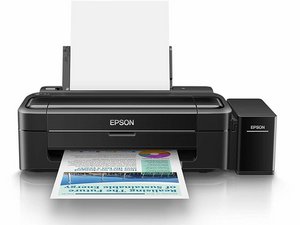
My printer's ink belt is been snapped and bitten by rat how to fix it
Printer ink belt snapped
Is this a good question?
Score
1

Rep: 23
 2
2
Printer ink belt snapped
Is this a good question?

Rep: 79
7
 1
1
replace the ink belt, theres guides online i think, if it dosent fit or smt, send me a picture and we will figure it out later
Was this answer helpful?
Thanks bro I will check
no problemo mate

Rep: 99.2k
419
301
 160
160
Did the rat bite the rubber drive belt or the plastic tubing on the CISS tanks? If the printhead drive belt was bit, you can replace it, but it's a bit of a job. See if you can find one for the L310. It shouldn't be hard since these are derived from the Epson XP/cartridge-based L series with the ink chip detection and hard stop coding removed. I don't know what Epson modified on early units.
PARTS DONOR LOCATION TIP: Early units usually use modified cartridge-based printers, so parts aren't hard to find.
Not sure how this applies to you, but in the US we can usually check thrift stores for a $10 donor that is close enough with a matching mechanism that uses Epson's overpriced ink tanks in the US when they did it in the US before making an effort to engineer them as a proper product and not a hack. We got a few hacky models in the US under the "ET-" label when Epson started selling them here.
It's a similar model to laser printers in the same family; the difference is often marginally worse parts being binned for the low end (where you need to adjust it so frequently you burn $400 in toner x2 sets very quickly trying to keep the nightmare going before you want to throw it out of the truck bed and watch $400 in toner turn into a cloud of dust mixed with the waste toner as a bonus because the printer can't hold the CMYK calibration correctly for more than a few months.
If the rat bit the ink tank lines, you're screwed in terms of fixing the OEM Epson tank :-(. Find a 3rd party CISS tank system without the cartridges and retrofit it onto the Epson ink carriers. You want one WITHOUT INK TANKS included (if possible) to convert it to use the Epson dummy parts and reduce as much system disruption as possible to avoid having to bleed it more than you have to (you will need a syringe to remove the air from each "cartridge" to get the air out or you will muck up the printer enough to make fixing it FAR worse). Check one of the intact lines and use a caliper on the tube itself (without squeezing it!), then do the same for the internal portion of the tube. Once you do that, measure the connector on the OEM ink carriers. While, in theory, it's possible to remove all of the Epson CISS parts and convert it to 3rd party CISS, it will not matter if what you use has chips as these CISS Epson do not have chip readers (or depend on it to print), and lack a cartridge authentication mechanism. It will not be used, so you are simply paying for parts you do not need.
Your refill mechanism will forever change to likely requiring large syringes, so you have to make a choice (either way, you need to suck the OEM ink out for handling):
- Find an OEM Epson tank (and keep using the Epson bottles (though this may be moot since the early units were a hack job similar to the 3rd party kits such it MAY NOT be different enough, but something to consider). Look for a unit with the paper and light LED pattern or a error relating to service parts unless you can find a used tank that was purged and a known good pull. Once Epson got to the point they had to try and stop hacking these things together with base model printers, they went to the EcoFit bottles which is when we got them here (US and Canada). Those can't be converted to a 3rd party tank; you need the Epson tank parts.
- Swap the tanks for a 3rd party tank. You will probably be stuck using large 30mL+ syringes not to break your fingers to refill it moving forward for the life of the printer. Since we never got them until the ET- series in the US/CAN, I don't know how easily you could use the Epson OEM bottles on a 3rd party CISS tank swap retrofit.
Was this answer helpful?
Bro thanks I will replace the belt It didn't do anything to the tubes only the belt
@yogarajahp29266 Good. Look for an XP/L belt from a printer with a similar control panel.
Bro should have been the chosen one
Past 24 Hours: 0
Past 7 Days: 6
Past 30 Days: 31
All Time: 399
