

Touch Screen is automatically Working?
When I start using my phone after sometimes it's touch starts working itself and I press power button and then it works well for a few minutes.
Is this a good question?
Score
41
Rep: 493
 2
2
 2
2
 1
1
When I start using my phone after sometimes it's touch starts working itself and I press power button and then it works well for a few minutes.
Is this a good question?
Rep: 375
5
4
Hello @bshhanaesharama,
It seems like a problem with the digitizer, but I could be wrong. Most likely, the fix is to replace the display panel.
Was this answer helpful?
Rep: 860.7k
1.4k
976
2.4k
@bshhanaesharama this is called a "Ghost Touching" and originates from a failure between the digitizer and the rest of the screen. You will have to replace the screen assembly. Use something like this video as your guide. Replacement screens are readily available and not to expensive. Just do an online search and select a vendor that appeals to you.
While you work on your phone, take lots of pictures. Once you are done with it, take those pictures and create a guide for iFixit. That will help the next person that has the same problem as you do. It's easy and fun to create these guides. https://ifixit.com/Guide/new The iFixit community will appreciate this.
Repair is War on Entropy!
Was this answer helpful?
When I start using my phone after sometimes it's touch starts working itself and I press power button and then it works well for a few minute
Infinix hot 10 play automatically screen touch
Touch Screen is automatically Working?
=== Update (11/16/23) ===
Touch Screen is automatically Working?
Touch Screen is automatically Working?
@ayanmohsin read my original answer. Ghost Touch on your screen too.
Rep: 100.7k
157
87
154
@muez, If you're referring to the cable connecting the motherboard to the LCD, then I'm afraid you're out of luck. The connections to the glass screen require specialized equipment and cannot be done at home. While it is possible to repair a torn flex cable, that too is extremely difficult and needs someone with extensive soldering experience.
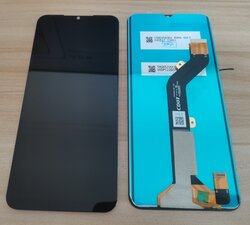
You could take it to a shop and possibly get it repaired, but I can't imagine it would be cheaper than just replacing the screen.
Was this answer helpful?
Rep: 1
3
3
Well I think you are facing the issue of ghost touch on android issue on your device well this video might be helpful for you:
https://www.youtube.com/watch?v=7goCFKzv...
And also check out this blog as well for more solution to your problem: https://wethegeek.com/ghost-touch-issue-...
Was this answer helpful?
Screen automatically wark
@infinixhot11s, read @oldturkey03's answer; you probably need a new screen if you're having the same problem as the others here.
Well I think you are facing the ghost touch issue I will suggest you to checkout the following video:
Check if the screen can be separated from the touch screen ,separate them if possible,get a new screen touch and then fix.
@teetech35558 Modern screens all have the LCD/OLED display bonded to the digitizer using Optically Clear Adhesive (OCA). In order to separate the two, you need a vacuum table and wire guides to use a very thin, strong wire to slice through the adhesive. Then the old adhesive has to be thoroughly cleaned and new OCA applied. After reassembling the screen, it goes into a vacuum chamber to remove air bubbles from the OCA, and finally into a UV cabinet to cure the glue.
Far, far easier just to replace the whole thing.
Please use the steps below to help troubleshoot the problem.
1. Clean the Screen
• Ensure your screen is clean and free of dust, dirt, or moisture. Use a soft, dry microfiber cloth to gently clean the screen.
2. Remove Screen Protector or Case
• If you're using a screen protector or a case, it might be interfering with the screen’s sensitivity. Try removing them to see if the problem persists.
3. Restart Your Device
• Sometimes a simple restart can fix temporary glitches. Hold the power button and select Restart.
4. Update Software
• Make sure your device is running the latest software. Go to Settings > System > System Update to check for and install any available updates.
5. Calibrate the Touchscreen
• Some devices have a touch calibration option. Check if this is available in Settings > Additional Settings or a similar menu.
6. Check for App Conflicts
• Sometimes apps can cause touch issues. Boot your device in Safe Mode to see if the problem persists. In Safe Mode, only pre-installed apps will run. If ghost touching stops in Safe Mode, an app might be the culprit. You can usually enter Safe Mode by holding down the power button and then long-pressing the Power Off option until you see the Safe Mode prompt.
7. Preventive Measures
• To avoid future issues, avoid using the device with wet or greasy fingers, and be cautious of physical damage to the screen.
If the problem persists , back up your data and take your phone with its receipt to the customer service Centre for assistance.
Was this answer helpful?
Past 24 Hours: 2
Past 7 Days: 11
Past 30 Days: 73
All Time: 7,912






19 Comments
Yes it working
by Butt G
My touch screen is broken and half side of my mobile is blank showing black and some colorful lines
by Manoj Lohia
@manojlohia, read @oldturkey03's answer; you almost certainly need a new screen.
by Jerry Wheeler
My Infinix smart phone is automatically touching itself
by Joel
Touch screen automatically working
by bhubane Meher
Show 14 more comments