Free Shipping on Domestic Orders $75+

Repair guides, disassembly, and troubleshooting information for the 6th-generation Apple iPad with Wi-Fi, available with 32 or 128 GB of storage. Released in March 2018. Identified by model number A1893. Features a 9.7" Retina display and 64-bit A10 Fusion chip.

I replaced the screen and the power button quit working.

I have replaced the screen on my iPad 6 a1893 and the power button no longer works. The volume buttons still respond. So I orders a new flex cable. Plugged it in to test. Same issue, volume works and power button does not. Any advice?

Answered! View the answer I have this problem too

Is this a good question?

Score 1
Add a comment

1 Answer

Chosen Solution

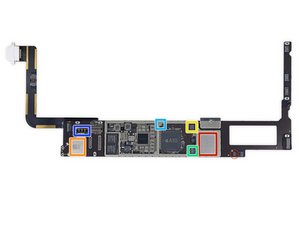
Hello! I believe the issue you are probably having is a board issue where the components for the power button may have been broken off or damaged. In the image of the iPad 6 logic board below, the components I circled in red to the left go the power/volume button zif connector are the components that control the power and volume buttons. Depending on which of these get knocked off, one of the buttons may stop working. I've accidentally knocked these off when cleaning the adhesive off of the frame of the iPad 6 before, it is very easy to do, but no so easy to fix, the components will most likely need soldered back into place.

Image

Was this answer helpful?

Score 0
Add a comment

Add your answer

Jessica Gauthier will be eternally grateful.
View Statistics:

Past 24 Hours: 0

Past 7 Days: 3

Past 30 Days: 6

All Time: 464