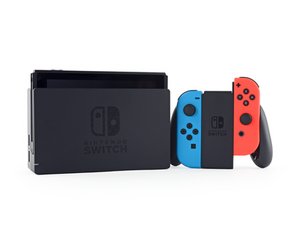
The Nintendo Switch is a handheld game console that can be played on the TV via a docking station, or on the go. Released March 3rd, 2017.

How to remove super glue from between Digitizer and Front Panel?

I had a friend change the digitizer on my Nintendo Switch because it was broken. We got a glass digitizer, and he decided to super glue it back on because we did not have any double sided tape. However, now the LCD is showing issues and I have no way of getting to it.

Does anyone know how I can safely remove the super glued digitizer?

I have checked for options online but it seems like most super glue removers, or acetone, will damage the plastic housing.

Answered! View the answer I have this problem too

Is this a good question?

Score 1
3 Comments

Can you try to remove the super glue using Isopropyl Alcohol(Rubbing Alcohol)?

by

@andrewsawesome I could, I just wanted more confirmation that it would be the best route given the situation, and that there wasn't any other option I was overlooking.

by

@rods012 were you able to remove the superglue?

by

Add a comment

1 Answer

Chosen Solution

so…… you can try and use a dropper and get some alcohol in between the screen and digitizer. and let it sit for a while. the superglue will need to be softened by it for a while. do your best to keep the alcohol out of the screen.

typically acetone is GREAT for superglue but its also not safe on electronics. it will eat the PCB components and layers so dont use it.

the alcohol may work but be prepared to have to replace both components (screen and digitizer)

next time have your friend refer to the tear down guides found on this site they have adhesive strips for sale also

Nintendo Switch Digitizer Replacement

How to Use a Pre-Cut Adhesive Sheet

i hope this helps. good luck

EDIT:

heres a guide to acetone. since youre not using ACETONE on any real PCBs, YOU MIGHT be able to try it as a last ditch effort. both the alcohol and acetone will need to sit for a while so you should honestly go into this expecting some kind of permanent damage to either the digi, screen or both.

https://keyboardkings.com/using-acetone-...

Electronics Skills Image

Guide

How to Use a Pre-Cut Adhesive Sheet

Difficulty:

Moderate

45 minutes - 2 hours

Nintendo Switch Digitizer Image

Guide

Nintendo Switch Digitizer Replacement

Difficulty:

Difficult

1 - 2 hours

Was this answer helpful?

Score 2

3 Comments:

@logixal Ahmm...so I did the same mistake as Rods Kaden..

But I used Uhu all-purpose adhesive..I don't think its super glue, is it? Thanks.

by

@Rainbow no Uhu is not a a super glue but will still require some work to remove. again dont use acetone! unless you can guarantee it wont get on PCBs. let the alcohol soak the adhesive and a heat gun or hair dryer would also help loosen everything up. make sure not to burn anything lol

by

@logixal thank you! I will give it my best.

by

Add a comment

Add your answer

Rods Kaden will be eternally grateful.
View Statistics:

Past 24 Hours: 0

Past 7 Days: 5

Past 30 Days: 12

All Time: 860
