
Free Shipping on Domestic Orders $75+

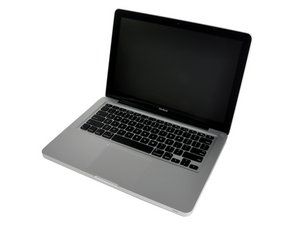
13" aluminum unibody, 2.0 or 2.4 GHz Core 2 Duo processor.

Trackpad doesn't work but clicks

Hi,

I have a 2008 MacBook where the trackpad doesn’t work and the cursor is stuck in the upper left corner but the clicking works.

I replaced the uppercase as I got it cheap and the trackpad worked at the beginning but then not sure what happened but it stopped working when putting everything back.

I then put back the old trackpad which I know worked before but was glitchy but now the same thing issue occurs, cursor frozen but clicking works. Cursor does move if I plug a USB mouse in and I also already tried the PRAM reset and no, I don’t have a bulging battery.

Aside from the trackpad connector that plugs into the logic board, is there something else on the logic board that controls the trackpad part?

Answered! View the answer I have this problem too

Is this a good question?

Score 0
Add a comment

1 Answer

Chosen Solution

That special model of trackpad is known for being prone to malfunction with age and when not used for some time, it clicks but doesn’t work.

However, it seems this is not the case as you say at least the old one was working normally before. External mouse uses the external USB circuit, not the internal USB trackpad circuit to communicate with the logic board.

Block Image

We know you don’t have a software issue but nothing more. You can try an SMC reset as well as exchanging trackpad cables. Check closely the relevant connector on the logic board isn’t damaged. You can also try disconnecting the keyboard to not let anything untried but you’ll need to short the pawer pads to start the system, you can find right location of them here: http://www.insidemylaptop.com/turn-on-ma...

Was this answer helpful?

Score 3

4 Comments:

Here's the replacement trackpad MacBook Unibody (A1278) Trackpad and here's the needed guide: MacBook Unibody Model A1278 Trackpad Replacement

by

@danj Thanks for the nice adddition :)

by

Smc reset and disconnecting keyboard did not fix the issue. I don't want to get another track pad because i don't want the same thing happening and doesn't make sense how these 2 track pads all of a sudden went bad in terms of the cursor not moving.

by

@ntec Well, I agree it makes little sense to try a third trackpad at this stage, but the alternative is a malfunction in the logic board, that's always a possibility. If you can't settle with an external mouse, you'll have to find a tech in Mac component level repairs, or dive in the world of schematics yourself.

by

Add a comment

Add your answer

John Nguyen will be eternally grateful.
View Statistics:

Past 24 Hours: 2

Past 7 Days: 4

Past 30 Days: 15

All Time: 462