
Free Shipping on Domestic Orders $75+

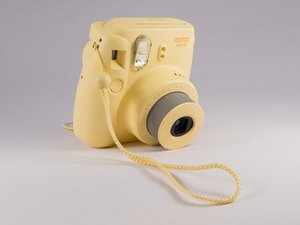
This instant camera from Fujifilm now boasts a slimmer and lighter body than previous revisions. The Mini 8 helps the photographer by alerting them the recommended aperture. It also has a High-Key flash mode which helps the photographer attain soft portraits for a stunning look.

InstaX mini 8 won't take pictures and all orange lights are on

Hi. I have the instax mini 8 Polaroid camera. I went to use it for the 4th time and all of a sudden it doesn't work. When turned on all the orange lights are on the dial not just one, there's a red light by the screen viewer and it won't take any pics. How do I fix this? I emailed Fuji film and they didn't answer

Answered! View the answer I have this problem too

Is this a good question?

Score 61

56 Comments

I have this EXACT problem. All the lights are flashing! I don't know who to contact though, Walmart, where I bought it) or fujI! This is bull crap. I got it two years ago and have barely used it. I just got the film today, too!

by

I have the same problem, and I just got it less than a year ago, I just noticed it stopped working when the practice picture film got stuck in the camera, I tried to pull it out, but when I did it went crazy and stopped taking pictures and now I also have flashing orange lights.

by

I have the same problem kind of the lights aren’t even turning on and I changed the batteries and I just put a new film and it won’t take pictures

by

Check the battery. That was my problem and then I changed the battery and it worked perfectly.

by

I have the same problem. I take pictures and all the lights are on and it has new film and batteries and I ejected the film card but when I take pictures they appear black

by

Show 51 more comments

Add a comment

12 Answers

Chosen Solution

So my film cartridge was stuck and I has to use a knife to push it out by the edges. You're going to need to force it out and wiggle it. Once the cartridge is out, the black sheet is going to be kinda hanging out so I just pulled it out because it was the source of the problem. Be sure to place the cartridge back in its slot AS SOON AS POSSIBLE !! Next I replaced the batteries and TA-DA !! The camera is fixed !! Though the first picture was a Dud, the next came out just fine ! I hope this helps !

Was this answer helpful?

Score 29

68 Comments:

bro pls help, i already eject the catridge and the black sheet too. then i dont know what should i do next

by

You should change the batteries and it's worked 4 me

by

Thank u @rubengarcia this saved me from ours of stress

by

This worked perfectly thank you

by

This worked great! I was about to throw the whole thing away!

by

Show 63 more comments

Add a comment

All i did was remove the pack of film that was in which was a little bit hard and then replaced the batteries with fresh batteries that have never been used and it printed out the picture that was stuck and it has been working great sence ALSO If you do n8t understand anyof these look up it up on youtube and go to Almondjoy Alica. I watched her and fixed it right away. I hope you can fix your camera. Good Luck

Was this answer helpful?

Score 10

3 Comments:

THIS WAS SO HELPFUL MY GOSH! THANK YOU! U SAVED MY LIFE. I got the same situation, the sample film got stucked too on my cam and thank God I found u! I did exactly the same that u did. Haha! And, the first film turned out plain white, its because the cartridge got exposed in a bit but the second picture was okay already. Thank you again!

by

It’s super hard to take out the cartridge, how’d you get it to come out ?

by

None of the batteries I put in seem to work

by

Add a comment

I had the same problem!! But i took outthe film it jad its was hard bc it was stuck but i pulled it out with some ✂️ the i changed the batteries and it still wouldn't work. I checked and checked and at the top of it , it had some film stuck so i pulled that out careful with some tweezers and tried to turned it on again and it worked the lights still kept flashing but i put an rmpty film in it and moved the settings and pressed the flash button and the numbers statted going down from 10-S it took a while but it worked!!!

Was this answer helpful?

Score 1
Add a comment

I found this on another website: the red light on the view finder is telling you that the flash on your camera is charging. You’ll have to wait a little while until you can take pictures.

Was this answer helpful?

Score 1
Add a comment

Remove the film pack and use a new one. There is a good chance somethings wrong with that film pack you have in camera.

Was this answer helpful?

Score 0

2 Comments:

the same happens to me. but when i try to take the film pack its stuck

by

will i be able to reuse the film pack that i removed?

by

Add a comment

Hi, we had the same issue with the Instax mini 8 andblinking lights and we could get this out by using a sisser and knife.the problem is that the last picture was hanging and this was caused by the small silver item in the right corner when you open it. After we removed the last casette to put a new one in this silver item did not get back to the right corner but was about 1cm above.We solved this by putting the old empty casette in it, pushed the button to make a picture and then removed the old casette again, now it was solved , the silver item was back in the right corner again and after installing a new casette it was working perfectly again. Good luck

Was this answer helpful?

Score 0

6 Comments:

I have the same problem: the silver thing is stuck. But I tried putting my old empty cassette in but I can't put it back because the silver thing is still up. Do you know how to solve this?

by

what is silver thing? i can't find it and i dont know :(

by

I don't understand

by

It's in the back, it's the hook that changes the film. Mine is stuck too. I've changed batteries 5 times. The silver film changer will not move.

by

Mine too, it looks like it lifts the film after you take a pic, and mine is stuck in the up position. Changing batteries won't fix it either :(

by

Show 1 more comment

Add a comment

Hey I also have this problem about a month ago, All the orange lights were on plus the red light beside the viewer. I just did’nt use it for a couple of days, I basically forgot about it then after 4 weeks when I came to check on it, it came back to life and was working great! I guess Maybe it needed a little rest

Was this answer helpful?

Score 0

1 Comment:

Hola la respuesta a que todas las luces se enciendan en que necesita buenas baterias yo compre duracell quantum son de las rojas y adios problema, saludos.

by

Add a comment

For me it did not help to replace the battery only after I opened the camera and unscrewed the motor. He couldn't turn the mechanism. I changed the motor mount from short screws to longer ones from the housing and the camera started. The conclusion is that in most cases it is the fault of the mechanism. Sorry for my english translator.

Was this answer helpful?

Score 0
Add a comment

Hi, i’m new to this but I just fixed this issue on my own. The camera turned on fine, I was able to see how the orange lights switched according to where I was shooting (daylight, inside, cloudy, etc) but whenever I tried to press the shutter button, the four lights blinked and the red light on the back on the camera turned on.


I opened the camera and found lots of dust/sand INSIDE the camera, precisely blocking the gears that linked the motor to the mechanism that pulls out the film after each shot. Using compressed air I removed the sand, move the gears by hand and made sure that everything run smoothly.


Then, I assembled everything up and the camera is working fine again.


Hope it helps!

Was this answer helpful?

Score 0
Add a comment

This happened to me, thrice already. I bought it from this thrift online website called Carousel.

The first time it happens, I think I almost $@$* my pants. But now that it happened thrice - here's my intake for it;

  1. No nothing will &&^&^$^ happen even when you change the battery. You can try your luck but I think 9/10 it won't work
  2. You won't get to safe ANY your current film cartridge. It happens again and again to me. I didn't get to safe any of it. But if you still want your camera and don't mind about buying new film cartridge; this is what I do
  3. Open the back and cut open the cartridge film be careful to not damage the upper part as the stuck film is still holding it tight and it might damage the projector (I just use normal scissors for this. JUST be careful pls)
  4. Once you've cut it open take all of the unused film out and you'll find the stuck film at the very back of the cartridge. Pull it by swigglin and do zigzaggin motion on it slowly
  5. Another thing I realized is DO NOT PUT ON YOUR CARTRIDGE OF FILM when the BATTERY HAS ALREADY BEEN INSERTED. For some reason it jacked off the projector. Always put the cartridge of film first. Then your batteries

I guess that's it. This might not be the most sophisticated way. Truth be told its a lambo way to get $@$* done. But I still can use my Mini 8 after 3 years I bought it. God knows how many years has the previous owner used it. Aite that's it. Hope it helps. Or not lmao ciaoooo

Was this answer helpful?

Score 0
Add a comment

if all the lights are blinking and the red light its on, and you changed the batteries, and didnt work, i found your solution, open the front cover and clean de photometers, as soon you clean it, it the motor will start working and the camera will return to the normal, if you want to thank me, my @its rogerclots.fotografia, have fun!

Was this answer helpful?

Score 0
Add a comment

i tried almost everything were mentioned her and obviously my problem was never about the battery type or age ( i used fresh alkaline battery with many different good quality brand) the orange light didn't turn of at all until

i saw someone here talked about pushing the battery in and i did it, i put the battery on ( the right side) and press on them kinda hard and it's worked finally

my advice is to keep trying until something work

ofc the first page was white i guess because i took the film out few time but im glad the second pic were fine

this problem started when one pic got stuck and i took it of with my hands

Was this answer helpful?

Score 0
Add a comment

Add your answer

Ally moore will be eternally grateful.
View Statistics:

Past 24 Hours: 28

Past 7 Days: 121

Past 30 Days: 530

All Time: 580,826