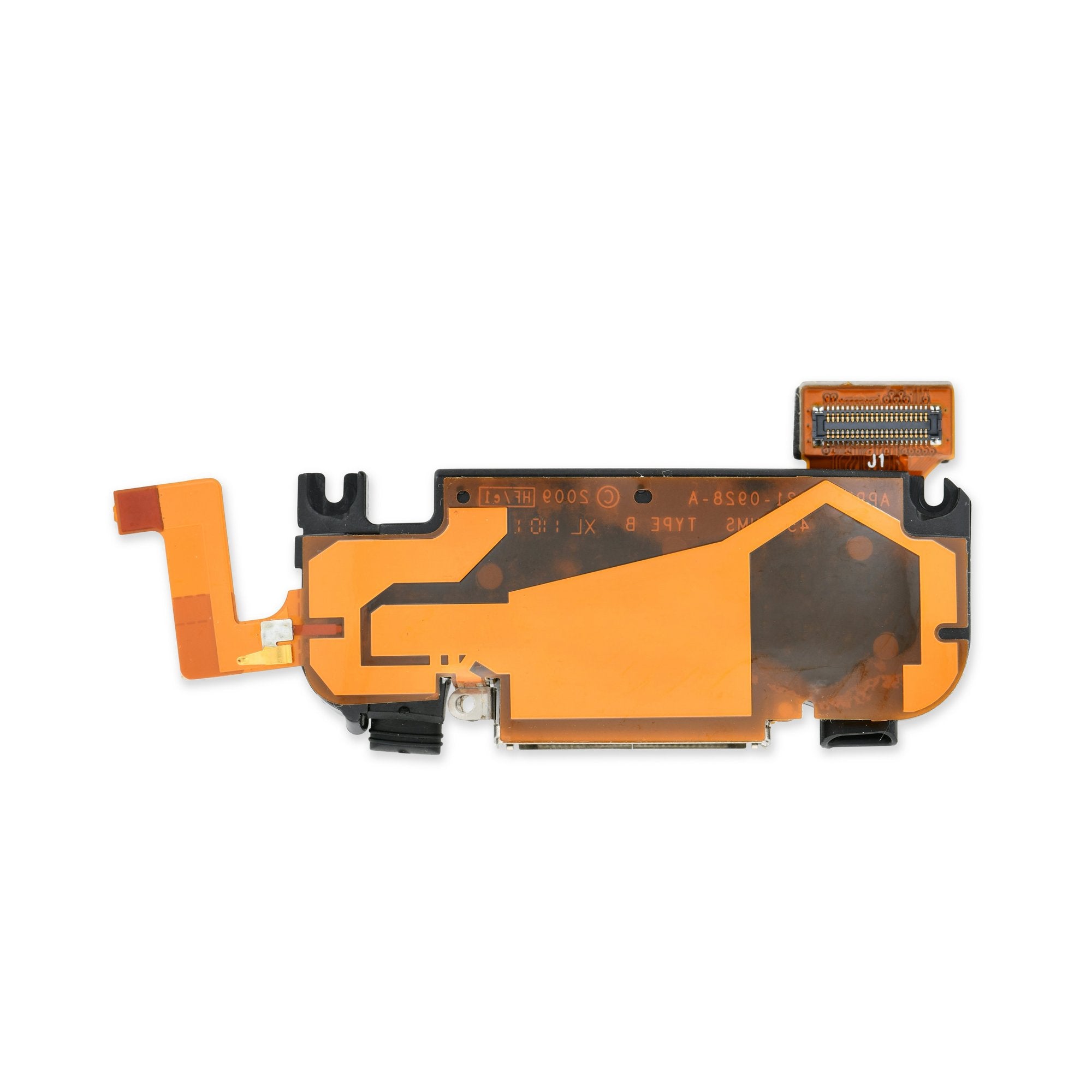
Click Image To Zoom


iPhone 3GS Dock Connector

$29.95

Product code: IF142-006

Product Overview

The 30-pin dock connector: Steve Jobs' brainchild in his vision for a universal interface. Everything from bite-sized iPod Nanos to less digestible iPads use this dock connector, and at one point, so did your iPhone 3GS. But now your wall charger, iHome, and car stereo are merely reminders of a better time—a time when plugging in your iPhone meant gazing fondly at a battery with a lightning bolt in it. Today, however the lightning bolt is gone and a vexing message stands in its place.

Bring back the good times with this replacement. We have the iPhone 3GS dock connector in black or white, so you can match your current color scheme or go avant-garde if you like.

Our iPhone 3GS dock connector is a new part, and is covered by our 6 month warranty. Compatibility is guaranteed in all iPhone 3GS devices, regardless of storage capacity. In addition to the docking port, the connector includes the speaker, antenna, and microphone.

Compatibility

Identify your iPhone

  • All 3GS iPhones

Product Details

$29.95 White


Condition:

New

Warranty:

6 month warranty

$29.95 Black


Condition:

New

Warranty:

6 month warranty

Add to Cart »
 

Install Videos


Product Details Edit

This is a dock connector


Compatibility

iPhone 3GS
16 GB
32 GB
8 GB
 

Stories

My Problem

I needed to change the provider and that part of the phone was broke.

My Fix

With the help of the video, it went very well.. Much better than

I had expected.

My Advice

Just take your time..

My Problem

My daughter's iPhone 3GS (my old one) stopped charging. Took it to the Apple store and they said the dock connector was broken. They would give me a new one for $149, but they wouldn't try to repair it, nor could they get the data off (which was a problem as she hadn't synced it in months).

My Fix

Very well. It took longer than I though as the screws are super tiny and my screwdriver isn't magnetic. Eventually was able to get everything in place.

My Advice

I think it's OK to have your video guides go another minute or two by showing the reassembly process. I know it's usually just working backwards, but it's helpful to see someone do it.

My Problem

Daughter smahsed pins in the dock connector.

My Fix

Great. Took about an hour. Spudger was a must. Online repair guide was essential and nearly perfect in detail. The ribbon cable clamp that must be rotated up could have been illustrated or explained a bit better.

Also, what is the purpose of the "danger do not remove" sticker? If it's an electrical insulator as I suspect, folks may want to know. My sticker ripped badly; consequently I used a small peice of electrical tape to replace it just in case it was an insulator.

My Advice

If it's an old device, replace the battery while you're in that deep.

My Problem

The original stopped working due to moisture

My Fix

very well! Guide was perfect

My Advice

have small containers for the multiple screws handy, and take your time!

My Problem

The iPhone battery drained out, and it refused to charge again. After testing the charger, I started suspecting the link between the battery and the charger : the Dock Connector

My Fix

I swapped the dock connector. Took a few hours, working slowly. So many different screws...

My Advice

Don't try and use an adhesive to remove the screen, it leaves marks. Use a a suction cup.

My Problem

I couldn't recharge my iPhone. That left me to turn it off and keep some charge for an emergency call until my iFixit Dock Connector replacement kit could arrive.

My Fix

The Repair went very smoothly. I have replaced iPhone batteries in the past and this was easier.

My Advice

iFixit guides and videos are great, very easy to understand.

My Problem

My old iPhone 3GS' dock connector stopped working all of a sudden. After taking it to an authorized Apple service center here in Colombia, they said that it wasn't worth fixing, as it would cost practically the same as a new phone. I refused to believe that was the end of it and went on the web to see if I could find a solution.

I ended up on the iFixit website and, after reviewing the guides, decided to take the risk and try fixing it myself with the parts sold by iFixit.

My Fix

The repair process went well, although it was a bit more difficult than anticipated for a newbie like me. I had to open the phone several times when I was testing the solution and, by the third or fourth time, I was already able to do it even faster than the video.

The dock connector worked perfectly, but I had to exchange the antenna that came with the part with my old one (which was working fine), and also had to exchange the microphone (my old one also worked fine).

Both parts weren't very good (very poor antenna performance and below average microphone performance). The antenna exchange was easy, as it doesn't require any soldering, but the mic was a bit trickier. In the end, it turned out fine and my 3GS is back!

My Advice

If your old antenna is working, you definitely want to exchange it. You just have to peel it off the old module, do the same with the new part, and swap them.

Also, check the mic, the one that came with my part worked well at first but then started to quickly lose performance. The microphone swap does require soldering though, so you need to be careful and have a basic soldering iron on hand.

My Problem

I had dropped my phone cracking the screen. Still worked, just cracked. A friend gave me theirs which I dropped in a puddle, making the dock connector and home button not work, so I used the module from my phone. I then had a phone fully functional and one with a cracked screen and broken dock connector and (I would notice later after fixing) a torn ribbon connecting the camera.

My Fix

Fixed the screen and dock connector and, with the exception of the camera I still have to fix, works great! Looks like new with the screen.

My Advice

Keep aware of the camera ribbon when pulling out the logic board. Also, invest in a good case.

sita's Story Photo #145853
sita's Story Photo #145852
sita's Story Photo #145851

My Problem

During the call phone buzzes (noise like when you telephone near speakers)

Home button was getting more and more 'stubborn'

Plus about half a year ago it fell down and glass was broken near home button. And all the scratches started to annoy a bit

My Fix

First of all I should say that this was new experience for me, but I like to do things where you need accuracy and handiness, so I thought to give a try (it would be too expensive to get service and you'll never know what you'll get back /in my country/)

I got all front assembly with lcd instead of glass and panel with speaker and button. Well if you have 30$ more and less time and dont want to be worried about dust on LCD, you should do the same. (For me there was no option because panel was out of stock - what a ** was when after ordering, next day I got email about new stockings! But you may not be interested in my long ordering story and how everything shipped to me over the ocean and how my friend during the flight was keeping assembly in her pocket and not being worried about all the cables..!)

So I watched a video (both to be exact) how to change parts, read many comments how disappointing dock changing might be and so many functions wont work. You should carefully watch too and read the manual CAREFULLY, every single word even its only about two screws. Its a start to success.

Opening front panel went well but I managed somehow to open it to wide and cables slipt off. Its better not to do it again. Then all the screws and getting everything from back panel was quite fast and without accidents. Advice: after opening, stop for a moment and stare a bit, because your phone in real wont be the same as in picture and small details make big difference and its important to notice them - otherwise getting parts back will be harder especially if youre doing it for a first time. Next advice from me about the dock is that when you put the new dock, dont forget that screw holes must be ON the silver bezel holes but NOT UNDER, cause its goes well and fits under but its not a place and getting dock out is muck harder than you think. (my second mistake)

Be careful with camera! Dust gets easy onto panel.

Talking about display I can tell a bit of a joke. I wrote in the beginning that I hadnt chance to disconnect cables and in the dock repairing manual didnt notice that all THREE cables must be connected so i did only two (nr 1 and 2) but not that tiny one which had to go under a plate (where you have to be VERY CAREFUL). Guess what? I closed everything, turned the phone on, enjoyed perfect results and posted self promoting FB update and only then realised that i forgot that cable! But everything was working! What it does? I guess something with sound, but i turn off many sounds so didint notice.

And silver bezel started to fit badly - did some glueing. This was because of slightly broken corner i guess.

So thats my story :)

My Advice

Many written before, but one more:

original dock on contacts had some tape on it, so i asked dad to give me some and put pieces too. The same with home button. It looks more hermetic for me - if youd look in light youll see some space between dock connection and panel - cool way for dust to get in.

Wish you good luck as it happened to me - even working without all parts connected :)

My Problem

The phone was 2.5 years old, rather than junk it (since it couldn't be charged without the cable), I decided to attempt this repair. Now, I can either sell is as a working phone, or let another family use it as an iPod Touch. Haven't decided yet.

My Fix

I have a little experience with minor electronic repairs - replacing hard drives in my MacBook Pro, replacing the screen in an old PowerBook. So, I'm no expert, but I've done a little.

With that as background, I found this repair quite simple with the instructions and photos on iFixit. No real tricks to convey - just a straightforward repair. It took me less than an hour.

I found the use of a lamp with a magnifying glass attached VERY helpful for all the small screws. It probably wouldn't have mattered 15 years ago when my eyes were better.

My Advice

The symptom for the iPhone was that it didn't recognize ANYTHING related to the cable - no charging, no communication via USB.

However, I noticed that as I cleaned the connector on the iPhone (cleaning was the first remedy I was going to try), one of the metal tabs that are part of the connector, actually came out with the toothpick I was using to clean. I'm talking about the tiny metal tabs that are the 'pins' of the 30 pin connector - the parts in the 30 grooves of the plastic.

This convinced me that the connector was the problem - that it was not software related. I guess the pins must have just worn down with 2.5 years of use and were starting to break and fall out. Based on my usage pattern, I expect this was over a 1000 connects/disconnects, which doesn't seem like a very long duty cycle. It was in a pretty humid environment, perhaps that contributed?

Note to others: depending on which pins broke first, I expect a user would experience different symptoms. If a pin related to charging broke first, the phone might not charge, but might still be able to communicate via USB. Or visa versa.