Introduction
Join us as we take a peek inside the 11.6" version of the all-new MacBook Air!
Want to stay up-to-date with the hardware world? Follow @ifixit!
We took this Air apart on October 21, 2010.
What you need
-
-
A new contender in the computer featherweight division has arrived!
-
We got our hands on the new MacBook Air 11" Late 2010, and judging from the picture on the box, it's thinner than we expected.
-
Technical specs on the thinnest Apple computer to date:
-
1.4GHz or 1.6GHz Intel Core 2 Duo processor
-
2GB DDR3 SDRAM (build to order option of 4GB)
-
64GB or 128GB Flash Storage
-
NVIDIA GeForce 320M graphics processor
-
-
-
We think this is absolutely awesome, and a couple of MacBook Air generations overdue.
-
Compensating for the lack of an optical drive, the box includes a USB software reinstall drive. The drive is 8 GB total, and contains both Snow Leopard and iLife '11.
-
The drive is bootable by holding down the "C" key on startup, just like a normal DVD restore disc.
-
The USB drive appears to be read-only, but we haven't tried any serious hacking to prove otherwise.
-
-
-
Measuring in at 11.8" wide and 7.56" deep and tapering off from .68" to .11" in height, the new MacBook Air looks a lot like a midget among dwarves compared to the old models.
-
A frontal view reveals the omission of the IR sensor and sleep LED.
-
The flip-open port door has been scrapped, and the new model manages to fit an extra USB 2.0 port along its right edge.
-
-
-
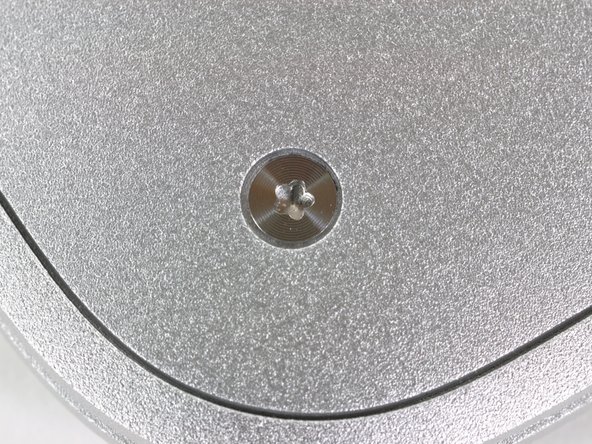
Apple apparently doesn't want you inside this thing. They decided to use 5-point "Pentalobe" security screws to attach the lower case.
-
For this teardown, we had to file a couple of flathead screwdrivers to take out the funky screws. We have since found the correct 5-point driver to fit it.
-
Here's a 1366x768 wallpaper version for the new MB Air owners out there. We won't tell where you got it from.
-
-
-
The large battery assembly is held in by five T5 Torx screws.
-
This battery is 35 watt-hours. Previous revisions of 13" MacBook Air machines have included 37 or 40 watt-hour battery packs. Since this Air has a smaller screen and lacks a spinning hard drive, we'd expect run time to be somewhat better than earlier Airs.
-
-
-
-
After another T5 Torx screw is removed, the 64GB flash storage board can be disconnected from the logic board. It would be easily user-replaceable if you disregard the strange 5-point Torx needed to get inside.
-
The Mini PCI Express form factor SSD drive is a completely custom part, and will probably only be available through Apple support services, thereby putting another nail in the coffin for user-serviceability.
-
-
-
The mSATA SSD unit appears to be assembled by Toshiba and is model number THNSNC064GMDJ.
-
There are six main chips on this custom board:
-
Four Toshiba TH58NVG7D7FBASB 16GB flash chips which make up the total 64GB.
-
Toshiba T6UG1XBG Solid State Drive controller.
-
Micron OKA17 D9HSJ DDR DRAM cache.
-
The new SSD is 2.45 mm thick compared to the platter-based 5.12 mm thickness of the old Air's drive. Being smaller in two of three dimensions definitely helps the new Air achieve a super-slim profile.
-
The SSD weighs in at a mere 10 grams, compared to the 45 grams of its spinning cousin.
-
-
-
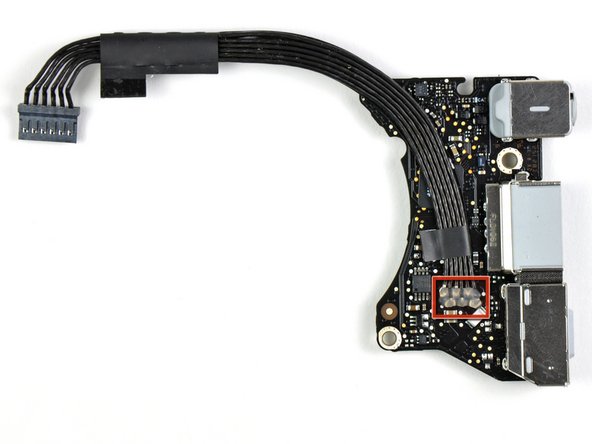
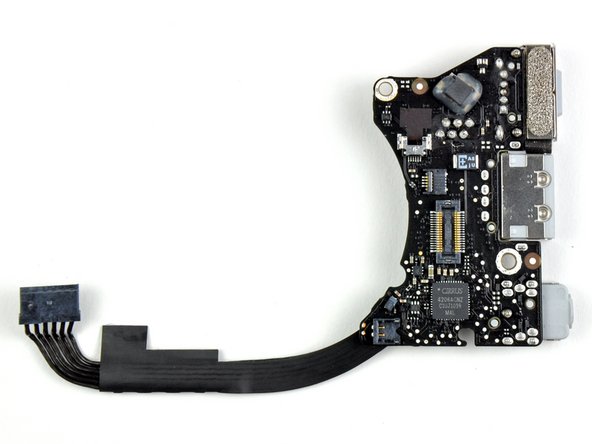
The MagSafe, USB port, and sound card are all part of one smaller board that connects to the logic board.
-
There's a blob of glue on the ribbon cable connection points that acts as an insulator. This may prevent some electrifying results from occurring should the contact points wear through the plastic sheeting and touch the aluminum case of the Air.
-
The Air sports a Cirrus Audio 4206ACNZ audio controller. We saw this same chip we found in the latest MacBook Unibody and Mac Mini
-
-
-
Three T5 Torx screws secure the ectomorphic logic board in place.
-
Like most recent Apple laptops, the heat sink comes out attached to the logic board. This is nice, as you'll only need to remove the heat sink and reapply thermal paste if you're replacing the logic board.
-
Unfortunately, like all previous MacBook Airs, the RAM is soldered to the logic board and is not upgradable. Apple does offer a 4GB RAM option at the time of purchase, but if you opt for only 2GB and decide you want more RAM later you'll be out of luck.
-
Our advice? Go for 4GB.
-
-
-
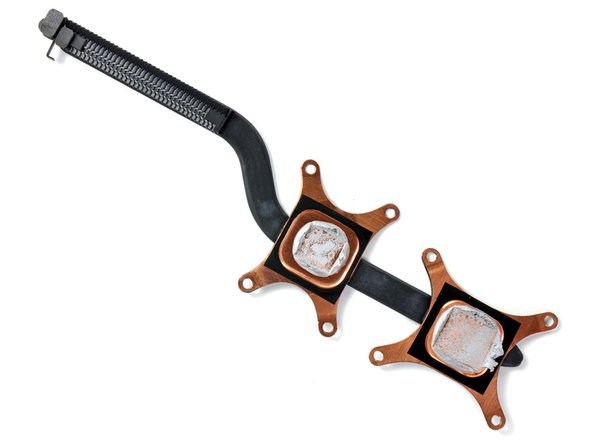
After removing eight T5 screws, the thermal paste on the CPU and GPU is the only thing remaining that affixes the heat sink to the motherboard.
-
The heat sink on the new MacBook Air is considerably smaller than all previous models. It weighs only 10 grams. Based on the tiny heat sink, it seems that the Ultra-Low Voltage 1.4 GHz Core 2 Duo CPU is a cool chip.
-
-
-
The back of the trackpad has a Broadcom BCM5976A0K chip on it as well as a Cypress CY8C24x94-24L PSoC chip.
-
The CY PSoC chip is likely responsible for the multi-touch capabilities on the trackpad as it has touch capability and has been found on many MacBook trackpads.
-
The board is cleverly grounded by little arms extending from the metal trackpad hinges.
-
-
-
We can now remove the display from the lower case.
-
The 11.6" MacBook Air features a resolution of 1366x768. That's a few more pixels and noticeably more widescreen (16x9 vs 16x10) than the 1280x800 resolution of previous Air models.
-
The bigger display in the second picture is from the earlier generation MacBook Air. If you look carefully, you'll see that Apple's removed the microphone from the display assembly. The microphone now lives in the body of the computer, right next to the headphone jack.
-
-
-
MacBook Air 11" Late 2010 Repairability: 4 out of 10 (10 is easiest to repair).
-
Once you manage to take off the bottom cover, all the parts are pretty easily replaceable.
-
Opening the bottom cover is quite difficult if you don't have the right screwdriver. It's clear that Apple didn't want people to open their machine.
-
All the components -- including RAM and hard drive -- are proprietary, meaning that no off-the-shelf parts will work in it without serious rigging.
-
If you're fortunate enough to have a more repairable Apple device, we've got you covered. We sell parts and tools to keep your Macs, iPods, and iPhones running smoothly.
-








16 Comments
Would something like this work to replace the SSD Card (though I guess it wouldn't be much of an upgrade due to its capacity)? http://www.newegg.com/Product/Product.as...
Please note the "Odd" Torx is called a "security torx" screw. There are two versions: a fived-lobed torx and a "High Security Torx" which is a five-lobed torx with a center metal pin coming out of it. Security torx is easy to find, high security is VERY hard to find but I've seen sources in automobile repair in the UK which uses these in some auto parts. Otherwise the company that makes the screws control tool distribution.
I have a question?
Why didn't apple just add a bunch more cells on that black plastic block. Like essentially make the whole thing battery as opposed to have six batteries but holes in the middle?
