Introduction
This guide shows you how to open your Time Capsule for the first time. Take your time with the first step, especially if your Time Capsule is of some age; the adhesive can become quite hard.
What you need
-
-
Open the Time Capsule by exposing the screws that hold the device together. The screws are concealed by the rubber base, which is the bottom surface of the device.
-
Use a heat gun or hair dryer to heat the rubber base, which softens the adhesive holding it on.
-
Starting in a corner, carefully lift the rubber base to prevent tearing. You can use a guitar pick or a small, plastic ruler to help separate the rubber from the metal.
-
-
-
-
Once the rubber base is separated from the device, remove the 8 Phillips PH00 screws that attach the metal bottom of the case to the plastic top of the case.
-
-
Tool used on this step:Tweezers$4.99
-
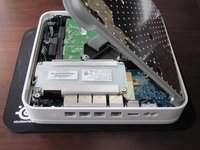
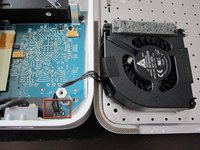
Lift up the left side of the metal plate and slowly flip it over the right edge of the device.
-
Since many people have had serious problems with the fan power connnector breaking, it is advisable to NOT try to disconnect the fan power connector. Be VERY careful with this connector. It is extremely fragile. If you absolutely have to disconnect the fan from the logic board, VERY carefully use a spudger or tweezers to do so.
-


To reassemble your device, follow these instructions in reverse order.
Cancel: I did not complete this guide.
53 other people completed this guide.


7 Guide Comments
I accidentally edited this page, instead of the fan. Could anyone tell me how to reverse that/reverse it for me? Thanks!
Just un-edit the page to what it used to be.
