Installing MacBook Pro 15" Unibody Mid 2010 Matte Finish LCD

User-Contributed Guide

User-Contributed Guide

This guide is not managed by iFixit staff.

A procedure for removal and replacement of a MacBook Matte Finish LCD.

  • Author: Mike K
  • Difficulty: Difficult
  • Add Note x

This guide covers removal and replacement of the Matte Finish LCD. Aside from your screen not being glossy or glared, you know you have a Matte Finish LCD if you have an approx. 14mm brushed aluminum bezel around your screen.

Most people DON'T have this bezel, and so should use the existing Glossy LCD replacement guide instead: Installing MacBook Pro 15" Unibody Mid 2010 LCD .

The display assemblies of Matte Finish LCD and Glossy LCD version of the MacBook Pro differ in a few ways:

  1. The aluminum bezel.
  2. The actual LCD is different (Matte finish, of course)
  3. The exterior glass of the matte display is optically bonded to the LCD, so you cannot remove the glass with suction cups.

Apart from the display assemblies, the Matte Finish LCD Macbook Pro is identical to a Glossy LCD Macbook Pro of the same screen size.

Note that this guide is marked "difficult". The reason it is marked that way is that you will have to remove the bezel, which is thin aluminum, and the display bumper which is a thin piece of rubber. If you damage these parts (i.e. you put a hard bend in the bezel or tear the bumper), you likely won't be able to get another. This is not necessarily a hard to perform procedure, but could be risky. So please read this guide and consider if it is for you before moving forward.

first image

Add Note Edit Step 1 — Display  ¶ 

  • Use the flat end of a spudger to carefully pry the AirPort/Bluetooth ribbon cable up off its socket on the logic board.

first image

Add Note Edit Step 2  ¶ 

  • Pull the camera cable connector straight out of its socket on the logic board.

  • Pull the cable parallel to the face of the logic board toward the optical drive opening.

first image

Add Note Edit Step 3  ¶ 

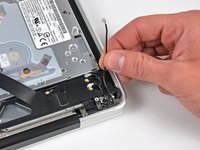
  • Use the tip of a spudger to pry the three antenna connectors up off the AirPort/Bluetooth board.

first image
thumb image 1
thumb image 2

Add Note Edit Step 4  ¶ 

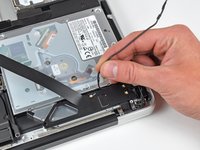
  • De-route all three antenna cables from their channels in the AirPort/Bluetooth housing.

  • De-route the camera cable from its channel in the AirPort/Bluetooth housing.

first image

Add Note Edit Step 5  ¶ 

  • Remove the following two screws securing the AirPort/Bluetooth housing to the upper case:

    • One 3.8 mm Phillips

    • One 8.6 mm Phillips

first image

Add Note Edit Step 6  ¶ 

  • Remove the AirPort/Bluetooth assembly from the upper case, minding any cables that may get caught.

first image
thumb image 1
thumb image 2

Add Note Edit Step 7  ¶ 

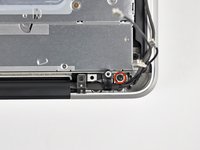
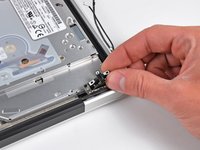
  • Remove the 8.6 mm Phillips screw securing the antenna/camera cable retainer to the upper case.

  • Remove the antenna/camera cable retainer from the upper case.

first image

Add Note Edit Step 8  ¶ 

  • Remove two of the three 6 mm T6 Torx screws securing the right side of the display to the upper case.

  • We purposely have you leave one screw attaching the display to the upper case to aid in future steps.

first image
thumb image 1
thumb image 2
thumb image 3

Add Note Edit Step 9  ¶ 

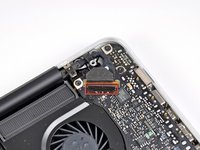
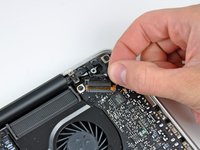
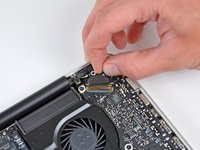
  • Grab the plastic pull tab secured to the display data cable lock and rotate it toward the DC-In side of the computer.

  • Pull the display data cable straight out of its socket on the logic board.

  • Do not lift up on the display data cable, as its socket is very fragile. Pull the cable parallel to the face of the logic board.

first image
thumb image 1
thumb image 2

Add Note Edit Step 10  ¶ 

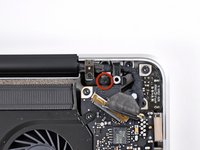
  • Remove the 8.6 mm Phillips screw securing the display data cable retainer to the upper case.

  • Remove the display data cable retainer from the upper case.

first image

Add Note Edit Step 11  ¶ 

  • Remove two of the three 6 mm T6 Torx screws securing the left side of the display to the upper case.

  • We purposely have you leave one screw attaching the display to the upper case to aid in future steps.

first image

Add Note Edit Step 12  ¶ 

  • Open your MacBook Pro so the display is perpendicular to the upper case.

  • Place your opened MacBook Pro on a table as pictured.

  • While holding the display and upper case together with your left hand, remove the remaining T6 Torx screw from the upper display bracket.

first image

Add Note Edit Step 13  ¶ 

  • Be sure to hold the display and upper case together with your left hand. Failure to do so may cause the freed display/upper case to fall, potentially damaging each component.

  • Remove the last remaining T6 Torx screw securing the display to the upper case.

first image
thumb image 1
thumb image 2
thumb image 3

Add Note Edit Step 14  ¶ 

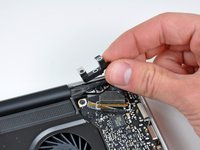
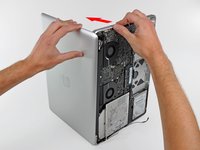
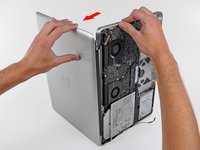
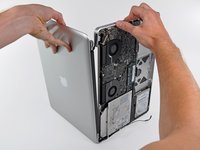
  • Grab the upper case with your right hand and rotate it slightly toward the top of the display so the upper display bracket clears the edge of the upper case.

  • Rotate the display slightly away from the upper case.

  • Lift the display up and away from the upper case, minding any brackets or cables that may get caught.

first image
thumb image 1
thumb image 2

Add Note Edit Step 15 — Matte Finish LCD  ¶ 

  • At the bottom right corner of the screen, insert the pointed side of spudger between the bezel and wide, flat part of rubber bumper. Pull the bumper towards to hinge to release the adhesive.

  • Then place the flat side of the spudger between bezel and bumper at the same location, slip the spudger underneath the bumper and lift.

first image

Add Note Edit Step 16  ¶ 

  • Moving up the right side of the screen, begin pulling the bumper out slowly, in approximately 1"-2" increments. Continue around the screen until the bumper is complete removed.

    • The bumper has several tabs, 2 on the left, right, and 3 on top. Use the pointed end of the spudger to assist in the removal of the tabs.

first image

Add Note Edit Step 17  ¶ 

  • While applying heat with a heat gun:

    • Place the flat edge of the spudger under the bottom lip of the bezel on the lower right portion of the display assembly.

    • Gently pry the corner of the bezel upward, creating enough space to insert the flat edge of the spudger between the bezel and display assembly.

  • With the flat edge of the spudger under the bezel, gently twist the spudger to release the double stick adhesive tape.

first image

Add Note Edit Step 18  ¶ 

  • Only insert the spudger from the outer edge of the display assembly, and do not push it more than 6mm (1/4in) towards the inner edge of the bezel - otherwise you risk damaging a gasket between the inner edge of the bezel and the screen.

  • Continue working up the right side in 1"-1.5" increments:

    • Apply heat to the unreleased area.

    • From the outer edge of the bezel, insert the flat side of the spudger to where it snugly fits under the lifted portion of the bezel.

    • Gently twist the spudger.

first image

Add Note Edit Step 19  ¶ 

  • Avoid placing the spudger within 20mm (3/4") of the built in camera. There is no adhesive in this location, and the spudger could damage the camera.

  • Continue the technique described in the previous step to release the bezel along the top and on the left side.

first image
thumb image 1
thumb image 2

Add Note Edit Step 20  ¶ 

  • To release the lower left of the bezel, while applying heat, insert the flat end of the spudger from the left side, and gently twist to pry up the double stick tape.

  • Repeat above from the right side to release the lower right.

first image
thumb image 1
thumb image 2

Add Note Edit Step 21  ¶ 

  • Remove the bezel from the display assembly.

    • The bezel will appear slightly bowed. This is OK as long as there are no sharp bends.

  • Clean the bottom side of the bezel with isopropyl alcohol and set it aside.

first image

Add Note Edit Step 22  ¶ 

first image

Add Note Edit Step 23  ¶ 

  • Reinsert the rubber bumper into the display assembly, taking care to align the tabs to the tab indentations in the flange.

  • With a cotton swab, clean any excess adhesive off with isopropyl alcohol.

first image

Add Note Edit Step 24  ¶ 

first image
thumb image 1
thumb image 2

Add Note Edit Step 25  ¶ 

  • Get the 12x12 sheet of 3M 4905 VHB Tape, place it on the table, red adhesive backing up, with the overhanging white adhesive backing on the top and bottom.

  • With a ruler, measure and mark 3mm from the right edge at the top and bottom of the 4905 sheet.

    • Some of the precut adhesives available for the glossy screen have failed with the aluminum bezel. 3M 4905 appears to be what Apple is using here, and it works.

first image
thumb image 1
thumb image 2

Add Note Edit Step 26  ¶ 

  • Place a metal straight across the sheet, aligned with the two 3mm marks made in the previous step.

  • With the X-acto knife, cut a 3 mm wide strip of adhesive.

    • Tip: To avoid gumming up the adhesive, start the cut on the white overlapped backing on the top.

first image

Add Note Edit Step 27  ¶ 

  • Repeat steps 7 and 8 one more times for an additional 3mm wide strip.

  • Then perform steps 7 and 8 three more times with 6mm measurements.

  • This should yield a total of:

    • Two 3mm x 12in 4905 adhesive strips.

    • Three 6mm x 12in 4905 adhesive strips.

first image

Add Note Edit Step 28  ¶ 

  • Trim one of the 6mm strips:

    • One 6mm x 120mm

    • One 6mm x 30mm

    • One 6mm x 155mm

  • Trim each of the other two of the 6mm into 6mm x 230mm strips.

  • Trim the each of the 3mm strips into 3mm x 170mm strips.

first image

Add Note Edit Step 29  ¶ 

  • On the display assembly, apply the 6mm x 230mm strips, red side up, to the flange between the bumper and screen on the left and right sides.

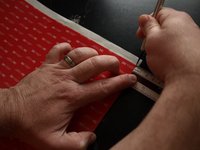
    • Tip: Unpeel about an inch of the white backing from the adhesive and fold the backing to the side. Apply this exposed adhesive carefully to the lower corner. Then, with the rest of the white backing on the adhesive, locate the position of the upper corner. Hold that position with one hand while peeling the backing off with the other.

first image

Add Note Edit Step 30  ¶ 

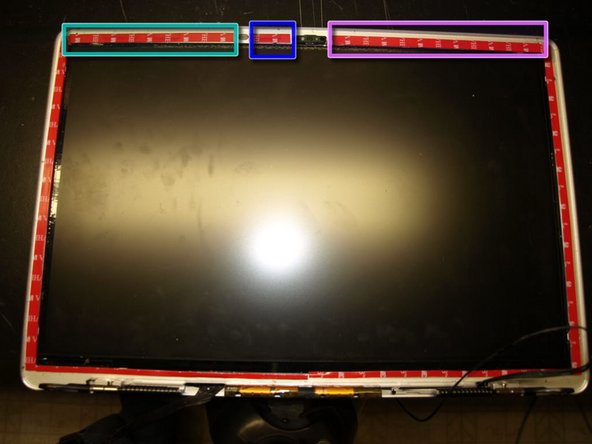
  • Apply the two 3mm x 170mm strips on the flange, red side up, between the bumper and screen at the bottom of the display assembly.

first image
thumb image 1
thumb image 2

Add Note Edit Step 31  ¶ 

  • Avoid placing any portion of the adhesive over the following areas:

    • Tooling holes on the left and right upper corners.

    • Camera.

    • EMI Pad

  • On the flange of the display assembly:

    • Apply the 6mm x 120mm strip, red side up, to the area on the flange between the EMI pad and the adhesive strip on the left side.

    • Apply the 6mm x 30mm strip, red side up, to the area on the flange between the EMI pad and the camera.

    • Apply the 6mm x 155mm strip, red side up, to the area on the flange between the camer and the adhesive strip on the right side.

first image

Add Note Edit Step 32  ¶ 

  • While applying pressure with the flat side of the spudger, drag the spudger across all of the attached adhesive strips.

    • The 3M 4905 VHB adhesive is pressure activated. This step is required for the adhesive to reach its proper strength.

first image
thumb image 1
thumb image 2
thumb image 3

Add Note Edit Step 33  ¶ 

  • On the upper corner of the adhesive on the left side of the display assembly.

    • Slip an X-acto knife between the red backing and

    • Use the X-acto knife to peel enough of the backing so that it can be grabbed with fingers.

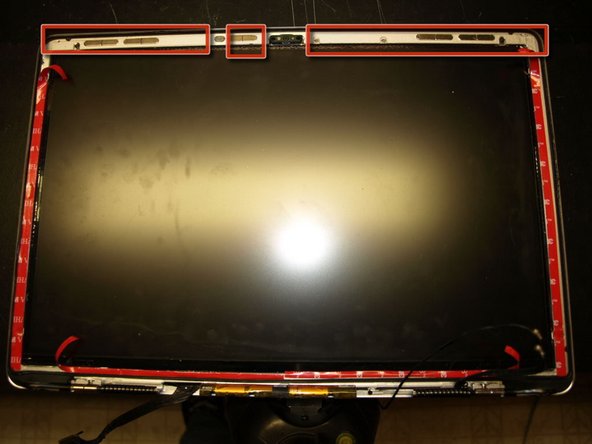
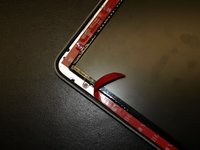
  • Peel about one inch of the red backing and fold it to the inside.

  • Do the same for the adhesive on the right side and both adhesive strips on the bottom of the display.

  • For the three strips on the top of the display, peel all of the adhesive backing off.

first image
thumb image 1
thumb image 2
thumb image 3

Add Note Edit Step 34  ¶ 

  • Carefully align the bezel tooling pin into in the tooling holes at the top of the display assembly. Set the bezel in place and apply pressure.

  • Pull the rest of the red backing strips to expose the adhesive to the rest of the bezel.

  • While applying pressure with the flat side of the spudger, rub around the entire bezel to ensure the adhesive sets properly.

first image

Add Note Edit Step 35  ¶ 

  • Place binder clips around the bezel to hold it in place. Use cardboard under the clips to keep from scratching the display assembly.

    • The adhesive takes around an hour to set and 3 days to cure. Because of bowing of the bezel during the removal process, the safest approach is to keep the clips in place for the entire three days.

After the bezel adhesive has adequately cured, install the display assembly according to the Installing MacBook Pro 15" Unibody Mid 2010 Display guide.

For more information, check out the MacBook Pro 15" Unibody Mid 2010 device page.

Did you successfully follow this guide?

This guide has been completed 1 time.

Comments Add Note Comments are offturn on