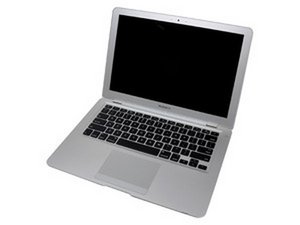
How to remove the clutch cover
I removed the LCD using the iFixit guide, but it doesn't show how to remove the clutch cover. Any suggestions? I have a A1237 Macbook Air.
Is this a good question?
Score
0

I removed the LCD using the iFixit guide, but it doesn't show how to remove the clutch cover. Any suggestions? I have a A1237 Macbook Air.
Is this a good question?

Rep: 78.2k
 385
385
 96
96
 162
162
Try looking at steps 20 and 21 of the teardown link. I hope they will answer your question.
Was this answer helpful?

Rep: 11.6k
29
27
23
I posted a similar question a couple weeks ago just trying to figure out what the part was, and you right, rear clutch assembly. Which is different than the hinge cover. It's not an easy fix, actually, less difficult but reminds me on replacing the front bezel on my first macbook pro.
I broke the system down and pulled the lcd, its fixed on pretty good ... so I just used a plastic pry tool (like you use on iPhones, etc) with the screws removed and popped the new one in.
(now its one of those "*!#$" moments where I should have snapped photos - i do this on other repairs and file for reference)
If I get another on in the shop in the next couple of days I'll try to take some snapshots, or better, some video.
Was this answer helpful?

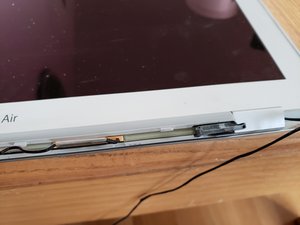
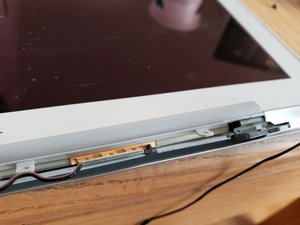
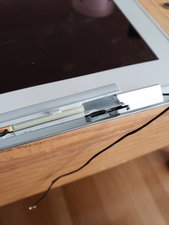
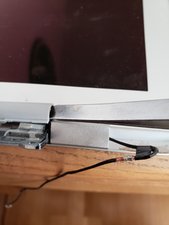
For anyone coming across this still looking to get the “clutch cover" off, have the hinge in the all the way “open" position both sides. Then on the lower lip, push in / up towards the LCD to work it around the hinge pin gently, if needed use a small tool in the open space for a little leverage, they are very fragile. Hope it helps someone!
Was this answer helpful?
Yeah this is a challenge. Thank you for posting your photos and comments. I've been struggling not to break any of the plastic
Past 24 Hours: 0
Past 7 Days: 6
Past 30 Days: 14
All Time: 5,503
