1

Score

Avatar
thoseevilrobots
33

Asked

How do I fix the broken prong on my battery connector?

History

So I noticed when I put my phone back together that everything worked fine, but the battery wouldn't charge.

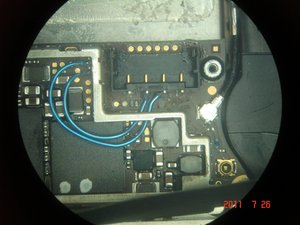
After taking it apart and inspecting it, I noticed that where the battery pins make contact with the logic board have been damaged.

Specifically, where the four battery prongs are lightly soldered to the board, when I removed the battery, the solder connecting the pin to the board was so strong that instead of detaching from the little square on the board, it pulled the square up with it.

Short of buying a new logic board and battery, is there any way to re-connect this somehow? I can provide pictures if needed. Thank you for your help.

Edit: Here is a picture.

http://imageshack.us/photo/my-images/854...

Edited by: thoseevilrobots ( )

Pictures would help.. One of our regular contributors repairs these and may be able to give an expert opinion on where to go form here depending on which pad is missing

pollytintop,

Okay updated with picture. Hopefully that should help. The problem is that apple lightly soldered the battery pins in place, so when i removed the battery, it ripped one of the square connecting pads up. since it looks like the square pads lead to the circular ports to their left, I'm guessing I should be able to wire it back somehow with some fine gauge wire, but I'm not really sure how, and I've never done soldering this small.

thoseevilrobots,

Is there any way to tag this specifically so the right person will see it?

thoseevilrobots,

Post Answer

4

Score

Avatar
hectordtruong
4.7k

Answered

Accepted Answer

PermalinkHistory

What you can do is solder to the CIRCLE right behind that missing solder pad. If you can get a connection there, then the phone will work again. Along with that, you have to solder to the other existing pads as well. This repair is tricky and takes a bit of patience to do. In the event that the circle pad isn't secure, I usually run a jumper wire to the main connection point under the heat shield.

Block Image

Thank you Hector! So instead of solder (since I'm unsure I can solder with that kind of precision), I got a $20 pen from radioshack that emits conductive silver designed for making quick repairs to circuits by drawing on new paths...i was thinking of drawing a conductive path from where the square will touch the board to the circle to the left of the square. Does this sound like a bad idea from your experience? Also, you said, "along with that, you have to solder to the other existing pads as well". Could you clarify that please? Specifically, what should I solder what to the other pads? Thank you for your help and knowledge!

thoseevilrobots,

Update: Just tried soldering from where the pad was before to the circle and I can get the phone to boot plugged in but not unplugged. the battery says it's charging when it's plugged in but the battery is not actually charging.

thoseevilrobots,

The other 3 pins need to be soldered to the board as well as the pin with the lift solder pad. What youre observing is an incomplete circuit, thus the phone dies when it is unplugged. I dont have experience with that pen youre talking about, but if you can get a small iron (small sized tip) you can probably manage it.

hectordtruong,

Ah, okay so you were right, I tried soldering the connections back, but the phone acted as a heat sink and I couldn't get enough wattage with such a small solder tip. The pads were strange. I think I'm going to have to solder jumper wires in. Can you please tell me more details about how you'd advise I do that? What kind of wire to use and how? I can see your picture...are the top and bottom pins of the battery connector wired to anything? or do I just need to worry about running jumpers to the middle two pins and then all the way to where you have them wired? Thank you again for your time and energy in helping me with this!..I'm really hoping I can fix my phone and use it again. I don't have much experience with soldering, but this doesn't seem super complicated?

thoseevilrobots,

3

Score

Avatar
Florida iDoctor
151

Answered

PermalinkHistory

Ask any mechanical or electrical engineer and they will advise that the use of jumper wires in such an application is a poor choice. There are several reasons that this holds true. One, when you install jumper wires into a device with such a small form factor and one in which you may remove the back plate in the future (for battery replacement, other repair work, etc) there is a tremendous risk that the wires can become caught (snagged) and torn. Secondly, those wires are routed under/over/around the motherboard frame. These wires can be routed next to or, worse yet, sitting on top of some very hot motherboard components. That heat that is generated by the components can have a detrimental effect on the wire itself as well as the heat conducting down the wire back to the connector itself.

We see dozens of these battery connector failures in our store every week. It is a very common repair for us. Here is how we have approached this repair. In coming up with this, we have spoken to (3) of the top circuit board rework companies in the US to solicit their input as to the strengths and weaknesses of each repair option.

In many cases when the battery terminal connector is ripped from the motherboard, one or more of the solder pads is removed as well. This is bad. The purpose of those solder pads is to act as a base for creating a solder fillet (joint) between the legs of the terminal connector and the motherboard. Each of those pads has a copper tailing that comes out and connects to the trace on the motherboard. When the pad is ripped out, you also lose that copper tailing connection to the trace.

Block Image

In our shop, we use the following standard procedure (again that was developed in conjunction with several motherboard rework companies).

1. We clean up the solder off of any remaining pads using a solder wick.

2. We then install new solder pads to replace the missing ones.

3. We use an exacto knife (or razor blade) and CAREFULLY remove the very top layers of the motherboard trace down to the point where the copper wire is exposed. You need to be careful as you only need to expose roughly the last 1/2" where the trace connects into the pad.

4. We then overlay solder the copper tailing off the new solder pad onto the exposed copper trace.

5. Once that is completed, we go in and put an epoxy coating on top of the exposed trace.

6. We use the same process for any other missing pads.

7. Lastly, we reinstall a new battery terminal connector by soldering it back onto the (4) solder pads on the motherboard. We also use a dab of neutral core silicone under the connector to better adhere it to the motherboard.

It is a very tedious process and one that is not simple, but it is the correct way to repair this iPhone 4S with a broken battery connector and lifted solder pad.

I do not want to get slammed for referencing our company but here is the link if you need any help:


Edited by: oldturkey03 ( ) , Florida iDoctor ( )

Great answer, but please place any reference to your company in your profile. You can then refer to that for further assistance. Otherwise it appears as if you are trying to use this site for solicitation. Thanks.

oldturkey03,

2

Score

Avatar
pollytintop
39k

Answered

PermalinkHistory

http://imageshack.us/photo/my-images/52/... take a look at this pinout.. Looks like it's a ground so try solder the coneector you may get away with no pad!

Thank you! I'm not as well versed in reading circuit schematics, but the application of your conclusion should help...i've tried hooking it back up with no pad, but that doesn't work, so I think the connection back to the board is important somehow. My hunch was that I could try to connect the pin to the circles near where the pads are supposed to be on the board, and Hector seems to have confirmed that idea, so I'll try that. Unrelated question: why did Apple start soldering the battery pins to the pads, and why is that not included in the iFixit manual as a warning? Is that something new they started like the pentalobe screws designed to thwart home repair?

thoseevilrobots,

Oh wait, I didn't realize what happened in my phone was that the battery clip stayed connected to the battery. I understand now. I think the tear-down should be modified to warn users about this issue, since it looks like a few other people on the site have also dealt with it. Is there a way to suggest this change?

thoseevilrobots,

0

Score

Avatar
Thorsten Herbst
1

Answered

PermalinkHistory

Hello. i´m searching for a solution of this issue too. I´m trying to fix an iphone from a good friend. The Problem is the same... seems like a broken battery connector.. I had soldered the battery connector at myself. But it didn´t work. Last, i recognized that the the connection was broken. The possible reason was not enough solder. Could you give me some tips how to solder it the right way? Or maybe how to solder the right way the jumper-wires? What do i need? I have a small, cheap SMD-Soldering station and a normal solder with 1mm. For better seeing i had bought a cheap USB Microscopecamera with stand.

whats about the heat shield holder at the logic board? Is it removable? cause its soldered too....

I would be very thankful if anyone could help me...

Thanks from germany.

diamond

0

Score

Avatar
Nmorin
1

Answered

PermalinkHistory

Ok, I have read most of the solutions about repairing the connector but there is one important item that has been ignored.

The connector was ripped off the board. How did you address the issue that the connector is held in place by only 4 small solder points? There are 2 solder points that hold the connector to the logic board but as we have all discovered, it is very easy to break those solder points. Has anyone tried epoxy or super glue to hold the connector to the logic board?

When using an adhesive such as a superglue (and similar) you need to make sure that it is a neutral cure adhesive. You do not want anything that might be corrosive to the board itself, that is why we use a non-corrosive, neutral-core silicone rubber. Let me know if you have any other questions. I am here to help.

Florida iDoctor,

0

Score

Avatar
iLLBehavior
1

Answered

PermalinkHistory

Just happened to me.....

Any answers yet on how to do the jumper wires etc?

Phone turns on when plugged into the wall but says connect to itunes and USB power doesn't seem strong enough.

Folks, I can not stress enough to read our repair recommendation (listed above). You DO NOT want to mess around with jumper wires on these units. It is simply too messy, far too difficult to solder these wires to the solder points that are just bigger than a grain of salt and there is too much risk to damaging the motherboard. We always recommend installing NEW solder pads for any that are missing. We do these repairs every day in our shop for customers all over the Tampa, Florida area. The method we list above is nearly 100% successful and you do not have any loose wires floating around. Any questions, just ask the Florida iDoctor. I am hear to help!

Florida iDoctor,

0

Score

Avatar
mathiestyler
1

Answered

PermalinkHistory

what does solder mean? my bad, I just tried to replace my battery and ended up tearing the little golden prongs off where the battery connecter plugs into :( please help!

0

Score

Avatar
Florida iDoctor
151

Answered

PermalinkHistory

What it means is that you have torn (ripped) the battery connector off of the motherboard of your iPhone. This is a COMPLEX fix as it COULD involve replacing solder pads that were lifted as well. Best to have a professional company fix this for you. You can reference our Profile for our contact information in case you need assistance. Again, this is a complex fix. If you do not have solder experience, then do not try this.

Add Your Answer