0

Score

Avatar
kathleen
1

Asked

broken digitizer retaining flaps

History

Help Please. I just finished replacing the LCD on my husbands ipad (i broke it a few months ago) everything looks good except the digitizing retaining flap fell off. Is there a way around using these flaps. I managed to hold it in place and the ipad worked but it fell off again and now the screen does not respond to touch. I have never fixed a electronic device before so I was feeling pretty good about myself until the flap problem--ugh!! Any suggestions??

I am in a similar situation and would love to hear anybody's solution.

andyboutte,

Post Answer

4

Score

Avatar
Joe
49

Answered

PermalinkHistory

For all those who have broken that retaining flap, I had the same problem. It can be resolved by using a thin Mylar strip, cut to the dimensions of digitize r connector, then slide it underneath the connector. It will hold the cable.

collins_joseph@hotmail.com

Did the Mylar tape work? I just replaced my ipad screen and broke both of the digitizer clips in the process. I tried putting the digitizer in with out the clips and the ipad powers on but the touch screen does not work. I am trying to find the mylar tape (looks like I need to buy it online). == Update == I got the screen working. With the help of Joe who suggested I find something thin enough to insert between the digitizer ribbon and the connector. This is what i did: 1) Insert the new digitizer connector. 2) Cut the old digitizer off of my old ipad screen and cut it to size. 3) Insert the old digitizer connector on top of the new one which locked and held it into place (I heard a click on both sides). 4) Cover with black electrical tape. Powered it on and it worked great! Thanks Joe and thanks I Fixit!!

John,

John and Joe,yall are life savers. My iPad was broken for the last year, and after replacing two digitizers i had given up hope. I had a feeling it was that broken tab the whole time but had no idea how to replace it. Your method worked wonderfully. Only one note, you kind of need to do things in reverse order (hooking the digitizer ribbon cable up first rather than last) to be able to have enough room to apply the force you need to get the second connector in on top of the first one.

andrew madson,

Joe has it exactly right! I bought Kapton tape off eBay (an insulator like Mylar), and cut a little strip to the size of the end of the ribbon cable. Here's an important part: I smoothed the tape out with my nail to get it as flush with the cable as possible so that it can clear the top of the retainer. I felt both sides of the cable hit home and the white guidelines met exactly where they had before I used the tape. Taped the back of the cable down with another inch of Kapton, and voila! Perfectly working digitizer! I have a whole roll of the tape now, so if anyone wants any just mail me at girl.luvzer.mac (-at-) gmail.com and I'll send you some. :)

Therese Stirling,

I must say that Joe's solution is a very brilliant solution that could save me a lot of work time and money. But I didn't understand something, the mylar or kapton tape should be taped (cuted to size) on the digitizer end ribbon cable and then sliding the ribbon to the connector or the tape are supposed to perform as a spacer that should be inserted AFTER the digitizer cable has slide in? If it's the other case then why using mylar or kapton tape at all? all we need is some kind of material like thin plastic that will hold with pressure the digitizer cable down to the conductive pins.

davduv,

Hi davduv! It's meant to be a spacer, basically wedging the contacts on the ribbon cable down onto the board below. There are two main reasons IMO for using Mylar or Kapton tape vs plastic. 1, Mylar and Kapton tape are both appropriate for use in electronics due to their insulating and temperature-stable properties. You wouldn't have that necessarily if you used something like cellophane like I did while waiting for my tape to arrive. The static off it (I suspect) caused the flakiest false-responses on my digitizer. 2. It's a real challenge to wedge a thin piece of plastic in at the same time as the cable unless they're adhered together due to the tiny amount of clearance there is to the sides and above the cable. This space restriction also requires the very thinnest of materials, and you'll have a hard time finding tape thinner than Mylar or Kapton. My above offer still remains... If you have a hard time finding either of these tapes, I can mail you some off the roll I bought. :)

Therese Stirling,

Show 3 more comments

0

Score

Avatar
cyberdoctormd
1

Answered

PermalinkHistory

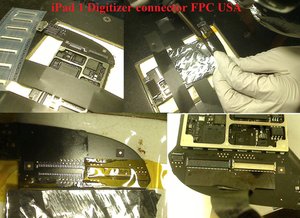
for those want to do the repair yourself you can buy a new PFC connectors

here

Block Image

with the desoldering alloy to help you remove the old connector off the board clean

video will be up on and youtube soon

Update

the youtube video of the repair soldering and changing the FPC connector is up,

it cost 110$ to get it replace and mail back

Edited by: oldturkey03 ( ) , cyberdoctormd ( )

0

Score

Avatar
andystonemgc
1

Answered

PermalinkHistory

you guys are fantastic! this worked great for me. I just used a small section of that aggravating plastic that covers everything we buy now. It may have been a little thinner. it was packaging material for a case of compact fluorescents.

at any rate, I inserted the cable, then the spacer on top of that. made the connection perfectly! problem solved.

I need someone to think out of the box on another problem I have. While disassembling an iphone 4(verizon) I broke a small connector that seemed to be barely holding on. You can see that guy here Installing iPhone 4 Verizon Upper Antenna on step 25. does anyone have a workaround? I would be really impressed.

0

Score

Avatar
Rabbito
1

Answered

PermalinkHistory

I've used a cheap chinese iphone 4 screen protector which was laying around gattering dust :)

Just cut it in shape and because it's thin and does not deform it's great !

You can either put it in first and then the flatcable or otherway around. Sits very firmly

Edited by: Rabbito ( )

0

Score

Avatar
miq
1

Answered

PermalinkHistory

I have exactly the same problem as descriped above.

Could it be possible with a picture that show how the Mylar tape is added on the Rippon.

Update

How thick may the Kaptone Tape be

Edited by: miq ( )

0

Score

Avatar
Lance
1

Answered

PermalinkHistory

We fix these connectors professionally and our recommendation

is if black flip latch came off you may be able to wedge something in the connector for contact. Adding tape to the flat-flex cable sometimes will help.

The latch acts as a tension clamp and if not perfect it would have dead spots on the screen. If the flat wedge object loosens over time, you'd have dead spots again.

If you'd like to have us replace the connectors for a long term solution we fix both types- digitizer touchscreen connectors as well as the LCD display connectors for iPad3 and iPad4.

We glad to answer any questions too.

iPad Logic Board Connector Repairs

0

Score

Avatar
Jorge
1

Answered

PermalinkHistory

where can I buy this mylar?

0

Score

Avatar
sam
1

Answered

PermalinkHistory

I have the same problem, I broke the clip from the LCD connector on my ipad 3, I tried the kapton tape and also I tried a thin piece of plastic on top of the connector but did not work, can you guys show me pictures or give some more details how to fix it, it's for ipad 3 LCD display connector. Thanks

0

Score

Avatar
myfriend 123
1

Answered

PermalinkHistory

Well ! ifixit guide is really useful.

Add Your Answer