0

Score

Avatar
M W
1

Asked

Wifi very weak after display replacement

History

Hi,

I just replaced a cracked display. Unfortunately after putting all back together, the wifi is just working when standing 1-5 meters away from the router.

I also tried to replace the Wifi antenna at the bottom of the iPhone, some of the EMI clips to the display assembly went off. The antenna cable is fitted in properly. I dont know what else I can check.

I have this wifi problem on 2 of my iPhones.

Help would be appreciated very much.

Post Answer

9

Score

Avatar
Bradley
117

Answered

PermalinkHistory

I had the same problem with my iPhone 4 and could not figure out why. Then I started messing with it and I realized the problem. I thought this would have nothing to do with the wifi connection but it does. When you first take the back off your phone there is a panel you have to take off that is by the camera. I believe like 5 screws including an abnormally long one. Well there is a tiny metal fitting that fits around the screw when you thread it in. Well mine fell off the first time I took my phone apart but I figured it meant nothing so I left it off. Then put my phone back together and wifi was weak. I thought for a few days and messed with it and I put that metal piece back on and I had 3 strong wifi bars. I thought that couldn't be it so I took it off again and it was weak again.

Can you please make a Picture of the tiny Metal Fitting and it's postion please ? I Must check where it is located Thx

pimp1310,

http://s1215.photobucket.com/albums/cc51... If the link doesnt work tell me and i will try again. Hope this helps!

Bradley,

ok, I managed to get the wifi working again, but the GSM/3G connection is still very weak.

M W,

Bradley I have done the same thing but how do you get that little metal piece back on the cover plate?

illinirog70,

4

Score

Avatar
Chavdar Sirakov
1.1k

Answered

PermalinkHistory

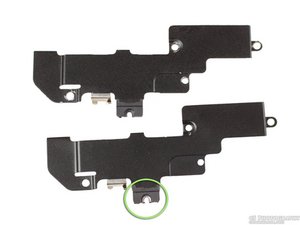
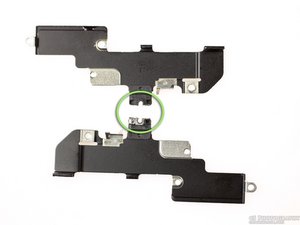
Losing the metal clips that you're talking of (marked in green on the bottom photos) is the top reason for abnormal Wi-Fi operation after reassembly.

Here are two images, which I shot, that better depict the cause of the issue. Once you lose that piece, you have no option but to order a replacement cover.

Block Image

Block Image

In case the images don't work here, here's an external link.

Hi, I have that little piece standing on the cover but still abnormal Wi-Fi and GPS operation. Any other idea?

zedd90210,

I guess... The usual troubleshooting stuff... Do you have your all screws or is some missing? Also, some guy from a repair shop suggested here or in another topic that replacing the antenna cable that runs along the loudspeaker enclosure has solved many of their cases of poor Wi-Fi reception. I guess it depends a lot on the type of initial damage that have been done to the device. Also do not exclude the possibility of a software issue, there are lot of people that swear their WI-Fi connectivity is quite poor since they updated to 4.3.3.

Chavdar Sirakov,

0

Score

Avatar
anas saab
1

Answered

PermalinkHistory

hi guys

if you looked at your iphone you will find on the top a shield with 2 screws by the camera one by the vibrator and the last one on the top be sure that the last one is already in it's right place and tied well sure you will find your phone working perfectly .

good luck

Edited by: anas saab ( )

0

Score

Avatar
Scott
1

Answered

PermalinkHistory

Where do I get the metal piece the screw threads through? Mine has come up missing and I need to replace it....

The metal piece just slides on the side of the metal plate and the screw threads in. If you can find a buddy's iPhone 4 who hasn't been messed with and check it out. You taking off the back cover will not void the warranty and look at the top of their plate to see their metal piece. But make sure you don't loose theirs as well!

Bradley,

0

Score

Avatar
illinirog70
1

Answered

PermalinkHistory

thanks the little silver peiece broke in half so now trying to find a hole new guard. That is the onlypart i cannot find on the internet

0

Score

Avatar
dirk
1

Answered

PermalinkHistory

I had the same issue after i got my iphone back from a screen replacement at podspital in Geneva. Unfortunately the people there did not realize that they had lost the piece and told me in a second round that had now replaced the wifi antenna - but of course without any success. When I forwarded them this description they started thinking and told me to wait for them to acquire the part they lost (looks like they don't have any stock or broken phones to cover their losses).

After weeks of waiting and some more emails I just ordered the part (indeed, not easy to find ) at http://www.comeparts.com/iphone-4-wifi-e...

Just $6.80 and a few days for shipment from hong kong and I have replaced it myself. Just wondering now why I paid $280 before to a repair place that can't even repair the damage they created themselves. To be fair their screen works...

Edited by: dirk ( )

0

Score

Avatar
zedd90210
1

Answered

PermalinkHistory

I have exactly the same problem, I checked that little metal piece but it didn't solved the problem for me :(

0

Score

Avatar
Brent
1

Answered

PermalinkHistory

Hey Brad,

I still have the metal piece on the panel. The screw goes in fine...still not very good service...if any. I see that there is a very small washer (not the washer that goes on one of the 6 side screws, but something smaller that may have fallen off. Would that be a cause for having minimal service? I'm sure it needs to be somewhere, I'm thinking the part that connects the small black wire to the motherboard?

Any help is appreciated!

0

Score

Avatar
Bradley
117

Answered

PermalinkHistory

I have taken a few iPhones apart and just noticed the metal piece that wraps around that screw on the top panel. That affects my wifi as for the little black wire I believe that has to do with your antenna for carrier service but I am not for sure. I know it is sometimes difficult to pop that black wire to the motherboard but I have never seen a washer. I'm sorry bud but I have no idea.

0

Score

Avatar
Dave M
1

Answered

PermalinkHistory

Thanks so much for the above posts. I also lost the "little metal piece". So I made a small square out or tin foil and placed it underneath the black metal panel so that it completed the circuit it was intend to. drove the long screw through it to complete the connection and "presto", 3 bars of wifi back. Now good as new. Dave M

0

Score

Avatar
benjishirley
1

Answered

PermalinkHistory

Chavdar Sirakov thanks for your post, the clip was missing and guess what! I FOUND IT :D

Everything works fine now...

0

Score

Avatar
ouaisouais ouaisouais
1

Answered

PermalinkHistory

hello i'm french I have exactly this problem,

i've just remove the emi shield

I checked i have little metal piece but low wifi/gps any help me for fix this

sorry for my bad english

0

Score

Avatar
Bradley
117

Answered

PermalinkHistory

Make sure that you tighten that long screw as tight as possible. Also make sure that you have not bent the tiny metal piece. One more solution i can think of if you still have low wifi is taking a peice of aluminum foil and place it between the panel and the motherboard. Pretty much make sure that the tiny metal piece is making contact where its supposed to on the motherboard.

0

Score

Avatar
MYEditor
1

Answered

PermalinkHistory

I had to change my home button and right after that I experienced WIFI problems. The signal was very weak, I found this video helpful,

http://www.youtube.com/watch?v=H_7Iherad..., also this step by step guide of how to install home button too, there are few tips that was really helpful along the way. Installing iPhone 4 Home Button this is the link. Good Luck!

Edited by: MYEditor ( )

0

Score

Avatar
ouaisouais ouaisouais
1

Answered

PermalinkHistory

i've tested and checked metal piece is here but always wifi/gps very low :(

this video on youtube is very interesting but with my little bad english i don't understood

it's very important for me to recover my wifi/gps

i've replaced with a new emishield and new long screw and no issu for me

0

Score

Avatar
Michael Rhein
1

Answered

PermalinkHistory

Thank you SO MUCH for this answer. I also had this problem after changing my display. Also changed the antenna but that didnt help. From changing the display i got this little metal thing fallen off and didnt know what to do with it. I keaped it for the last month, and after finding your article i now was able to put it in the right place.

And it works!! I already gave up hope to ever have three bars of Wifi when being more than two steps away from my router.

Thanks so much again. I hope you understood what i meant, my english is not the best. Greatings from Germany.

0

Score

Avatar
horapiedra
1

Answered

PermalinkHistory

hello i lost that metal piece what to do ???? does it come in the whole wifi replacement part???

0

Score

Avatar
suvaash
13

Answered

PermalinkHistory

ohhh thank you very much...i recovered my wifi signal again...:D i forget to put that metal cover while reassembling :D

0

Score

Avatar
ReekoB
487

Answered

PermalinkHistory

If anyone loses that little metal cover from the iPhone 4 Wifi EMI shield it is available from a UK supplier HERE

0

Score

Avatar
Bbradner
1

Answered

PermalinkHistory

The metal clip was the answer. I ordered 1 from Chine for $2.55 and it took 8-10 days but it fixed it, Thanks for your help and I high recommend you get that metal clip, they fall off way too easy!!!

0

Score

Avatar
Ken
1

Answered

PermalinkHistory

I took my 4s in for a front screen repair, got it back and the %%&& wifi & bluetooth signals are both weak now. i opened it up and discovered the brass looking clip that is held in by one of the main shield screws at the top, left side, directly above the camera was not reinstalled and is missing. I don't know if that has any direct affect on the wifi signal or not? I am looking to find out if it does have an affect on wifi and/or bluetooth? thanks

0

Score

Avatar
Bradley
117

Answered

PermalinkHistory

I just took apart my 4S today to replace the screen for the 3rd time and every time I always make sure that the little brass clip is put back by the camera. I'm assuming if apple put it in the that it has something to do with the signal. The metal clip that is on the 4's panel has been remove from the connectors is not there anymore. I believe apple moved that metal clip over to near the camera. I am willing to take it out and see if any changes. After I took it out I didn't see any immediate changes but my router is in the same room. The signal seemed to stay strong thoroughout the house. As for the Bluetooth I was again see no differences in quality of sound or the distance from device to device. Did you make sure the little snap cable that runs from the speaker to the motherboard is connected properly? Sometimes it can be tricky to connect. It connects near the battery connector.

0

Score

Avatar
Roshan
1

Answered

PermalinkHistory

http://www.dealrepairs.com/iphone-4-emi-...

Found this site that sells it with free shipping

0

Score

Avatar
Charlie Paterson
1

Answered

PermalinkHistory

With the LONG screw - there's a small piece of metal connected to it - I didn't notice the positioning while I was taking it to pieces and have nothing to compare it to - but I also had WIFI problems - so after a bit of playing around.. I put that metal plate UNDER the Antenna while it was loosely fitted - then tightened the screw.- I went from 2 to 3 bars immediately.

Charlie

0

Score

Avatar
joindc
1

Answered

PermalinkHistory

I had the same problem after replacing the screen on my iphone 4. I didn't even notice that I'd lost the little metal piece that fits around the long screw on the bottom of the wifi shield. I took the advice from Dave above and put a small square of tin foil on top of the logic board right where that log screw goes in (under the wifi shield). When the wifi shield is put back on, the long screw is driven through the tin foil which acts like the missing metal piece. Worked like a charm!

Just make sure the piece of tin foil is just big enough to fit in place of the missing metal part and does not touch the nearby connection points (the little metal dots) on the logic board below it. If you're not sure, check out the picture of the bottom of the shield that a couple people posted above.

0

Score

Avatar
Gaurav Sharma
1

Answered

PermalinkHistory

Hi Bradley

I wanted to thank you so very much for the answer provided and the photographs that you have uploaded.

The photographs are more than perfect and they really solved my wifi issue. Thank you one again buddy as I have fixed my iphone4 with your answer which is not more than a year old.

Cheers

0

Score

Avatar
Matthias
13

Answered

PermalinkHistory

Thank you so much.

This is such an informative thread.

I had such bad wifi signal, anything further than 10 meters my iphone 4 will not connect to the wireless router.

I remembered the silver clip dropping out while tearing down my iphone, not knowing what to do with it, I kept it inside a container.

Anyway my silver clip was bended quite a bit so I had to used a plier and pincer to bend it back in place and fit it back, well not 100% perfect but will do.

Now my wifi works great!

By the way it does improves the gps signal as well.

Thanks to all the hardworking contributors!

Edited by: Matthias ( )

0

Score

Avatar
tjernagel
1

Answered

PermalinkHistory

Great Info. I had the same issue after a screen replacement. I knew I had damaged the EMI shield and had ordered a replacement but didn't take the time to change it. Today I did and my wifi signal is back. This thread lead me to the fix.

Thanks!

0

Score

Avatar
BSlash
1

Answered

PermalinkHistory

folks!

order here for much lower price ;o)

http://www.smartphone-parts.com/iPhone-4...

Update

If you cannot wait for a new cover here is a

LOWPRICEFIX :)

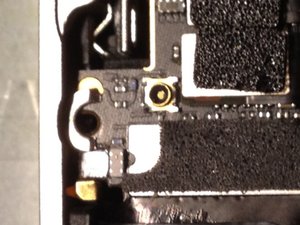
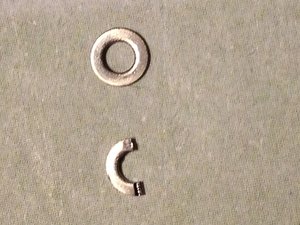
Just cut a washer from the iphone 4 screw kit in the middle and place as you can see on the photo on top the logic board, install the wifi cover than carefully screw the long screw tight so that it contacts with half the washer which contacts the golden pad of the logicboard.

uuuund scheissdiewandan wifi signal is back!!!!!

so let me know if it works 4 u

Block Image

Block Image

Edited by: BSlash ( )

0

Score

Avatar
Alastair
1

Answered

PermalinkHistory

thatnks man worked like a charm. ur a legend.

Add Your Answer