3
Score
Pavel
37
Asked
wi-fi distance was reduced
Couple days ago I dropped my iPhone 4 on the floor. As a result it's display was cracked. But the phone kept their functionality: GSM, WI-FI, GPS worked fine. I decided to change display, so I asked my friend to help me. He disassembled my iPhone, and replaced old cracked display with new one. I was very glad, my iphone seemed like new....but unfortunately I noticed that after dissasembling the iphone's WI-FI became to work worth than before dissasembling. My iphone doesn't see my office's wifi network any more. In my home I have to be in a room with wi-fi router to use wi-fi. :-(( It seems like the iphone wi-fi module is not connected to it's antenna...but me and my friend do not know where it should be connected. If anybody know where it should be connected, or what is wrong please answer :-)) Thanks!!!
Edited by: Scott Head ( ) , Scott Head ( ) , Taylor Arnicar ( )
6
Score
Chavdar Sirakov
1.1k
Answered
Accepted Answer
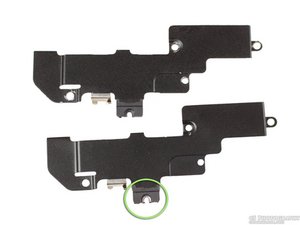
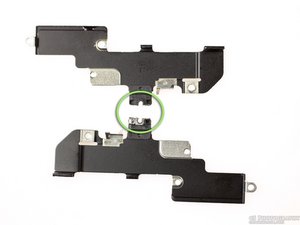
Losing the metal clips marked in green is top reason for abnormal Wi-Fi operation after reassembly.
Here are two images, which I shot, that better depict the cause of the issue. Once you lose that piece, you have no option but to order a replacement cover.
In case they don't work here, here's an external link.
I've also lost my 1.4mm "hole" (or nut as I would call it). I still have it but I don't think there's a way to fix that back onto the logic board. Anyway, I keep a loose dummy screw there to make the needed contact and so far I've had no issues.
As regards the EMI fingers on the antenna cable hat runs by the loudspeaker enclosure, they are really overrated. I had them all snapped off and there were no issues with Wi-Fi, 3G or 2G signal. Then I replaced them just to be sure - same thing, no difference.
Edited by: Chavdar Sirakov ( )
3
Score
Answered
DO THIS IF YOU LOST YOUR "RINGY THING"
Hi there, Great success, Wifi is fixed and works perfectly again :)
Fixed mine missing "ring thingy" with few strips of thin copper wire (by connecting that big screw and connection point on MBO that ring does naturaly)...
Hopefully it helps someone! Have fun using your fixed phone!
Here's the pic of repair:
http://img30.imageshack.us/img30/8941/im...
73 de 9A6NGK
Edited by: Goran Kapetanovic ( )
Cool, nice thinking, Goran. I was thinking of a way to fix that the DIY way but I didn't think of the copper wire. Good job, man!
Hi there, Just to add up... have same problem, broke my screen and wifi has poor range... I have just seen I'm missing that "fingery hole" thiny on big EM shield... Any online stores where to purchase it from?
2
Score
Alex
25
Answered
1
Score
Azazelo
13
Answered
@ Flo
Having a similar problem, but mine seems to be related to the golden circle on the mobo missing. So even with copper wire or a new EMI shield, there is no contact. Check to see if your's is in place, if so, then it's just a matter of creating contact between the shield, the big screw and the gold circle grounding.
Update
@ Flo
Hi mate, no worries bout English (not my native lang either :)
Anyways, the only other thing I ran into that may be connected to this is the gold connector on the top of the mainboard (on some forums they suggest to check if it touches the metal frame).
Otherwise, it might be that the Wifi chip on the mainboard might be flawed in some way.
Sorry I can't be of more help to you.
Cheers.
0
Score
Answered
It all has to do with the top IEM connector cover plate (the one above all the connections). Either that was not put back on right or there is something wrong with that. Clean the connections and make sure its assembled right. That is the location of the WiFi antenna. Hope that helps. Let me know
Thanks, I will try...but I am not sure that I understand where it is :-( Is there any photo of the IEM connector to compare with my phone's IEM connector?
That was probably mistype... it was meant to be EMI. following this http://www.ifixit.com/Guide/Repair/Insta... , step 22, second picture, on the metal shield, you will find small fingers. those are the ones in questions. odkial si?
Yes. EMI is what I meant. Check step 15 http://www.ifixit.com/Guide/Repair/Insta... that is the piece I believe is responsible for peoples after conversion WiFi issues. The steps mentioned by palokiller will fix the phone not the wifi seeing as the wifi antenna is up top not at the bottom. Thoughts?
0
Score
Answered
0
Score
Answered
0
Score
Adam G
1
Answered
Having this issue now, but saw no "plate" over the top of the upper shield.. the shield is pristine... I cannot see a "ring thingy" on the two shield pics posted by chavdar, (other than a lil wear around the screw holes). As for the remark about "clem 1 and 2" I have no idea what those are, and found nothing in the tear down instructions referencing that. I have wifi but its about 50% or less powerful than it used to be.
Can someone, perhaps, elaborate on this in detail.. and explain what part is what (from motherboard out) for the wifi antenna path? The pic from goran is beyond too blurry to see anything...
Can someone also explain what the little gold springy thing is on the top of the mainboard.. is it just a ground, or some kind of antenna...
0
Score
Answered
http://s807.photobucket.com/albums/yy360...
Ovdje se vidi dio lima koji fali kod vijka.
Edited by: Zeljko Matija ( )
0
Score
Jerome
1
Answered
I just changed my screen too , i have the ring thingy but I cannot get the screws in , the screw socket appear to be loose or something , and I don't want to change the middle frame someone has any idea what I can do , they solve this issue
0
Score
Answered
Hello again people,
If you are having trouble finding replacement "wifi shield" there are few being sold on ebay... Got mine for 3$ and it did include the lost ring.
Bought it from this seller http://www.ebay.com/itm/120811176741?ssP...
Have fun!
@Goran Kapetanovic: Does the fact that you bought the ring in the end mean that your copper wire fix didn't work? If it does work could you please tell me in more detail how to do it? Thanks a lot!
@Matthijs: Both methods of fixing it work, i decided to buy replacement shield just because i feel more secure with original part... If you are loooking into fixing it yourself you just need to connect round contact on the motherboard with outside antenna... By default that is the function of the "ring" and the screw. Screw is is screwed into antenna and the "ring" touches motherboard contact... Merry Xmas!
0
Score
telis
1
Answered
0
Score
Answered
0
Score
andrew
1
Answered
0
Score
Answered
0
Score
Flo
1
Answered
0
Score
Flo
1
Answered
@ Azazelo
thx for your answer!
the golden circle on my mobo is not missing, but i´m sure i fixed the connection between the big screw and the circle! i tried lots of things...no signal.
any other ideas? are there any parts below the mobo that i may put together in a wrong way?
(again...sorry for my english)
0
Score
rrraf
1
Answered
first, a massive thank you to you guys!
i had a 50% wifi range drop for months and it was driving me crazy. got the idea that is was close to ios update 5.1.1 but i was this wifi antenna piece problem. in my case, the piece looked perfectly fine: no ringy thingy missing, broken or strange. but i guess it was a bit loose as taking of the screw and putting it back (a little bit stronger not to be loose again but not strong enough to break anything) fixed the problem in a second!!!
back to full wifi range like it used to be (and like other wifi equipment in the house).
problem solved.. and for free ;-)
0
Score
Hector
1
Answered
I DIIDDDDD IT!!!!!! after a lots of missing trys i did it guys.. let me expalin something!!! i did it with aluminium foil ! YES.
you have to attacth the little gold ring that is on top left en the other side put it in the little gold circle that is in the plate. Screw tight and there you should have it!
THANK YOU SO SO SO MUCH!!!