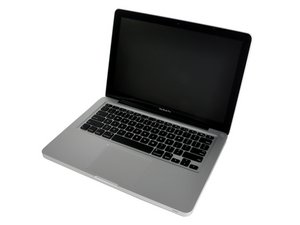
replacing keyboard on MacBook Pro 13"
How difficult is it to replace just the keyboard? (I see that several folks sell them)
Is this a good question?
Score
1

Rep: 13
 3
3
 2
2
How difficult is it to replace just the keyboard? (I see that several folks sell them)
Is this a good question?

Rep: 685.3k
3.4k
1.1k
 2.6k
2.6k
You have to replace the whole upper case, here's the part: MacBook Pro 13" Unibody (Mid 2009-Mid 2010) Upper Case
For installation instructions go to the More information on the parts page and click the link to Step-by-step installation instructions.
This is listed as a dificult installation.
Was this answer helpful?
I've seen the adds on eBay too about buying just the keyboard, but so far have never met anyone that this worked for.
Mayer, i've done that several times. I agree that it's not easy but separate keyboards are sold on ebay etc.
Hey guys. Big question here: Do any of you guys tried the A1278 keyboard if it fits the A1343. I want a keyboard upgrade with light on my A1343 and, from what i see the layout is the same. I wonder if the connectors are the same. Please help. Reply me at cristian.zdrang@yahoo.com

Rep: 67
4
1
I'm doing it now, will update on how it goes.
Mayer, no I can't find a part number on my keyboard, I saw one on the backlight 815-9996. On the keyboard I see the word "TOP" on the plastic circuitry & I saw some numbers but the were unreadable thought the circuit lines.
Just search ebay they should have the correct models labeled with years & sometimes model numbers.
Was this answer helpful?
Update: FULLY WORKING, no issues. VERY DIFFICULT. One stripped screw and YOU'RE SCREWED!
please do update, i am looking at doing this as well
Replacing Just the keyboard is probably the most difficult repair besides pulling the display glass without it breaking, but takes many more steps. A 8/10 - very difficult on the repair scale.
That said, it does work just fine. As long as you have some experience with pulling the logic board, can follow instructions & you're careful It's possible.
Where to find them? ebay, like everything else. I found keyboard+backlight for $69 new.
Was there a part number?
where did you purchase JUST the keyboard?

Rep: 13.3k
45
21
11
The keyboard is attached to the topcase with 40+ supertiny screws. Of corse you will have to remove the logicboard, optical drive and the middle bracket to get there. No need to remove the battery. After a liquid spill there are often issues with the keyboard backlight, though. Only a thorough clean, especially of the sides of the six LEDs and the "reflective plate" can remedy that.
Was this answer helpful?
more like 50 and the problem is often that replacement is due to fluid spills which render kb ions but also cause of these watchmaker size steel screws. Try drilling those out and rethreading the upper case holes! If the local area of the particular key is affected in this way then they key is likely to not work well, especially if it's a frequently used like "."
Past 24 Hours: 0
Past 7 Days: 5
Past 30 Days: 8
All Time: 53,387

1 Comment
How difficult is it to replace just the keyboard? (Not the entire top case)
by bradleydad