Student-Contributed Wiki
An awesome team of students from our education program made this wiki.
Asus ZenWatch2 will not power on
My ZenWatch2 does not turn on no matter what I do.
Dead/Uncharged battery
Hold the contact button on the right side of the device for a few seconds to turn it on.
If the device does not turn on, plug it into a power source to begin charging.
Once the device has been charged, power it on using the contact button on the right. If battery problems continue you may need to replace the battery.
ZenWatch2 software not functioning
I cannot access my applications on my ZenWatch2.
Restart the ZenWatch2
If you are unable to open your applications or other software on the device, you may be experiencing an issue with your motherboard. Restart the ZenWatch 2 to reset the motherboard, and if software issues persist you may have to replace the motherboard.
ZenWatch2 does not charge
My ZenWatch2 is not charging when I plug it into an outlet.
Unplug from charger, replug
Use the charging cable provided and plug the smartwatch into a power source. If the watch continues to not charge you may have to replace the battery.
Plug into different power source
If the ZenWatch2 is still unable to charge, it may be the result of a faulty power source. Plug your charging cradle into a different power source and try again.
The watch strap is uncomfortable
My ZenWatch2 has become too uncomfortable to wear, the strap is old and cracked.
Strap is dirty
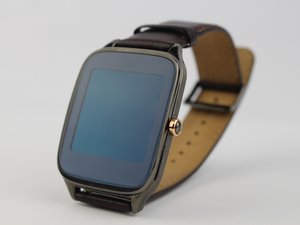
Pat down the ZenWatch2's leather strap with a dry, soft cloth. If that’s not enough, apply hand-soap to a damp cloth and gently pat the leather strap. If the strap is still unclean purchase leather conditioner and clean according to the instructions provided.
Strap is too tight
The ZenWatch2 has nine separate holes in the strap, allowing the belt-like mechanism to catch on any of them, tightening or loosening the grip on the user’s wrist. Simply adjust the strap the way you would a belt, and move it to your leisure.
Strap is degrading
After continuous use, the strap may become degraded. If the ZenWatch2 strap is too degraded you may have to replace the strap with a new one.
Vibration mode not working
My ZenWatch2 does not alert me when I receive a new notification.
Restart device
If the vibration mode on the ZenWatch 2 stops working, restart the device by powering it off. Wait a few seconds and turn it back on. If the device restart does not fix the problem, the vibrator motor may be faulty and will need to be replaced.
Adjust settings in software menu
Vibration mode on the ZenWatch2 can be toggled using the software on the device. Adjust the vibration setting by sliding down on the watch face to turn the feature off. Use your finger and slide up on the watch face to turn the feature on.
If problems with your Asus ZenWatch2 vibrator motor continue you may have to replace the vibration motor.
Replace the speaker
The built-in speaker will need to be replaced if the device fails to play an audible sound when new notifications are received.

Team

USF Tampa, Team S1-G1, Leahy Spring 2017 Member of USF Tampa, Team S1-G1, Leahy Spring 2017
USFT-LEAHY-S17S1G1
3 Members
60 Guides authored

6 Comments
Crackling and scratchy sound when making calls ?
Glenn Thomas - Reply Share
The biggest problem I had with my ZenWatch 2 is that it would stop getting notifications. I found two solutions for that, one that fixes the issue and one that prevents it.
I found that I can fix the issue by force quitting the Wear app on my phone. Really. That’s it. Everything else (rebooting the watch, resetting the watch) didn’t help. My guess is that the app is taking up too much memory, as I assume when you check a notification on your watch, it fetches the info from the phone app.
So, the way I now have prevented that from happening is just clearing notifications constantly. That seems to keep the Wear app from running out of memory or whatever happens when it stops sending notifications. Or maybe the watch memory is too full to receive them. Either way, it seems to be a memory issue.
Max - Reply Share
My ZenWatch will shut off after a few minutes, even if the battery is 100%.
The only way it will come back on, is when I plug it up to the charger.
Then it will come on. Once I remove it from the charger (even if I let it stay on it for hours) it will shut off again after a few seconds.
Dallas Baker - Reply Share
I have the same issue, did you ever find a fix for this?
Rob White - Reply Share
Watch not working why
Shine C T - Reply Share