Student In Progress
This wiki is being worked on by hardworking students.
Firmware or Bluetooth glitch
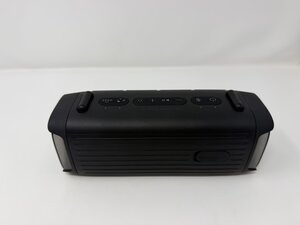
- Locate the top of the unit, identified by the three clusters of buttons
- On the left side of the clusters, identify the power button and Bluetooth connection inputs
- Hold firmly on both buttons for ten seconds each, this will initiate the Force-Restart process
- Allow the Soundcore Boom 3i to fully restart before attempting to connect your device
Too much bass at high volume makes the drivers clip, which sounds fuzzy
- Open the Soundcore app and tap the Boom 3i
- Go to EQ and pick Default, or draft the bass and treble back toward the middle
- Turn bass off and test again
- Keep your phone's volume around 80% instead of maxed out
- Raise the bass slowly and stop as soon as it starts to crackle
Debris from external audio drivers
- Set the speaker on a dry, clean surface
- Locate the three audio driver banks. Two located on the side of the unit, and one behind the protective grill on the front of the unit
- Using compressed air, gently blow and debris from the grill
- Using a dry soft towel or cloth, gently scrub debris from the audio driver bank

Team

Utah Tech University, Team 1-4, McMurrin Fall 2026 Member of Utah Tech University, Team 1-4, McMurrin Fall 2026
UTAHTECH-MCMURRIN-F26S1G4
3 Members
0 Guides authored

0 Comments