Free Shipping on Domestic Orders $75+

This translation was generated by a machine and has not been reviewed by a person yet. Speak this language? Review it.

why! N240BU Access to major components

Views: 755

View statistics:

Past 24 Hours:
2
Past 7 Days:
16
Past 30 Days:
85
All Time:
755
Comments: 0

No one has left comments on this guide. Will you be first?

Go to guide comments
Completed: 0

No one has marked this guide "completed." Will you be the first?

Favorites: 0

No one has favorited (and subscribed to) this guide. Will you be the first?

Time Required: 1 minute
Difficulty: Very easy
Community-Contributed Guide

An awesome member of our community made this guide. It was not created by iFixit staff.

why! N240BU Access to major components

Introduction

Go to step 1 ↓

This guide shows you how to open a why! N240BU laptop to access its main internal components.

What you need

Tools

    1. why! N240BU Access to major components, Battery: step 1, image 1 of 2 why! N240BU Access to major components, Battery: step 1, image 2 of 2
      • Start by unlocking the right locking latch.

      • Then, by simultaneously unlocking the left latch, lift the battery out of its socket.

      Ask FixBot

      Add Comment

    1. why! N240BU Access to major components, Access to main components: step 2, image 1 of 2 why! N240BU Access to major components, Access to main components: step 2, image 2 of 2
      • Begin by spotting the dummy memory card.

      • Then, remove it and put it on your workplan.

      Ask FixBot

      Add Comment

    2. why! N240BU Access to major components: step 3, image 1 of 3 why! N240BU Access to major components: step 3, image 2 of 3 why! N240BU Access to major components: step 3, image 3 of 3
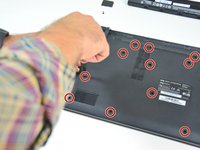
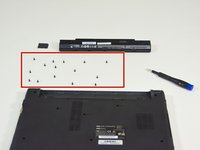
      • Locate the 15 screws that hold the bottom cover of the device in place.

      • Unscrew them and place them on your work surface.

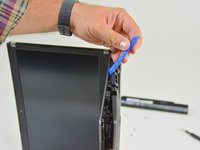
      • Then, un-clip the bottom cover, starting with the side shown in the third picture.

      Ask FixBot

      Add Comment

Conclusion

To reassemble your device, follow the instructions in reverse order.

Cancel: I did not complete this guide.

Special thanks to these translators:

fr en

100%

Israel is helping us fix the world! Want to contribute?
Start translating ›

Felice Suglia

Member since: 06/15/13

33,634 Reputation

283 Guides authored

0 Guide Comments

Add Comment

View Statistics:

Past 24 Hours: 2

Past 7 Days: 16

Past 30 Days: 85

All Time: 755