Free Shipping on Domestic Orders $75+

iPod Nano 5th Generation Click Wheel Replacement

Prerequisite Only
This is a prerequisite-only guide! This guide is part of another procedure and isn’t meant to be used alone.

What you need

    1. iPod Nano 5th Generation Click Wheel Replacement, Click Wheel: step 1, image 1 of 2 iPod Nano 5th Generation Click Wheel Replacement, Click Wheel: step 1, image 2 of 2
      • Use a heat gun to soften the adhesive underneath the plastic bezel at the bottom of the iPod.

      • Use a low heat setting and do not hold the heat gun in place for too long to avoid melting the plastic bezel.

      • Use a plastic opening tool to pry the bezel from the case of the iPod and remove it.

      Ask FixBot

      Add Comment

    2. iPod Nano 5th Generation Click Wheel Replacement: step 2, image 1 of 3 iPod Nano 5th Generation Click Wheel Replacement: step 2, image 2 of 3 iPod Nano 5th Generation Click Wheel Replacement: step 2, image 3 of 3
      • Unscrew three screws from the bottom of the iPod:

      • Two 4.4 mm angled Phillips screws

      • One 5.4 mm Phillips screw.

      • These screws may not come out on their own, so be sure not to lose them when removing the retainer.

      • Use a plastic opening tool to pry the metal retainer out from the bottom of the iPod and remove it.

      Ask FixBot

      Add Comment

    3. iPod Nano 5th Generation Click Wheel Replacement: step 3, image 1 of 2 iPod Nano 5th Generation Click Wheel Replacement: step 3, image 2 of 2
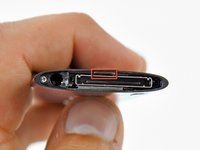
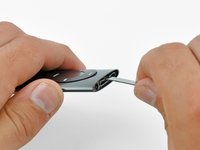
      • Insert a metal spudger into the slot at the bottom of the iPod just above the dock connector.

      • Use the metal spudger to pry up the bottom edge of the click wheel.

      Ask FixBot

      Add Comment

    4. iPod Nano 5th Generation Click Wheel Replacement: step 4, image 1 of 2 iPod Nano 5th Generation Click Wheel Replacement: step 4, image 2 of 2
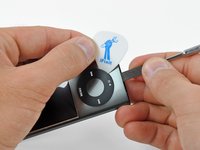
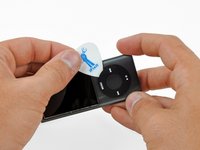
      • Place a guitar pick between the click wheel and the case of the Nano and remove the metal spudger.

      • Pry up the edges of the click wheel with the guitar pick until the click wheel comes free from the case.

      • Do not try to completely remove the click wheel yet, as it is still held in place by a ribbon cable.

      Ask FixBot

      Add Comment

    5. iPod Nano 5th Generation Click Wheel Replacement: step 5, image 1 of 2 iPod Nano 5th Generation Click Wheel Replacement: step 5, image 2 of 2
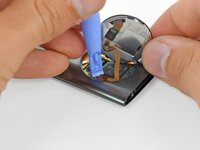
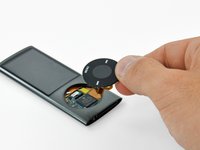
      • Lift the click wheel out of the way with one hand and use a plastic opening tool to pry the click wheel ribbon cable connector off its socket on the logic board.

      • Remove the click wheel.

      Ask FixBot

      Add Comment

Conclusion

To reassemble your device, follow these instructions in reverse order.

Cancel: I did not complete this guide.

Matthew Newsom

Member since: 01/05/10

43,066 Reputation

67 Guides authored

0 Guide Comments

Add Comment

View Statistics:

Past 24 Hours: 0

Past 7 Days: 5

Past 30 Days: 17

All Time: 1,419