
iPhone X Rear Camera Lens Replacement

cPix and
Last updated on Aug 31, 2021
Views: 155K
View statistics:
- Past 24 Hours:
- 7
- Past 7 Days:
- 39
- Past 30 Days:
- 189
- All Time:
- 155,463
Comments: 13
4 comments on steps, 9 guide comments.
Go to guide commentsCompleted: 43 44
43 people have marked this guide "completed." Will you be next?
44 people have marked this guide "completed." Including you — great job!
Favorites: 3 4
3 people have favorited (and subscribed to) this guide. Will you be next?
4 people have favorited (and subscribed to) this guide — including you!
Community-Contributed Guide
An awesome member of our community made this guide. It was not created by iFixit staff.
Introduction
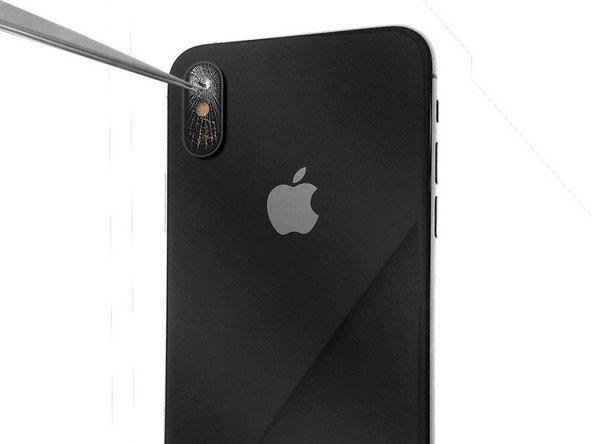
Go to step 1 ↓- The glass lens of the rear camera on your iPhone X is broken.
- You need to replace this lens because the pictures are fuzzy.
- To start with, remove the broken fragments of glass and obtain a new lens.
- Clean the area and attach the new lens with double-sided tape or 2 drops of glue.
- This simple repair requires care as you must avoid touching the cameras.
- For safety, use eye-protection glasses in order to avoid any flying glass fragments getting in your eyes.
-
-
-
If the camera glass is broken, remove the broken glass pieces from the camera housing.
-
Remove the broken glass around the camera lens area, then clean the contours of the camera lens area.
 Ask FixBot
-
-
-
-
Attach the new rear camera glass with adhesive or use two drops of clear superglue on the sides of the camera housing.
-
Position the replacement camera lens in the camera lens area using precision tweezers.
-
-
-
Apply light pressure on the camera lens to secure the lens glass to the camera housing.
-
-


Congratulations! You have successfully replaced the camera lens on your iPhone X. Clean the lens with a microfiber cloth and you should be able to shoot videos and take pictures normally again.
Cancel: I did not complete this guide.
43 other people completed this guide.
Special thanks to these translators:
100%


These translators are helping us fix the world! Want to contribute?
Start translating ›

9 Guide Comments
It was great to see…
Will the device still be waterproof after this repair? (provided the repair is done correctly)
Bonjour,
Pour information : les iPhone ne sont pas étanches ! Même si les publicités laissent penser le contraire, il faut savoir que les iPhone ne sont pas étanches, pour preuve : il suffit de lire les conditions de garantie de chez Apple qui stipulent bien : “La présente Garantie ne s’applique pas : ... aux dommages causés par un accident,... une exposition à un liquide, au feu, à un tremblement de terre ... “
Donc, que ce soit après une réparation ou avant la réparation, votre iPhone n’est pas étanche, les différents joints “d’étanchéité” présents dans l’iPhone le protège principalement des poussières fines et des petites projections de liquide (genre : micro gouttelettes d’eau) .
Mais n’oubliez pas, il n’est pas étanche ;-)
This is the worst repair guide on this website. . Not enough information on this guide to properly do the repair
